
I will confess to something that I was a little ashamed of two years ago. When I first heard someone say “I use AI to write emails and content” at a conference, my first reaction was: that's cheating. As if the value of the work is directly proportional to how many hours I spend on it.
Today I see it differently. Today's “me” of the old “me” would say: stop closing your eyes to what works and finally start working smarter.
Because the reality of a business woman in 2026 is that time is the only resource from which you cannot conjure more. And AI tools are probably the cheapest way to buy more of that time back today—without having to hire another human or work until midnight.
So here are the tools that I use myself or recommend to others in Action Women – with a specific description of what they are for and how much they will actually save you. I use a lot more of them, but I like to share the others in person at our workshop.
Why most female entrepreneurs do not use AI to its full potential
The numbers make it clear: In 2026, AI is no longer an added benefit – it's your core competency. Like ten years ago, “not knowing wasn't enough.”“ social networks. But the gap between what AI knows and what we actually use is huge. Why is that so?
Most tools are presented in the context of large corporations or Silicon Valley startups. No one will show you how ChatGPT will help specifically with the fact that today you have to write five e-mails to clients, prepare an Instagram post and also respond to comments – and do it all in an hour instead of three.
And so most of us ask AI generic questions and get generic answers. The error is not in the tool. The problem is that we have never been given a practical guide on how it actually works and saves time when you start using AI wisely and consciously.
5 AI tools that really work for small and medium businesses
1. ChatGPT – your multifunctional assistant
For what: content writing, e-mail communication, preparation of documents, brainstorming, summarizing long documents Price: free (basic version) / ~20 € per month (Plus) Savings: 3-5 hours a week
ChatGPT is like having a smart assistant next to you who is never tired, doesn't need a briefing, and can handle the first draft of anything in two minutes.
What I specifically do with it: when I need to write a long email to a client – I dictate 3 sentences about the context and the desired output, and in 30 seconds I have a draft to edit. When I want a summary of a 20-page report – I upload it and ask. When I'm looking for ideas for a series of posts – I describe the topic and target audience and I get 10 concepts.
Important: ChatGPT is only as good as your prompt. Instead of: “Write me a post about business,” try: “Write me an Instagram post in the tone of a motivational friend for a 35-year-old female entrepreneur who struggles with procrastination. 150 words. No hashtags.” The difference is dramatic.
Research shows that teams using ChatGPT Plus to create first drafts have reduced their time writing content by 65-75%. Even if it only applies to half – we're still talking hours every week.
2. Notion AI – your second brain
For what: notes, meeting notes, knowledge base, SOP documents, project plans Price: free in basic Notion / ~€10 per month for AI functions Savings: 2-4 hours a week
If you use Notion to organize your business (and if you don't, you should – but that's a topic for another article), Notion AI is a feature that will change your workflow.
After meeting with the client, you throw raw notes into Notion – chaos, abbreviations, torn sentences. Notion AI will turn it into readable meeting notes with a list of action items in 10 seconds. Without spending 20 minutes rewriting.
Or: you need to update the onboarding document for a new team member. You write what has changed and ask the AI to integrate it into the existing text and preserve the structure. Done. According to test data productivity in 2026, Notion AI will save on average for knowledge management tasks 4.5 hours a week. That's more than half a working day. A few years ago, it would have been a little science fiction for us.

3. Make.com (or Zapier) – automation without programming
For what: automatic workflows between applications – no code, no IT department Price: Make for free up to 1,000 operations / month, Zapier for free up to 5 automations Savings: 2-6 hours a week (depends on what you automate). This is a tool that most businesswomen don't know about – and when they discover it, they wonder why they didn't use it sooner.
Make.com (formerly Integromat, a Slovak tool) and Zapier will allow you to link applicationswhich you use, and set rules like: “when X happens, automatically do Y”.
Examples from practice:
- The new client fills out the contact form → she automatically receives a welcome email → the data is saved in CRM → you receive a notification on Slack, for example
- A new post on your blog → is automatically shared on all your social networks
- The invoice is paid → the client receives a thank-you email and access to the materials
It sounds technical, but the interface is visual, and in 2026 Make will even design a workflow for you if you describe what you want to achieve. If you're not sure where to start, identify one manual task that you do repeatedly every week. There is a 90% chance that you can automate it.
4. Descript or Riverside – video and podcast without an editor
For what: video editing, podcast editing, subtitles, content repurposing Price: Descript free (basic) / from $12/month; Riverside from $15/month Savings: 3-5 hours per month
If you create video content or a podcast – or plan to start – this changes everything. Descript works by transcribing the recording to text and you cut the video by erasing the text. Do you want to cut out the “um” and pauses? One click. Do you want subtitles? It will generate them automatically. Do you want to turn a one-hour interview into a 60-second reel? You describe the topic and the AI suggests the strongest passages. This is specifically something I've seen changing the content creator's business model. Instead of paying someone to cut it, you can do it yourself in a fraction of the time.
5. Claude (from Anthropic) – for long documents and strategic thinking
For what: analysis of long documents, strategic questions, preparation of documents, more sensitive content Price: free (basic version) / ~20 € per month (Pro) Savings: situationally, but very valuable for complex work
While ChatGPT is great for quick drafts and brainstorming, Claude excels where you need depth and precision. It can upload and analyze a long contract, a research report or a 50-page business plan and give you understandable outputs.
For businesswomen working with sensitive documents, partnerships or complex projects, Claude is a safer and more accurate alternative for some types of tasks. I personally use Claude Cowork and have automatic tasks set up in it, such as email management and email and calendar priorities. Also monitoring the competition and a morning coffee overview. And there will be much more. I literally fell in love with Claude. The only problem is that with love the taste increases, as well as the number of minute tokens.
How to start – without having to deal with it for a whole month
Here's a little warning: There is no such thing as a perfect set of tools. There is only the one you actually use. I spent early hours comparing tools instead of just using them.
Therefore, one specific procedure for you:
- Step 1: This week, choose one tool (I recommend ChatGPT Plus) and use it for one specific recurring task – for example, writing the first draft of each email.
- Step 2: After two weeks, add a second one – for example, Notion AI for meeting notes.
- Step 3: Once you're comfortable with these two, check out Make.com and identify one manual task it can automate for you.
This way you have a functional AI workflow in three months without spending a weekend setting up systems. If you want to take this first step in an intimate group of women with a lecturer who makes AI a natural part of everyday work – read on, I have a specific tip for you.
How much does it all cost?
The basic combination I recommend:
- ChatGPT Plus: ~20 €/month
- Notion AI: ~10 €/month
- Make.com (free tier to start): €0
Together: ~30 € per month. For that, you get a virtual assistant, a knowledge management system and the basics of automation. Compare that to an hour of any freelancer's work. Or with how much your time costs when you do things manually that you can delegate to a machine.
What AI cannot replace
AI will not replace you relationships, credibility or your personal voice. Content that is written by AI and you publish it without editing, the reader will feel it. AI will prepare a draft for you – but the personal story, your specific experience, your perspective – you need to bring it. That's how I set it up: AI as inspiration, outline, transcription of ideas, first editor (because the last one is our precious editor Veronika). AI writes the first draft, I write the last. I save time, but the output is mine.
Do you want to try AI directly in practice – with a lecturer and a specific output?
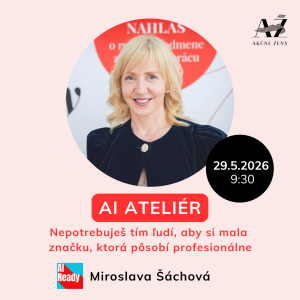 If you have read this article and you think “ok, but where do I start me?“ – I have an answer for you.
On May 29, we are organizing in Bratislava AI ATELIER – a practical morning workshop for women who want to finally start using AI for real.
In 90 minutes you will create on the spot:
- professional portrait photo and brand visual (there will be a photographer with us and the photo is included in the price)
- your personal manifesto and 3 bio versions (LinkedIn, Instagram, web),
- custom AI workflow for content creation,
- finished post on social networks – text and visual,
- a set of prompts for everyday work.
And you will take away a booklet with 30 prompts that you can use the very next day.
It covers it Miroslava Šáchová – co-founder of the AI Association (ASAI), author of the Trendy AI podcast and 15 years in the top management of publishing houses. No theory for theory's sake – only what works for us in practice. Where: Jarošova 1, Bratislava When: May 29 from 9:30 a.m Price: €39 (originally €59). In addition, breakfast, good coffee and a cozy group of women with whom you can talk openly.
👉 Book your place at AI ATELIÉRI
And if you are looking for a longer-term space for growth?
In the Action Women community, we share specific workflows, prompting and tips even after the workshop – not theory, but what really works in Slovak and Czech business. Check out the membership packages – inspiration, community and club are waiting.