Facebook has evolved into a robust marketplace, and Meta offers a wide range of advertising options for businesses looking to reach their audiences. Boosting a post is perhaps the most efficient way to ensure your content is seen by a larger audience of people you want to reach.
If your business is trying to achieve added visibility, boosting your posts can make that happen without straining your pockets. These posts sit at the intersection of organic content and paid reach. They allow brands to amplify posts that are already resonating with their audience without the heavy lift of full-scale ad campaigns.
In this article, we will discuss what a boosted post is, how to boost posts on Facebook, and whether doing so would actually benefit you in any way.
What is a Facebook Boost Post?
Boosting a Facebook post turns a regular post into a paid ad, helping you reach a wider audience beyond your Page followers.
You can create a post from scratch and boost it right from the get-go, but you also can boost a previously published post to further its organic reach. You simply pick a post from your page’s timeline and click on the Boost Post button.
Available to anyone with a business page, it’s a hassle-free way of advertising on Facebook, as you don’t need knowledge of Ads Manager.
Boosting a Facebook post can make your content go the extra mile and be seen by more people, including those who don’t currently follow your page but may be interested in your business.
What Happens When A Facebook Post is Boosted?
We know that boosting a post can give it more exposure on Facebook. But you need a better understanding of what goes on behind the scenes before you boost your own posts.
Here’s what Facebook actually does:
1. Switches the post from organic to paid mode
The post enters Facebook’s ad auction system rather than relying solely on organic reach. Facebook’s algorithm prioritizes it based on your budget, bid, and objective.
2. Expands the audience beyond your followers
Facebook starts showing the post to people outside your Page’s existing audience. It uses the targeting options you selected or its own optimization if you chose automatic targeting.
3. Optimizes who sees the post
Facebook suggests the boosted post to people more likely to take action, helping you reach your selected goal.
4. Adjusts feed placement and frequency
The post can appear more often and in more placements like Facebook Feed, Explore, and sometimes Instagram, than it would organically.
All likes, comments, and shares, both paid and organic, accumulate on the same post, increasing credibility and visibility.
6. Collects performance signals in real time
Facebook continuously learns from how people interact with the boosted post and refines delivery to improve results within your budget.
Facebook Boost Post vs Facebook Ads: Key Differences
| Facebook Boost Post | Facebook Ads |
| Increase post visibility, likes, comments, and shares. | Drive specific business outcomes aligned with funnel stages |
| Simple and quick to set up directly from a post. | More advanced setup through Facebook Ads. |
| Ideal for basic targeting, including age, gender, location, interests, and connections. | Suitable for advanced targetin,g including lookalike audiences, and exclusions |
| Used for lower budgets, best for quick visibility. | Used for greater budget flexibility and optimization controls |
| Placement is mostly limited to News Feed. | Full control over placements with permitted visibility in Feed, Stories, Messenger, Audience Network, etc. |
| Basic performance metrics | Detailed analytics, optimization, and A/B testing options. |
How to Create Boosted Posts on Facebook?
Boosting a Facebook post is quite easy. You only need to have a business page on Facebook, business manager access, and a native post on the Page. You’ll also need an ad account since boosted posts require a budget.
Now let’s see how to create a Facebook boost post:
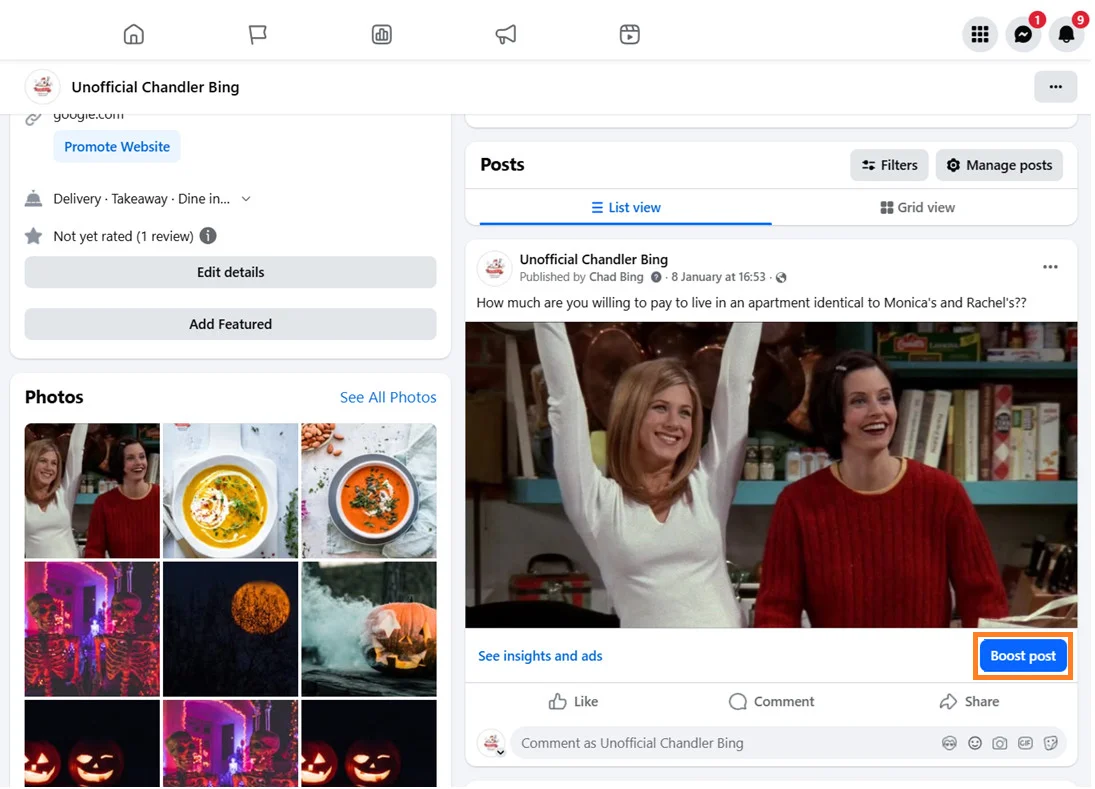
Log In and Find Post
- Log in to your Facebook profile and switch to the page.
- Go to your profile feed and scroll down to the post you want to boost and click on the “Boost Post” button.
Fill Out Ad Details
- On the Boost Post page, fill out the details necessary for defining the key details of the target audience, budgeting, running period, and payment method.
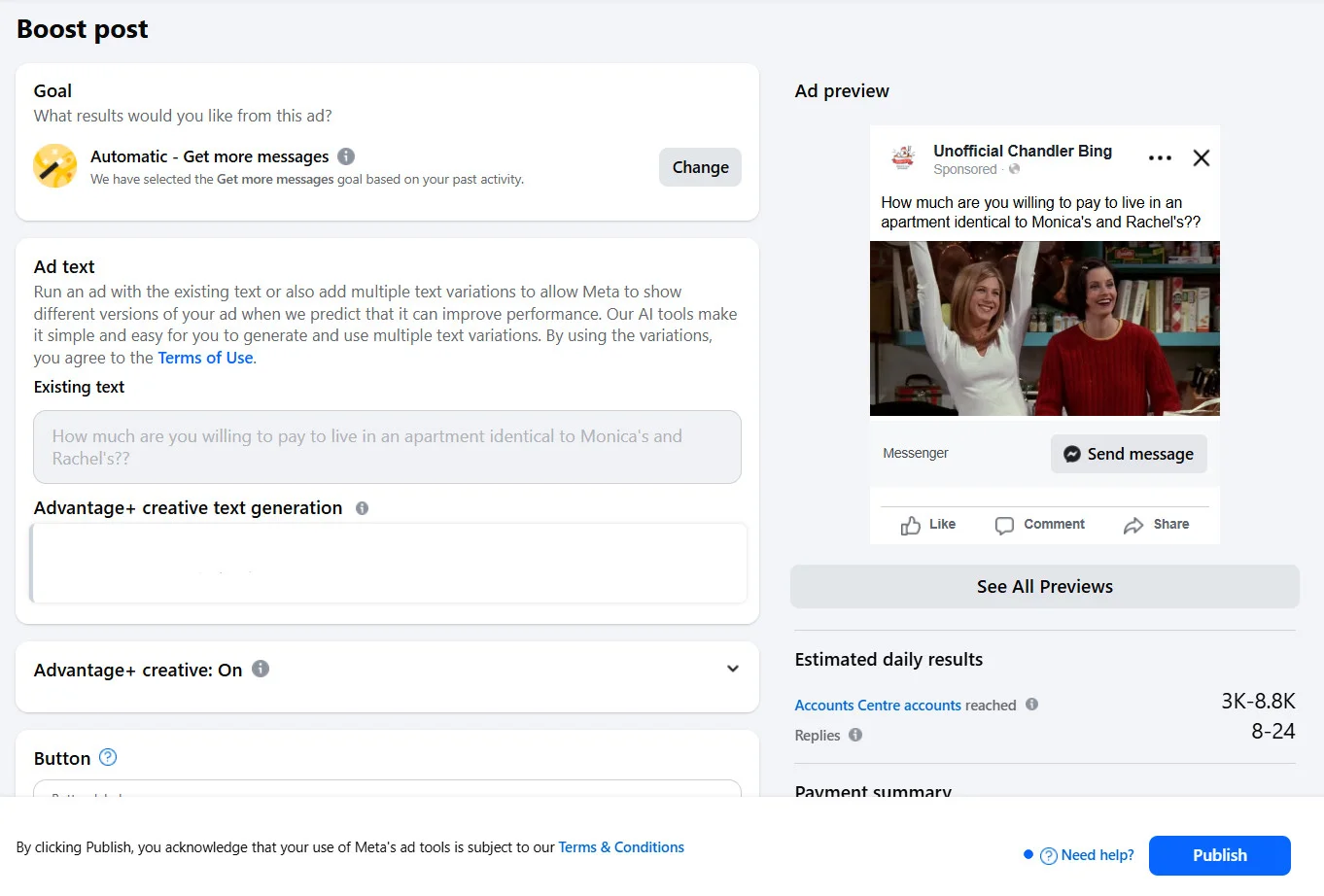
- Goal: Pick an objective you want to achieve with the boosted post. You can let Facebook select your goal with the Automatic option or pick a specific one yourself.
- Ad text: Facebook suggests AI-generated alternatives to your post captions. You can include and keep these as options for Meta to show different variations of the ad.
- Button: Meta will recommend a CTA button based on the goal of the boost post.
- Audience: Select the mode of audience targeting for your boost post. Facebook gives you the option to make it automatic, create a definitive audience, or target people locally. You can decide the demographics, behaviour, and interests of a custom target audience.
- Duration: Decide the time period to run the ad for or choose to run it indefinitely.
- Daily Budget: Set a budget for the period selected for running the ad or a daily limit for running it continuously. Facebook shows estimated reach for that budget, so you can adjust up or down.
- Placement: Select the Meta family platforms where you want the ad to appear, or let Meta decide the placement.
- Payment: Add a payment method to run the boosted post so charges can be deducted automatically.
Publish Boost Post
- Once you have filled out all the details, check out the preview of the boost post. Once you ensure everything appears accurately in the post preview, click on Publish to make the ad live.
Create New Boost Post
Instead of boosting a previously published post, you can create a brand new boosted post. All you need to do is activate the Boost Post toggle in the post settings while creating a new post.
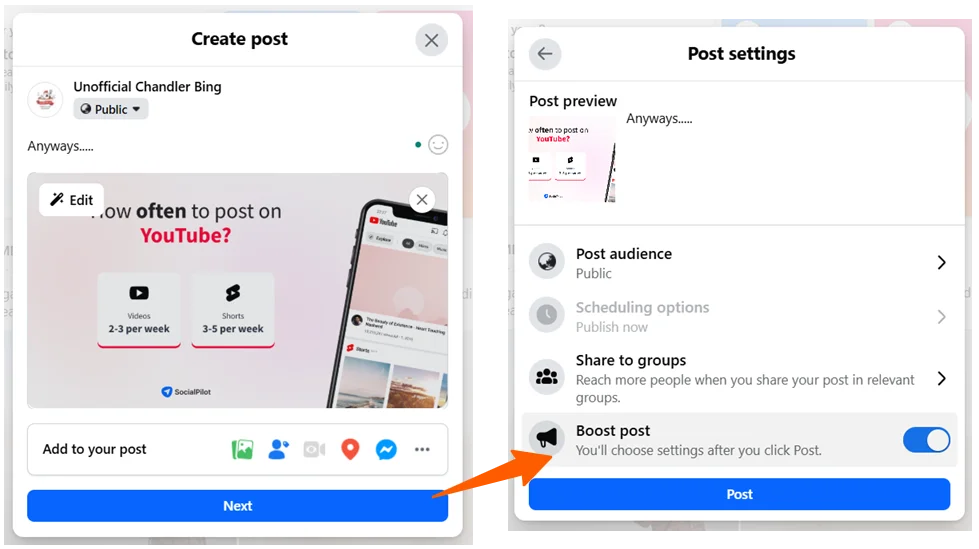
When you select Boost Post and click on the Post button, you will be taken to the Boost Post page, where you can fill out the targeting options as discussed in the previous section.
Success on Facebook requires focus and a good strategy. Even with thousands of followers and great content, not promoting your posts correctly will reduce your chances of succeeding. To make it easier for you to boost your posts successfully, we have outlined some of the best ways to use Facebook boost posts.
Best Practices for Using Facebook Boost Posts
1. Set Clear Objectives and Expectations
Before you click that “Boost Post” button, you need to define your goals and expectations. Evaluate what it is that you want to accomplish: is it more brand awareness, building a Facebook community, or increasing your sales? Setting your objectives will help you measure your strategy and make the necessary changes.
2. Restrict the Time Period
You should never run the same boost post for too long. Keep in mind that even successful boosts posts often decline in performance when you run them for over a week. This will also help avoid instances where a person sees the same boosted ad over and over again in their feed. The audience may get tired of your content.
3. Narrow Down Your Audience
The Boost Post feature allows you to select targeting options for your post. By default, you can choose people who currently like your page or your followers, plus their friends.
However, you also have the option to create a custom audience for your boosted posts. Since you already know a lot about your audience, you should narrow down your audience as much as possible. The custom audience option allows you to target a specific demographic based on location, sex, age, or interests.
For instance, you can limit your targeting to specific places where most of your customers dwell or areas where you offer your services.
4. Boost Posts that are Performing Well
Posts that already have many comments, likes, and shares are the best posts to boost. A high engagement rate shows that the content was interesting to the audience. Followers are more likely to click on a post with 100 likes, 60 comments, and 42 shares than on a post with just 3 likes.
Therefore, use the Facebook Insights guide to check which content is doing well and decide which ones are worth boosting further.
5. Use a Tool to Automate Boosting
Social media marketing can be very time-consuming. Fortunately, some tools can help you make the process easier and smoother. Many social media scheduling tools, like SocialPilot, have an automated boost post feature that can help you save time and streamline your ads. For instance, SocialPilot can schedule and automatically boost your best-performing posts.
Now we’ll go through some of the typical missteps marketers take while running boost posts.
Mistakes to Avoid for the Success of Boost Posts
1. Promote to a Wider Audience
Many people tend to choose a broader audience when promoting their posts. Unfortunately, this is a mistake that you should never be tempted to make. Targeting a wider audience will reach more people, but not the ones that matter to your business. Hence, pick the right audience by smartly narrowing down who is likely to be interested in what you’re offering.
2. Run it for a Longer Time Period
The number of days to run a Facebook boost post depends on the post’s nature and budget. Many people tend to think that the longer a boost post runs, the better the results. On the contrary, you should never boost a post continuously for more than 7 days. However, evergreen content can run for a longer period compared to newsworthy content.
3. Boost the same ad for a similar audience
While evergreen content is always great for boosting, you should avoid boosting the same ad for a similar audience repeatedly. Try experimenting with your ad copies with different audiences.
4. Boost post but fail to monitor
Some people boost posts and relax, waiting to get results. Unfortunately, this is not how it works. After you boost a post, you need to monitor its performance to gauge if the ROI was worth it. Facebook Analytics helps you see what is working and what is not, so that you can make adjustments to your social media strategy for better results.
Why Boosting Facebook Posts Still Works for Brands
Improves Visibility and Brand Awareness
Facebook’s massive content volume makes organic reach harder than ever. Boosting posts helps your content cut through the noise and stay visible to the right audience. When used strategically—like Sendo’s brand awareness campaign during Vietnam’s biggest shopping festival—boosted content can drive strong lifts in ad recall, consideration, and ROI.
Drives Meaningful Engagement
Likes alone don’t move the needle—engagement does. Boosted posts increase the chances of interactions such as comments, shares, and clicks, especially when paired with strong, scroll-stopping creatives. Since Facebook’s algorithm prioritizes engagement, this directly supports better performance.
Gives You Precise Audience Control
Boosting allows you to decide exactly who sees your post using demographic, geographic, behavioral, interest-based, and connection targeting. This ensures your budget is spent reaching people most likely to care about your brand, rather than a broad, uninterested audience.
Expands Reach Into New Markets
With Facebook’s global user base, boosted posts can help brands tap into new regions and audiences. Brands like Zemmaworld successfully used Facebook ads to enter new international markets, such as Japan, by reaching relevant local audiences.
Enables Audience-Specific Content
Different audiences respond to different messaging—even for the same product. Boosted posts allow you to tailor creatives and messaging for specific audience segments, making your campaigns more relevant and effective.
Summing it up
When it comes to users, Facebook is the most used social media platform to date. If done correctly, Facebook ads can yield extraordinary results. With all the advanced features the social media platform provides these days, there is nothing more left than to leverage them properly.
Getting the best results from Facebook sponsored posts is all about targeting the right audience at the right time and having the right tools to back you up. Explore our pricing plans and try SocialPilot with a 14-day free trial to streamline your campaigns and take full control of your Facebook marketing.