YouTube is the world’s second-largest search engine and the third most popular social media platform. It is also the number one streaming app in the world with over 2.5 billion monthly active users.
Despite these numbers, this platform is still not on the radar for most small and medium businesses. Most SMBs either don’t have a YouTube channel or use it very poorly, just to promote their workshops, webinars, etc.
This is because they don’t know how to get traffic on YouTube or how to use this platform to achieve their larger business goals. They underestimate the potential of YouTube videos in driving traffic to their websites.
This is exactly what we will address in this blog. We will cover everything SMBs and medium size businesses need to know about YouTube marketing so they can truly leverage YouTube’s power to achieve their business goals.
Let’s start.
Is YouTube a Good Source for Driving Website Traffic
Starting a YouTube channel in 2026 can help small businesses leverage the power of storytelling and create a personal connection with their audience.
Businesses can create long-form YouTube videos on different industry-related topics. They can talk about the problems of their audience and the solutions that their business offers. This can be a powerful way to establish brand awareness and credibility.
But can all this help businesses drive traffic from YouTube to their websites? The answer is “YES.”
YouTube is not just another social media platform. In fact, it is the second most powerful search engine after Google, that helps many people discover new brands or products.
YouTube videos also improve your SEO and discoverability on Google search. So, this platform can actually help you get more website traffic. But unlike other “drop a link and get clicks” platforms, YouTube works as a high-intent discovery channel.
So, when businesses post content that matches a search or has problem-solving intent – like tutorials, product comparisons, demos, case studies, reviews, webinars, and “how to” videos – the viewers are more likely to click through for a deeper resource, which can be a template, booking form or a website page.
The platform supports clickable links in long-form video descriptions, and channel profile links. When businesses add the right CTAs, they can redirect their audience to their website.
Businesses can also use YouTube Analytics to track the website visitors coming from YouTube.
Overall, a YouTube channel empowers small businesses to reach their audience, build credibility, grow their business, and get more website traffic.
Let us now talk about some tips that can help you get more website traffic from YouTube.
How to Get More Traffic From YouTube – 6 Easy Steps
On average, 20 million YouTube videos are uploaded every single day. To make the most of this platform, small businesses should take active steps to increase their YouTube views and get more traffic from YouTube to their websites.
But how can they do that? Let’s break it down
1. Conduct Strategic Keyword Research
Before you start creating video content on YouTube, come up with a few broad topics that your audience wants to know about. These are your seed topics.
For instance, if you are a SaaS business, your audience might want to learn about email automation, client onboarding, or CRM setup.
Once you have decided on these seed topics, go to YouTube Search and type on these topics. Don’t hit enter and just watch what the YouTube search results suggest. These are the actual queries that people are searching for.
For instance, these are a few queries that YouTube autocomplete suggests when you look for client onboarding.
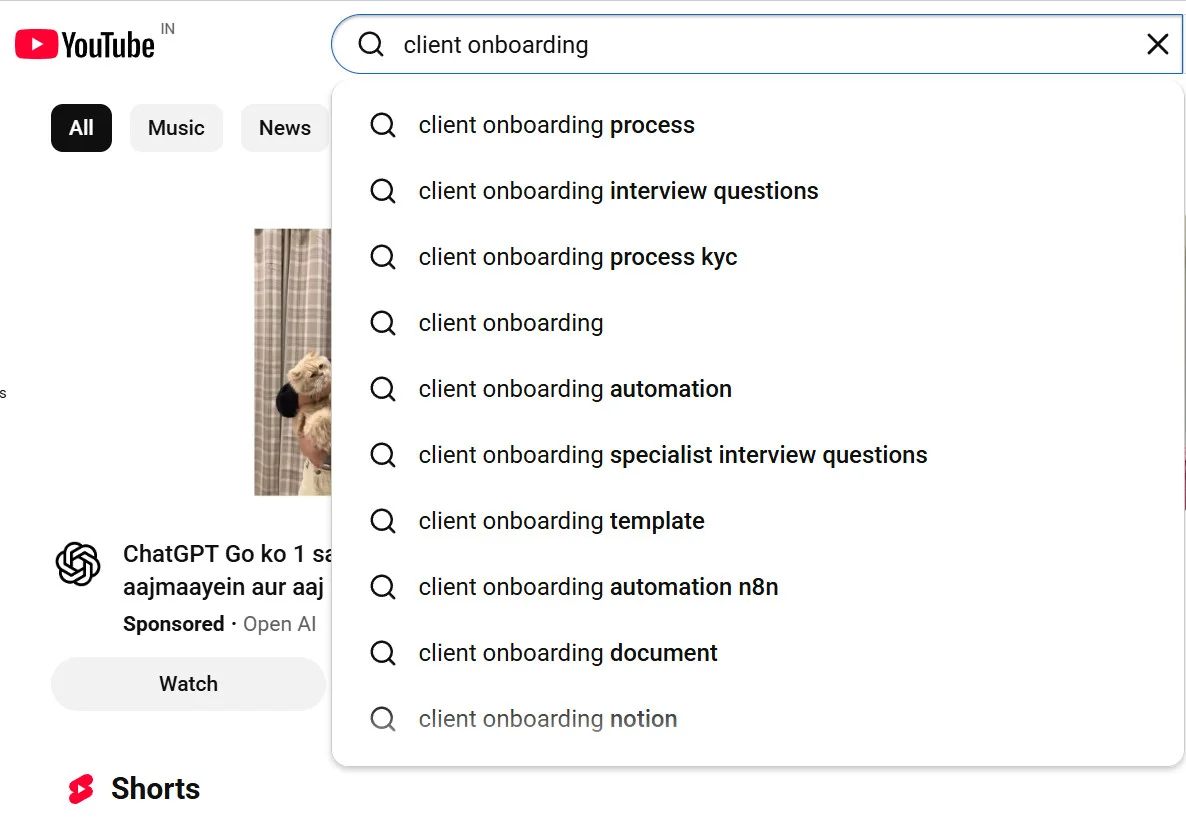
These are the keyword variations you should target.
If you have a business account on YouTube, you can also use YouTube Studio’s “Research” and “Google Trends” features to see what your YouTube audience is actually searching for.
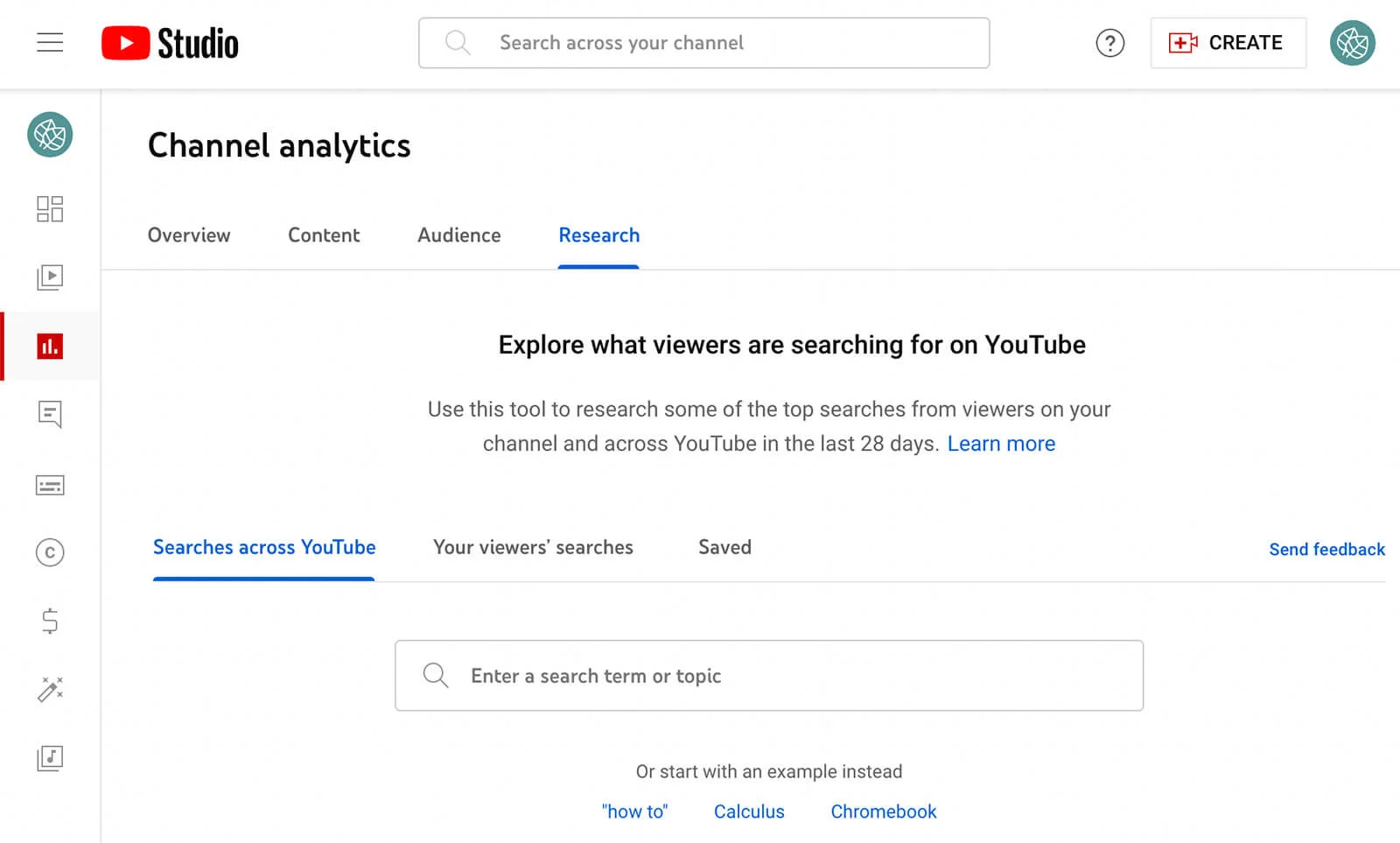
YouTube Help explicitly recommends using YouTube Analytics Research and the Google Ads Keyword Planner to identify popular keywords and synonyms to maximize search traffic.
Also, look for keywords that your close competitors are targeting. Here are some patterns to look for:
- What words are they repeatedly using in video titles?
- What subtopics keep appearing?
- What questions are people asking in their comment section?
- Which of their videos have strong views but weak explanations? (your opportunity)
Make a cluster of these keywords and use them in your video titles, descriptions, and scripts. Strategic keyword research can improve your discoverability and bring in more views.
2. Create Helpful YouTube Content
As a business, you should focus more on creating useful, evergreen content that will stay relevant for years.
If your video genuinely solves a problem, answers a question, or simplifies a decision, you’re already ahead of 80% of businesses on YouTube.
Here are some powerful content formats that work well for YouTube channels:
1. Educational & How-To Videos
Users often visit YouTube when they face a particular problem, and creating educational, how-to videos offers a clear solution. These videos are evergreen and provide businesses with steady, long-term visibility.
Below is a “How-to” video on “How I Make Educational Videos,” where the creators break down the process in 7 easy steps
2. Product Demonstrations & Tutorials
96% of the marketers agree that videos can improve a user’s understanding of their product or service. And the truth is that people will only buy from you if they know how to use your product/service. Creating tutorials will not only boost purchase intent but also help reduce post-purchase friction.
3. Customer Testimonials & Case Studies
Testimonials provide an emotional “afterglow” by showing real people’s satisfaction, and case studies, on the other hand, provide a logical “roadmap” with data and metrics, thus proving the ROI of a business. When used together, they can help you get more traffic from YouTube and boost conversions.
In fact, 77% of consumers state that watching a brand’s testimonial video directly influenced their decision to buy.
4. Brand Stories and Behind-the-Scenes
Brand stories and behind-the-scenes (BTS) content help humanize your brand, build trust, and foster emotional connections. Sharing daily messy realities of a small business demonstrates honesty. It also helps you establish credibility against larger, faceless competitors.
5. Repurpose the Content from Blogs, Webinar or Podcasts
Businesses often struggle to come up with new content ideas for their YouTube channel. But, look closely, and you would realize there is a goldmine of content around you. Your blogs, webinars, and podcasts can all be structured as YouTube videos. You can first post them as long-form videos, then break them down into YouTube Shorts, and repost them for better visibility.
Please Note: When creating any video for YouTube, make sure to use the primary keyword and its different variations verbally throughout the video. YouTube transcribes all videos and using keywords will help the algorithms pick up those words.
3. Optimize Your YouTube Content for SEO
Businesses often wonder how to get more traffic from YouTube videos. The answer isn’t luck, it’s optimization. Doing YouTube SEO will not just improve your reach, but it will also help you reach the right audience who truly resonates with your brand.
Here’s how you get started:
1. Optimize Your Video Titles for Search Intent
People read the titles before they click to watch a video. Even YouTube scans the title before recommending your video to its viewers.
Here’s how you optimize the title:
- Use your primary keyword naturally
- Make sure the title states the benefit
- Match your title with what YouTube users are searching for
2. Add a CTA towards the end of the Videos
Most businesses make great videos and then just end them by saying, “Thanks for watching.” Think of it like this: if someone has watched your video all the way till the end, they probably already trust you. Adding a clear CTA towards the end will guide them to your website and take the next step.
This is exactly how you get traffic from YouTube to your website’s landing pages. You can also use this opportunity to redirect your viewers to other related feature videos and increase your engagement signals.
Use CTAs like:
- Click the link in the description to get started today.
- Visit our website to access the full step-by-step guide.
- Head to the link below to learn more
You can also add lead magnets like
- Download the free checklist using the link below.
- Grab your free guide from the link in the description
- Download our free toolkit from the link in the description, etc.
3. Write SEO-Optimized Descriptions
The first 2–3 lines of your video descriptions are prime real estate. That’s where you should:
- Repeat your primary keyword naturally
- Explain what the video covers
- Add your main website link
Adding a link to your landing page in the first few lines of video descriptions can directly increase click-throughs to your site.
Here is the best placement to follow when writing YouTube video descriptions:
- Your primary landing page link at the top
- Lead magnet links below
- Relevant resources further down
You can also use SocialPilot’s YouTube video description generator, a free tool that helps you generate powerful YouTube descriptions, in a matter of minutes.
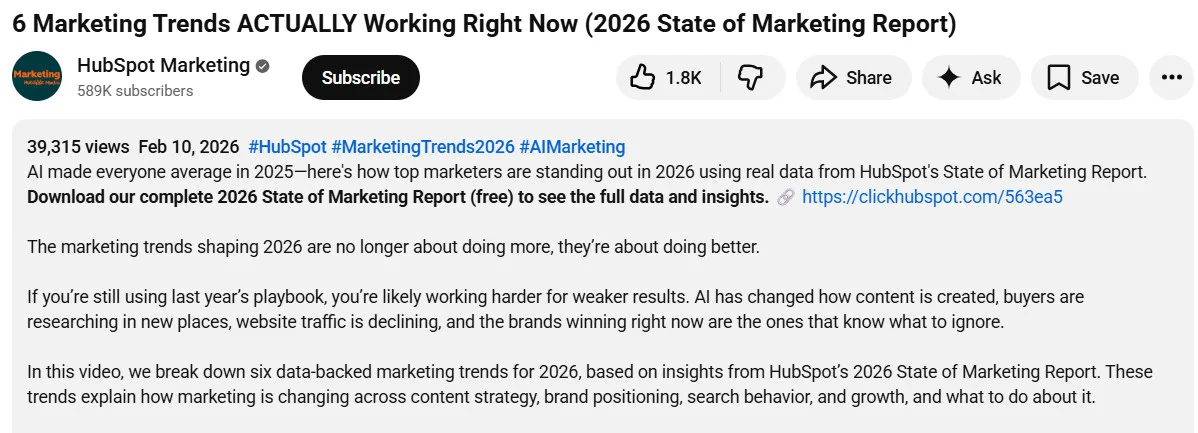
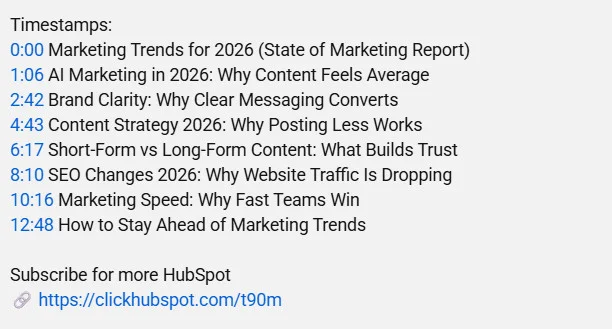
Below is the description of a HubSpot Marketing video; they used their primary keyword, “Marketing trends,” in the title and as a hashtag in the first line of the description. Further, they have added the report link in the next line.
4. Use Timestamps and Keyword Variations
Adding timestamps (also called chapters) not only improves user experience but also helps YouTube understand the content structure. Here is an example of timestamps from the above marketing trends video by HubSpot.
5. Add Video Tags and Hashtags
Adding video tags in the YouTube Studio primarily helps algorithms understand your topic, context, and keyword variations. These tags also help your topic appear in the YouTube search results for similar or related user queries.
Next comes hashtags. These are added in the descriptions and are visible to the viewers. Add 3–5 relevant hashtags at the top or bottom of your description.
You can use SocialPilot’s YouTube hashtag generator – a free tool that helps you generate the most relevant and trending hashtags, so your videos can appear in YouTube search results.
Free AI Youtube Hashtag Generator
Use SocialPilot’s AI-powered Youtube Hashtag Generator to create engaging Youtube Hashtaga in a snap!
Here is the Generated Result
6. Design Click-Worthy Thumbnails
While SEO helps you get more impressions, video thumbnails help you get more clicks. It directly impacts your click-through rate (CTR), and if your CTR is low, YouTube stops pushing your video – even if it’s well optimized.
Here’s what works for thumbnails:
- Use bright, high contrast colors like black, red, orange, etc. are they instantly grab attention
- Use large, readable text, but keep it to 3-6 words max.
- Use a visual hook or a clear facial expression
- Maintain visual branding consistency – use similar fonts, brand colors, and layout style
Here we have some video thumbnails by Y Combinator:

When you optimize videos using all the steps above, it increases your chances of appearing in YouTube search results.
4. Create in Batches, Schedule, and Post
Most businesses struggle with being consistent on social media. Posting one random video someday and then disappearing for weeks will affect how your videos perform. Inconsistency also prevents your videos from appearing in YouTube search results. So, it is important to pre-plan your topics around the keywords and build a content calendar.
Planning your YouTube videos in advance helps you maintain consistency and avoid last-minute scrambling.
Here’s how you can batch-create videos for YouTube:
- Create content batches around different keywords
- Plan for seasonal campaigns and product launches
- Script 3-4 videos together and film them in one session
- Edit and schedule them in advance
Next, schedule the video so you never miss out on the peak engagement hours and get maximum traffic to your YouTube channel. Look for the best time to post on YouTube and then schedule your videos for those time slots. The best posting times may vary by location and industry.
You can either schedule your video using YouTube Studio or use a third-party tool like SocialPilot. Here is a detailed step-by-step guide on how to schedule YouTube videos that talk about both native and advanced publishing tools.
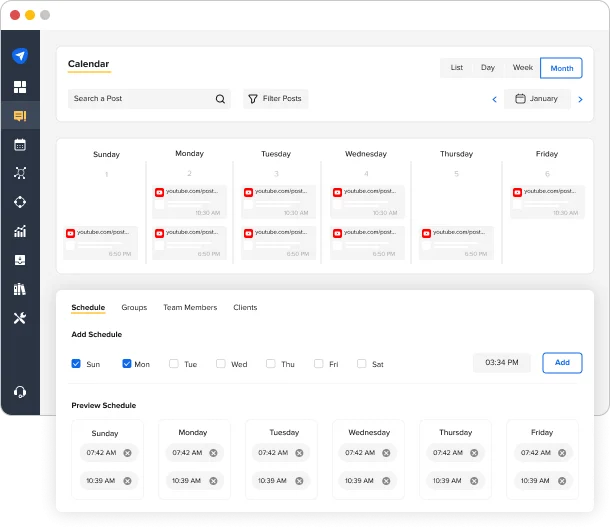
While the native scheduling via YouTube Studio can work well for beginners, agencies, and medium-sized businesses looking for a more streamlined workflow can rely on SocialPilot’s YouTube scheduler.
Its calendar view comes with a simple drag-and-drop functionality that makes it supremely easy to view and queue both Shorts and video content with just a few simple clicks.
Simply upload the video, add a thumbnail, title, description, and set the privacy status for your video.
On SocialPilot, you can also:
- Generate video titles and descriptions with AI Pilot
- Set advanced content category
- Add video tags
- Allow embedding, so others can embed your video on their websites.
It also lets you prepare and queue multiple videos at once, thus saving you a lot more time and manual effort.
Try SocialPilot today!
Just like other social platforms, YouTube also rewards consistency. When you post regularly, it helps algorithms understand your niche and your viewers develop a habit of watching your content. Eventually, your YouTube channel gains momentum.
Lastly, just choose a realistic posting schedule that you can stick to. For instance, posting one video and two Shorts on your channel page every week is a realistic plan to begin with. Over time, consistent publishing will multiply the impact of your SEO efforts.
5. Use End Screens, Cards, and Pinned Comments
When people come to YouTube and watch your video, it already means that they are interested in what you’re saying. Now all you need to do is guide them toward the next action, that is, visiting your website.
YouTube has three built-in features that help you do this effectively: End Screens, Cards, and Pinned Comments.
When used together, they can help you get more traffic from YouTube to your landing pages.
1. YouTube End Screens
End screens are clickable elements that appear in the final 5–20 seconds of your video. They allow you to promote content or send viewers to specific destinations.
You can add your external website link here by following these steps:
Go to YouTube Studio > Click Content > Select the video > Click Editor, then End Screen. From the elements, select external link and adjust the timing anywhere between 5-20 seconds
These screens appear right after your viewers finish watching the video and because of their clickable element, anyone who clicks on the link will be redirected to your website.
2. YouTube Cards
Cards are small interactive prompts that appear during the video, usually as a small “i” icon in the top-right corner. When viewers click it, a pop-up link appears.
Cards can link to another video, a playlist, channel, or a website.
To add a card, open YouTube Studio > Go to Content and select video > Click Editor > Select Cards > Select the card type and insert the timestamp where it should appear.
You can place a card exactly where you have finished talking about your product/service, so users can click on it and get redirected to your website.
3. Pinned Comments
A pinned comment is the top comment that appears under your video, and it stays fixed there. Unlike descriptions (which people may not expand), comments are immediately visible in the discussion section.
Just add your website link in a comment, post it under your own video and click on the three dots next to the comment, and select “Pin.” That comment will now stay at the top of the comment section.
6. Track the Performance and Conversions
Now that you know how to get traffic on YouTube, it’s time to track and result and see what’s working. Performance tracking is a vital step for small businesses because it helps you understand how your videos perform and which videos help you get the most traffic on your website.
Here are some metrics to look for:
- Watch Time: How much time are people really spending on your videos?
- Click-Through Rate (CTR): How many people clicked your YouTube videos after seeing the thumbnail and title?
- Audience Retention: Where are your viewers dropping off? If people leave in the first 30 seconds, your intro needs work. If they drop midway, your structure may be weak.
- Subscriber Growth: How many new subscribers did you get over a period
- Engagement Trends: The likes, comments, and shares that you have got
The next important metrics are website traffic and conversion rates. These metrics tell you how much traffic you are getting from YouTube. To measure this:
- Add UTM parameters to your description links
- Use Google Analytics to track traffic from YouTube
- Monitor landing page conversion rates
- Track lead form submissions, downloads, or purchases
Figure out:
- Which YouTube video drove the most website clicks?
- Which topic generated the most leads?
- Are viewers converting into subscribers or customers?
The goal here is to figure out how to get traffic from YouTube that actually converts. Tracking your conversions and assessing the cost per acquisition will help you determine the profitability of video marketing efforts on YouTube.
Read our YouTube marketing guide for more insights into how to track YouTube metrics for data-driven decision making.
It’s Time to Leverage YouTube for Your Business Growth
YouTube isn’t just another social platform competing for attention. In fact, it works as both a search engine and a social platform, attracting users directly and from sources like Google Search, ChatGPT, and Bing.
Users often come to YouTube channels with an intent and not to doomscroll. Many are actively looking for answers, comparisons, tutorials, and solutions. Businesses that fail to leverage YouTube miss out on a significant opportunity to attract an intent-driven audience, build authority, and increase conversions.
SocialPilot is a social media management tool that helps you post consistently and grow on YouTube. Its content calendar allows you to plan your YouTube videos in advance, while AI Pilot helps generate compelling titles, descriptions, and relevant hashtags.
Its AI-suggested best time to post helps you capitalize on peak engagement hours, and its analytics clearly tell you what’s working and what needs improvement.
Overall, SocialPilot is a one-stop solution for businesses looking to leverage YouTube for their business growth.
Try our 14-day free plan and grow your YouTube channel like never before.