
The popularity of video marketing is already at its pinnacle. Several brands and individuals are intensively creating video content to engage with their followers.
Whether it’s Instagram or Facebook, videos have been dominating the social media landscape. They are effective in conveying any information in an appealing manner.
And now that producing quality videos doesn’t require regressive skillset and logrolling efforts, it has become the most anticipated form of online content.
But often, we end up with a compromised engagement just because every social platform follows varied dimensions of video posts. That’s why it’s more important than ever to ensure that you complement the quality of your videos with platform-appropriate dimensions and sizes as a marketer.
Here we have compiled an all-in-one guide that’ll keep you updated with the latest video dimensions and sizes as per each social media platform.
Excited to improvise your video marketing efforts?
Let’s get started!
1. Facebook Video Size
Video posts get at least 59% more engagement than other post types.
There are numerous types of videos that can be shared on Facebook, but each has a different dimension.
Let’s dive straight into each video format available on Facebook video specifications.
Shared videos ‘autoplay’ in your News Feed. It is one of the most common forms of videos on Facebook. These are the videos shared by your friends and brands.
Shared videos have an orientation of either landscape or portrait.

Facebook Shared Video Specifications
- Recommended resolution: 1080 x 1080 pixels (square) or 1280 x 720 pixels (landscape)
- Portrait: 720 x 1280 pixels
- Supported aspect ratios: 16:9 (landscape), 9:16 (portrait), 1:1 (square), 4:5 (portrait)
- Max file size: 4 GB
- Max video length: 240 minutes (4 hours)
- Recommended formats: MP4, MOV
- Codec: H.264 with AAC audio
- Recommended bitrate: 2–5 Mbps
Square (1:1) videos take up more space in the mobile feed and consistently outperform landscape formats for engagement. Use 1080 x 1080 px as your default unless you have a specific reason to go widescreen.
360° Videos
Facebook also prioritizes 360° videos as they appear organically in the Facebook Feeds. Click the Advanced tab, set your default point of view, and click the 360 Controls tab to record any video in this format.
Users can get an elaborate 360° view of your videos by scrolling the cursor with a touch on their device.

Facebook 360° Videos Specifications
- Video dimension for Monoscopic videos: 5120 x 2560 maximum, aspect ratio 2:1
- Video dimension for Stereoscopic videos 5120 x 5120 maximum, aspect ratio 1:1
- Maximum Length: ½ hour
- Maximum File Size: 10 GB
- Video with 360 metadata embedded
- File Type: MP4 container
Facebook Video Ads
Facebook video ads have the lowest CPC, with an average CPC of $0.97.
Advertisers are using videos in a big way on Facebook to market their products and brands. There are different types of Facebook ads, and marketers have to be careful about getting the right specs of each one.
Desktop Newsfeed Link Video
The Facebook Desktop News Feed Link video is similar to the shared videos as they live in the user feeds and also appear in the right column of the Facebook timeline. These ads can either be square or in landscape dimensions.

Video Specifications
- Video Dimension: 1280 x 720 pixels
- Format: .MOV or. MP4 file
- Landscape Aspect Ratio: 16:9
- Square Aspect Ratio: 1:1
- Duration: 4 hours (max)
- Video Size: 4 GB (max)
Carousel Video Ads
Carousel ads are 10 times more likely to get clicked compared to the static ads on Facebook.
With carousel ads, brands can show multiple images before clicking a link. They are definitely a fun way of promotion that allows users to have more in-depth interaction with your service or product.

Video specification
- Recommended resolution: 1080 x 1350 pixels (4:5 portrait) or 1080 x 1080 pixels (1:1 square)
- Supported aspect ratios: 4:5 (portrait), 1:1 (square), 16:9 (landscape) — all slides must match
- Max video length per slide: 60 seconds
- Total slides: Up to 20 videos per carousel (updated from 10)
- Max file size: 4 GB per video
- Formats: MP4
- Codec: H.264 with AAC audio
- Frame rate: 30 fps minimum
Collection Video Ads (for mobile)
The Collections ads are ideal for marketing products that come in different colors, like clothes and retail products. This video ad is followed by 3 product images, giving viewers an immersive experience.

Video Specifications
- Video Dimensions: 1080 x 1080 (Landscape and Square)
- Landscape Aspect Ratio: 16:9
- Square Aspect Ratio: 1:1
- File Size: 4 GB (max)
- Video Length: 2 hours (max)
Instant Experience Ads (Previously Canvas Video Ads)
This form of paid content gives users a great deal of information on swiping and scrolling on their mobile devices. These ads don’t have any character and text limit.

Video Specifications
- Video Dimensions:1200 x 628 (Landscape and Square)
- Landscape Aspect Ratio: 16:9
- Square Aspect Ratio: 1:1
- File Size: 4 GB (max)
- Video Length: 2 hours (max)
Slideshow Video Ads

Video Specifications
- Video Dimensions:1200 x 720 (Landscape and Square)
- Landscape Aspect Ratio: 16:9
- Square Aspect Ratio: 1:1
- Video Duration: 15 seconds (max)
Stories Video
Facebook Stories videos are full-screen vertical videos that disappear after 24 hours. They are separate from feed posts and have their own specifications.
Video specification
- Recommended resolution: 1080 x 1920 pixels
- Aspect ratio: 9:16 (vertical, full-screen)
- Max file size: 4 GB
- Max video length: 60 seconds (Facebook automatically splits longer clips into 15-second cards)
- Recommended formats: MP4, MOV
- Safe zone: Leave 250 pixels at the top and 340 pixels at the bottom free of critical content to avoid UI overlap
Facebook Reels
Facebook Reels is Facebook’s short-form vertical video format, directly competing with TikTok and Instagram Reels. Reels appear in the dedicated Reels tab, the main feed, and on profiles.
Video specification:
- Recommended resolution: 1080 x 1920 pixels (1440 x 2560 px recommended for maximum sharpness)
- Aspect ratio: 9:16 (vertical, full-screen)
- Max file size: 4 GB
- Max video length: 90 seconds
- Recommended formats: MP4, MOV
- Safe zone: Keep key visuals and text within the central area, the top and bottom are partially covered by UI controls
Reels are currently the highest-reach format on Facebook. Repurposing Instagram Reels or TikTok content directly to Facebook Reels is a common and efficient strategy, just ensure there are no visible third-party watermarks.
Facebook Live
Facebook Live allows you to broadcast in real-time to your followers, Page audience, or Groups. Live videos get significantly higher organic reach than recorded uploads.
Video specification
- Recommended resolution: 1920 x 1080 pixels (1080p at 30 fps)
- Supported quality levels:
- 1080p @ 60 fps: 4,500–9,000 Kbps
- 1080p @ 30 fps: 3,000–6,000 Kbps
- 720p @ 30 fps: 1,500–4,000 Kbps
- 480p @ 30 fps: 600–2,000 Kbps
- Max broadcast length: 8 hours
- Protocol: RTMPS (recommended for security)
- Video codec: H.264 (Level 4.1 for 1080p/30 fps, Level 4.2 for 1080p/60 fps)
- Audio: AAC stereo, 44.1 kHz or 48 kHz
In-Stream Video Ads
In-Stream Video Ads appear mid-roll inside other people’s Facebook videos, similar to YouTube pre-roll ads. They play automatically when a viewer is watching a video and cannot be skipped until a set interval.
Video specification
- Recommended resolution: 1080 x 1080 pixels
- Aspect ratio: 16:9 (landscape) or 1:1 (square)
- Video length: 5–15 seconds (strict limit for skippable; up to 60 seconds for non-skippable)
- Max file size: 4 GB
- Formats: MP4, MOV
In-Stream Ads require viewer attention from the first second. Lead with your brand or hook, there is no build-up time.
2. Instagram Video Size
Since the inception of Reels, Instagram videos have come a long way. The latest statistics showed that about 5.2 million people viewed brand-created Instagram videos.
Advertising on Instagram is definitely worth investing in. Let’s discuss the specifications of the various Instagram videos.
Instagram Videos
Grab your audience’s attention with captivating videos while they scroll down their Instagram feeds. These videos are an interesting and fun way to keep the audience glued to your brand. In 2021 Instagram merged IGTV videos and regular feed videos to create a Video Tab, making it easier for creators to showcase their content with a unified video size specification.
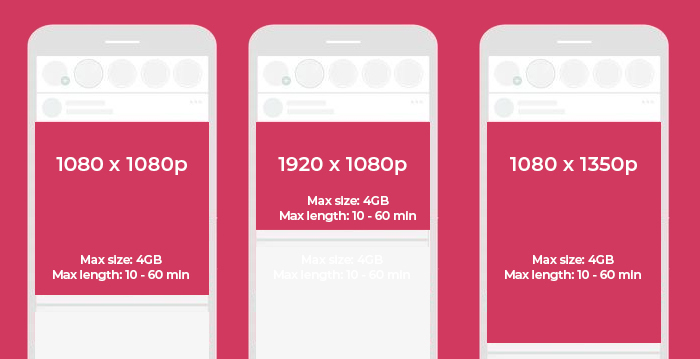
Video specification
- Recommended resolution: 1080 x 1920 pixels (for vertical); 1080 x 1080 pixels (for square)
- Landscape: 1920 x 1080 pixels (1.91:1 aspect ratio)
- Portrait: 1080 x 1350 pixels (4:5 aspect ratio)
- Square: 1080 x 1080 pixels (1:1 aspect ratio)
- Max file size: 4 GB
- Max video length: 60 minutes (videos longer than 15 minutes must be uploaded via the web; longer content is best served as Reels)
- Recommended formats: MP4, MOV
- Codec: H.264 with AAC audio
- Recommended bitrate: 3,500–5,000 Kbps
- Minimum frame rate: 30 fps
Note: In 2021, Instagram merged IGTV and regular feed video into a unified Video format. IGTV as a standalone product is fully discontinued.
Carousel Video Ads
Carousel posts signify the presence of multiple content elements. The small dots below the post indicate more than one image, creating a step-by-step tutorial detailing the product features and usage.

Video Specifications
- Video Dimensions: 1080 x 1080 (max)
- Aspect Ratio: 1:1
- Video Length: 60 seconds (max)
- File Type: .MP4 & .MOV
- File Size: 4 GB (max)
- Number of Cards: 2 to 10 (max)
Instagram Stories Ads
Engage your audience with compelling storytelling using the Instagram stories feature. Instagram stories contain up to 10 images, and they disappear after 24 hours from your Instagram feed. You can share the same story on your Facebook handle as well.

Video specification
- Recommended resolution: 1080 x 1920 pixels
- Aspect ratio: 9:16 (full-screen vertical)
- Max file size: 4 GB (not 4 MB — the article has a significant error here)
- Max story video length per clip: 60 seconds (no automatic splitting into 15s segments anymore; it remains one 60s video).
- Recommended formats: MP4, MOV
Safe zones: Leave 250 pixels (14%) at the top and 340 pixels (20%) at the bottom free from text, logos, and CTAs to avoid overlap with profile icons and UI buttons.
Instagram Reels Videos
Instagram reels are the trending video content format on Instagram. This TikTok rival has an amazing organic reach and allows users to take part in the latest trends for higher engagement.

Video specification
- Recommended resolution: 1080 x 1920 pixels
- Full-screen aspect ratio: 9:16
- Feed thumbnail aspect ratio: 4:5 (cropped in the feed — keep critical content in center)
- Profile grid thumbnail: 3:4 (as of the 2025 grid update)
- Max file size: 4 GB
- Max video length (in-app recording): 3 minutes (180 seconds) — extended from 90 seconds in January 2025
- Max video length (upload from device): 15 minutes
- Recommended formats: MP4, MOV
- Codec: H.264 with AAC audio
- Recommended bitrate: 3,500–5,000 Kbps
- Minimum frame rate: 30 fps
Instagram extended the maximum Reels length from 90 seconds to 3 minutes in January 2025. Videos uploaded from your device can be up to 15 minutes long. Design for the first 3 seconds, that is the critical hook window before viewers scroll away.
Instagram Live Video
Instagram Live lets you broadcast in real time to your followers. Live videos are prominently featured at the front of the Stories bar.
Video specification
- Recommended resolution: 1080 x 1920 pixels (9:16 vertical)
- Minimum resolution: 720 x 1280 pixels
- Recommended bitrate: 3,500–5,000 Kbps
- Frame rate: 30 fps recommended (60 fps supported)
- Max duration: 4 hours
- Codec: H.264 video, AAC audio
Note: Lives can be saved and shared as feed videos or Reels after the broadcast ends
3. Twitter Video Size
500 million tweets are sent each day on Twitter. The sports and the entertainment sector make extensive use of this platform for marketing their brand stories. Let’s check out their video specifications.
Twitter In-Feed Video
You can upload the in-feed video content in the landscape and portrait formats directly on Twitter. While these specific formats cannot be shared through YouTube and Vimeo links, Twitter provides easy ways of sharing organic content. For paid content videos ads too, you can use the same specs as follows.
To maximize the impact of your Twitter videos and boost sales and engagement, explore our detailed guide on video marketing strategies.

Video Specification:
- Recommended resolution: 1920 x 1200 pixels (landscape) or 1200 x 1900 pixels (portrait); minimum 32 x 32 pixels
- Recommended for feed: 1280 x 720 pixels (landscape)
- Supported aspect ratios: 16:9 (landscape), 9:16 (portrait), 1:1 (square)
- Max video length (standard): 140 seconds (2 min 20 sec)
- Max video length (X Premium – web/iOS): 4 hours (240 minutes)
- Max video length (X Premium – Android): 10 minutes
- Max file size (standard): 512 MB
- Max file size (X Premium): 8 GB
- Recommended formats: MP4, MOV
- Codec: H.264 with AAC audio
- Recommended bitrate: 2–5 Mbps (5 Mbps at 1080p, 2.5 Mbps at 720p)
- Frame rate: 30 fps or 60 fps
Note: X (Twitter) introduced 4-hour video uploads for Premium subscribers on web and iOS. Standard (non-Premium) accounts remain limited to 140 seconds. For most brand content, keeping videos under 60 seconds delivers the best completion rates.
X (Twitter) Video Ads
- Recommended resolution: 1200 x 1200 pixels (1:1) or 1920 x 1080 pixels (16:9)
- Minimum resolution: 600 x 600 pixels (1:1) or 640 x 360 pixels (other ratios)
- Supported aspect ratios: 9:16, 16:9, 1:1
- Max video length: 2 minutes 20 seconds (same as organic); recommended 15 seconds or less for ads
- Max file size: 1 GB
- Recommended formats: MP4, MOV
- Codec: H.264/AVC with AAC-LC audio (128 Kbps max)
- Frame rate: 29.97 fps or 30 fps (up to 60 fps supported)
4. YouTube Video Size
More than 500 hours of videos are viewed on Youtube every day.
Youtube is a great channel for marketers to promote their brands through interesting videos. Let’s check out the basic requirements and technical specs for uploading video content to YouTube.
Standard YouTube Video
The best format which gives high-quality videos for uploading on Youtube is the MP4 format with H.264 codec and AAC codec, though numerous other formats are supported.

Video specifications
- Video Dimensions: 3840 x 2160 (max)
- Aspect Ratio: 16:9 or 4:3
- Video Length: 12 hours (max)
- File Type: .MOV, .MPEG4, MP4, .AVI, .WMV, .MPEGPS, .FLV, 3GPP, and WebM
- File Size: 128 GB (max)
Note: All YouTube video ads have the same basic specifications. The only difference is the length of the specific videos.
Length of various YouTube video ads
- Skippable video ads: Max length is 12 hours( can be skipped after 5 seconds)
- Non-skippable video ads: Max length is 15-20 seconds( 30 seconds in some areas)
- Mid-roll video ads: Minimum length is 30 seconds
- Bumper video ads: Max length is 6 seconds
Display Ads
Display ads appear in the search results or in the right column when watching a Youtube video.

Video specifications
- Video Dimensions: 300 x 250 (max)
- Aspect Ratio: 16:9 or 4:3
- Video Length: 12 hours (max)
- File Type: .MOV, .MPEG4, MP4, .AVI, .WMV, .MPEGPS, .FLV, 3GPP, and WebM
- File Size: 128 GB (max)
YouTube Shorts
YouTube shorts are similar to Facebook and Instagram stories. Most brands use this format to make a more dynamic presence on YouTube. They also serve as a quick reminder to check a new video upload.

Video Specification:
- Recommended resolution: 1080 x 1920 pixels
- Aspect ratio: 9:16 (strict vertical requirement — horizontal videos are not promoted as Shorts)
- Max video length: 3 minutes (180 seconds) — extended from 60 seconds in late 2024
- Max file size: 2 GB
- Recommended formats: MP4, WebM
- Codec: H.264 with AAC audio
- Frame rate: 30–60 fps
YouTube Live Streaming
YouTube Live allows creators and brands to stream in real time directly to their channel.
- Recommended resolution: 1920 x 1080 pixels (1080p at 30 fps)
- Bitrate recommendations:
- 4K (2160p) @ 60 fps: 20,000–51,000 Kbps
- 1080p @ 60 fps: 4,500–9,000 Kbps
- 1080p @ 30 fps: 3,000–6,000 Kbps
- 720p @ 60 fps: 2,250–6,000 Kbps
- 720p @ 30 fps: 1,500–4,000 Kbps
- 480p @ 30 fps: 600–2,000 Kbps
- Video codec: H.264
- Audio: AAC stereo, 44.1 kHz or 48 kHz
- Keyframe interval: 2 seconds
- Frame rate: 30 fps (default recommended) or 60 fps
- Max stream duration: 12 hours
5. LinkedIn Video Size
While LinkedIn has still not introduced many features for its video content campaigns, the number of executives who watch videos is growing rapidly. About 54% of senior work executives share video content with colleagues at least once a week.
Along with uploading the video, LinkedIn gives you the option to share YouTube links in shared posts and LinkedIn Pulse articles. You can run video ads to increase your chances of lead generation and branding.

Video specifications
- Recommended resolution: 1920 x 1080 pixels (16:9 landscape)
- Portrait: 1080 x 1920 pixels (9:16)
- Square: 1080 x 1080 pixels (1:1)
- Maximum resolution: 4096 x 2304 pixels (4K)
- Supported aspect ratios: 16:9 (landscape), 4:5 (portrait), 1:1 (square), 9:16 (vertical)
- Max video length: 15 minutes (desktop); 10 minutes (mobile upload)
- Max file size: 5 GB
- Supported formats: MP4, MOV, ASF, AVI, FLV, MPEG-1, MPEG-4, MKV, WebM
- Recommended codec: H.264 with AAC audio
- Recommended bitrate: 8–12 Mbps at 1080p
- Frame rate: 24–30 fps recommended (10–60 fps supported)
LinkedIn’s algorithm currently favors native video uploads over YouTube or Vimeo links. Videos under 60 seconds tend to get the highest completion rates on the platform. Subtitle/caption your videos — a significant portion of LinkedIn users watch without sound.
LinkedIn Live Video
LinkedIn Live allows Pages and individuals (with approval) to broadcast live to their network. It is particularly effective for product launches, thought leadership sessions, and virtual events.
Video specification
- Recommended resolution: 1920 x 1080 pixels (16:9) or 1080 x 1080 pixels (1:1)
- Minimum resolution: 256 x 144 pixels
- Maximum resolution: 4096 x 2304 pixels
- Recommended bitrate: 8–12 Mbps at 1080p (range: 192 Kbps to 30 Mbps)
- Frame rate: 24–30 fps recommended (10–60 fps supported)
- Video codec: H.264
- Audio: AAC (Advanced Audio Coding)
- Max live duration: Typically up to 1 hour (varies by encoding partner)
- Requirement: LinkedIn Live access must be requested and approved via LinkedIn’s application process
LinkedIn Video Ads
LinkedIn Sponsored Video Ads appear in the LinkedIn feed and are targeted based on professional demographics — making them highly effective for B2B campaigns.
Video specification
- Recommended resolution: 1920 x 1080 pixels (16:9)
- Supported aspect ratios: 16:9 (landscape), 1:1 (square), 9:16 (vertical)
- Max video length: 30 minutes
- Max file size: 500 MB
- Formats: MP4
- Recommended length for ads: 15 seconds or less for awareness campaigns; up to 90 seconds for consideration
6. Snapchat Video Size
Are you one of the billion viewers seeing videos on Snapchat?
Snapchat has grown bigger than Twitter and Pinterest, a favorite among the younger generation, though it is a much younger platform.
55% of Snapchat users report that they follow one or more brands or businesses on the platform.
So if you want to leverage the power of Snapchat for your video marketing campaigns, you should also be aware of the video specifications.
Single Video
This video format is the basic way in which users communicate on the platform. Yet, as a marketer, you can post videos to showcase products and latest events in your business. To complement your video production, don’t miss our video marketing strategy guide to craft engaging content that drives results.

Video specifications
- Recommended resolution: 1080 x 1920 pixels
- Aspect ratio: 9:16 (full-screen vertical)
- Max file size: 500 MB
- Max video length: 5–60 seconds
- Recommended formats: MP4, MOV
- Minimum resolution: 640px wide with a minimum 3:4 aspect ratio
The live article lists “32 MB (max)” — this is the old, outdated limit. The current maximum is 500 MB.
Snapchat Spotlight
Snapchat Spotlight is Snapchat’s algorithmically-driven short video feed — similar to TikTok’s For You Page. Videos can reach far beyond your follower base based on engagement.
- Recommended resolution: 1080 x 1920 pixels
- Aspect ratio: 9:16 (full-screen vertical)
- Max file size: 500 MB
- Max video length: 5–60 seconds
- Recommended formats: MP4, MOV
- Content requirements: Must be original content; no watermarks from other platforms, no still images, no text-only content, no low-resolution uploads
Spotlight videos are eligible for Snapchat’s creator payment program, making it the platform’s primary monetization pathway for creators. Videos that feel native (not repurposed from TikTok or Reels with visible watermarks) perform significantly better.
Long-Form Video Ads
Long-form videos are the only format that Snapchat offers for paid ad formats. But, there are opportunities galore to add a video to Snapchat’s discovery option. You have to explore this social media network to ascertain how it can be best suited for your video ad campaigns.

Video specifications
- Recommended resolution: 1080 x 1920 pixels
- Supported aspect ratios: 9:16 (vertical, primary), 16:9 (landscape), 1:1 (square)
- Max file size: 1 GB
- Max video length: 180 seconds (3 minutes)
- Recommended formats: MP4, MOV
- Recommended length: 15 seconds or less for non-skippable; up to 3 minutes for unskippable long-form
7. Pinterest Video Size
Pinterest does support native video uploads, allowing users to create and publish video Pins directly on the platform. You can upload videos in formats like MP4, MOV, or M4V, with durations ranging from 4 seconds up to 15 minutes.
In addition to native video Pins, Pinterest also supports video ads and idea pins, which autoplay in users’ feeds and are designed for higher engagement.
Pinterest Video Pin (Organic)
Pinterest Video Pins are native videos that appear in the feed and search results. They play silently by default, so visual storytelling and on-screen text are essential.
Video specification
- Recommended resolution: 1080 x 1920 pixels (9:16) or 1000 x 1500 pixels (2:3)
- Supported aspect ratios: 9:16 (vertical), 2:3 (portrait) — vertical formats perform best
- Max file size: 2 GB
- Max video length: 15 minutes
- Recommended length: 15–60 seconds for best engagement
- Recommended formats: MP4, MOV, M4V
- Audio: Auto-muted in feed — always include captions or on-screen text
Long-Form Video Ads
The two formats for Pinterest Promoted videos are: square and vertical. While they are almost the same, they have some unique dimensions.

Video specifications
Pinterest Promoted Video Ads (also called Standard Width Video Ads) appear in feeds and search results. They are available in multiple aspect ratios.
- Recommended resolution: 1080 x 1920 pixels (9:16 vertical)
- Square option: 1000 x 1000 pixels (1:1)
- Portrait option: 1000 x 1500 pixels (2:3)
- Supported aspect ratios: 9:16, 2:3, 1:1
- Max file size: 2 GB
- Max video length: 15 minutes (recommended 6–15 seconds for ads)
- Recommended formats: MP4, MOV, M4V
Note: Pinterest also offers Max Width Video Ads that span the full width of the feed. These use the same specs but require a minimum 600 x 600 px resolution and 1:1 or 16:9 aspect ratio. Max Width Ads are only available as paid placements.
Idea Pins
Pinners use story pins to share short-form content with their followers. This can be accessed the same way as Instagram and Facebook stories.

Video Specifications
Pinterest renamed “Story Pins” to Idea Pins in 2021. The format is Pinterest’s multi-page content experience for creators.
- Recommended resolution: 1080 x 1920 pixels
- Aspect ratio: 9:16 (full-screen vertical)
- Max file size: 100 MB per video
- Max video length per page: 60 seconds
- Recommended formats: MP4, MOV
8. TikTok Video Size
TikTok brought a revolution in the video marketing aspects, showcasing the true potential of short videos. You can participate in challenges and give your brand a personalized touch.
However, you need to abide by TikTok video specifications to elevate the experience of your viewers.
Organic Videos
These are the usual TikTok videos that viewers might come across in their feeds if they are following you. Brands use them for duet challenges and daily posting.

Video Specifications
- Recommended resolution: 1080 x 1920 pixels
- Aspect ratio: 9:16 (full-screen vertical)
- Max file size: 500 MB (videos under 3 minutes); 2 GB (videos 3–10 minutes)
- Max video length: While in-app recording is capped at 10 minutes, users can now upload pre-recorded videos up to 60 minutes long via the app or web.
- Select accounts: Up to 30 minutes
- Recommended formats: MP4, MOV
- Codec: H.264 with AAC audio
- Recommended bitrate: 6–8 Mbps at 1080p/30fps
- Frame rate: 30 fps (optimal); 30–60 fps supported
2025 Update: TikTok expanded the maximum video length from 5 minutes to 10 minutes for all users in 2025 (recorded video up to 60 minutes). Some verified accounts and select creators can upload up to 30 minutes. Despite this, videos between 21–34 seconds consistently see the highest completion rates and organic reach. Use longer formats only for content that genuinely requires depth (tutorials, reviews, storytelling).
Feed Ads
If you have found your niche audience on TikTok, utilize feed ads and resort to paid ads. They will boost your reach to a wider range of audiences and increase your engagement metrics considerably.

Video Specifications
- Recommended resolution: 1080 x 1920 pixels
- Aspect ratio: 9:16 (full-screen vertical) — preferred; also supports 1:1 and 16:9
- Max file size: 500 MB
- Max video length: 60 seconds (ad format limit, even though organic can be longer)
- Recommended ad length: 9–15 seconds for best performance
- Recommended formats: MP4, MOV, AVI, GIF
- Codec: H.264 with AAC audio
TikTok’s ad platform caps In-Feed video ads at 60 seconds regardless of organic video length limits. Shorter ads (under 15 seconds) see significantly better completion rates and lower CPMs.
TikTok Live
TikTok Live allows creators to broadcast in real time. Access to Live requires at least 1,000 followers and a minimum age of 16.
Video Specifications
- Recommended resolution: 1080 x 1920 pixels (9:16 vertical)
- Recommended bitrate: 4,500–6,000 Kbps
- Frame rate: 30–60 fps
- Keyframe interval: 2 seconds
- Video codec: H.264
- Audio codec: AAC
9. Threads Video Sizes
Threads (by Meta) added native video support in 2024. As a text-first platform built on Instagram’s infrastructure, Threads supports a range of video formats and is increasingly used for short-form video content.
Threads Feed Video Specifications
- Recommended resolution: 1080 x 1920 pixels (9:16 vertical)
- Supported aspect ratios: 9:16 (vertical), 3:4 (portrait), 1:1 (square), 16:9 (landscape) — flexible, no strict requirement
- Max file size: 1 GB
- Max video length: 5 minutes
- Recommended formats: MP4 (H.264 codec preferred)
- Optimal length for engagement: Under 90 seconds
Threads does not have a dedicated video feed like Reels, videos appear inline in the Threads conversation feed. Content repurposed from Instagram Reels or TikTok works well here, given the shared audience. Videos under 90 seconds see the strongest completion rates.
10. Bluesky Video Sizes
Bluesky added video upload support in September 2024 and expanded it significantly in March 2025. As a decentralized alternative to X (Twitter), Bluesky’s video capabilities are growing rapidly.
Bluesky Feed Video Specification
- Recommended resolution: 1080p (1920 x 1080 pixels or 1080 x 1920 pixels)
- Max file size: 100 MB
- Max video length: 3 minutes (180 seconds) — extended from 60 seconds in March 2025
- Supported formats: MP4, MOV, MPEG, WebM
- Recommended codec: H.264
- Upload limits: 25 videos per day; 10 GB total per day
- Account requirement: Verified email required to upload video
- Audio: Auto-muted on some clients — use captions or on-screen text
2025 Update: Bluesky extended video uploads from 60 seconds to 3 minutes in March 2025. Video support on Bluesky is still maturing, currently there is no dedicated video feed or algorithm, so videos appear inline in the text-based timeline.
11. Google Business Profile Video
Videos on your Google Business Profile help make your listing more engaging on Google Search and Maps. To ensure the best quality and visibility, follow the recommended video specifications below.
Google Business Profile Video Post
- Recommended resolution: 1920 x 1080 pixels (1080p)
- Minimum resolution: 1280 x 720 pixels
- Aspect ratio: 16:9
- Max file size: 75 MB
- Max video length: 30 seconds
- Recommended formats: MP4, MOV
Note: GBP videos are displayed on your Business Profile in Google Search and Google Maps
- Duration: Up to 30 seconds
- File size: Maximum 75 MB
- Resolution: 720p or higher (1280 x 720 recommended)
- Formats: MP4 or MOV (preferred)
- Orientation: Supports both vertical and horizontal videos
Note: Product and menu videos appear alongside your listings, helping showcase offerings more effectively and improve customer engagement.
It’s clear that video is king on social media channels. For example, Facebook boasts of having 8 billion video views on its platform every day, highlighting the massive engagement video content drives.
Marketers know that videos are the most engaging piece of content these days and therefore it’s important for them to create and execute these videos as much as possible in order for their brand to grow.
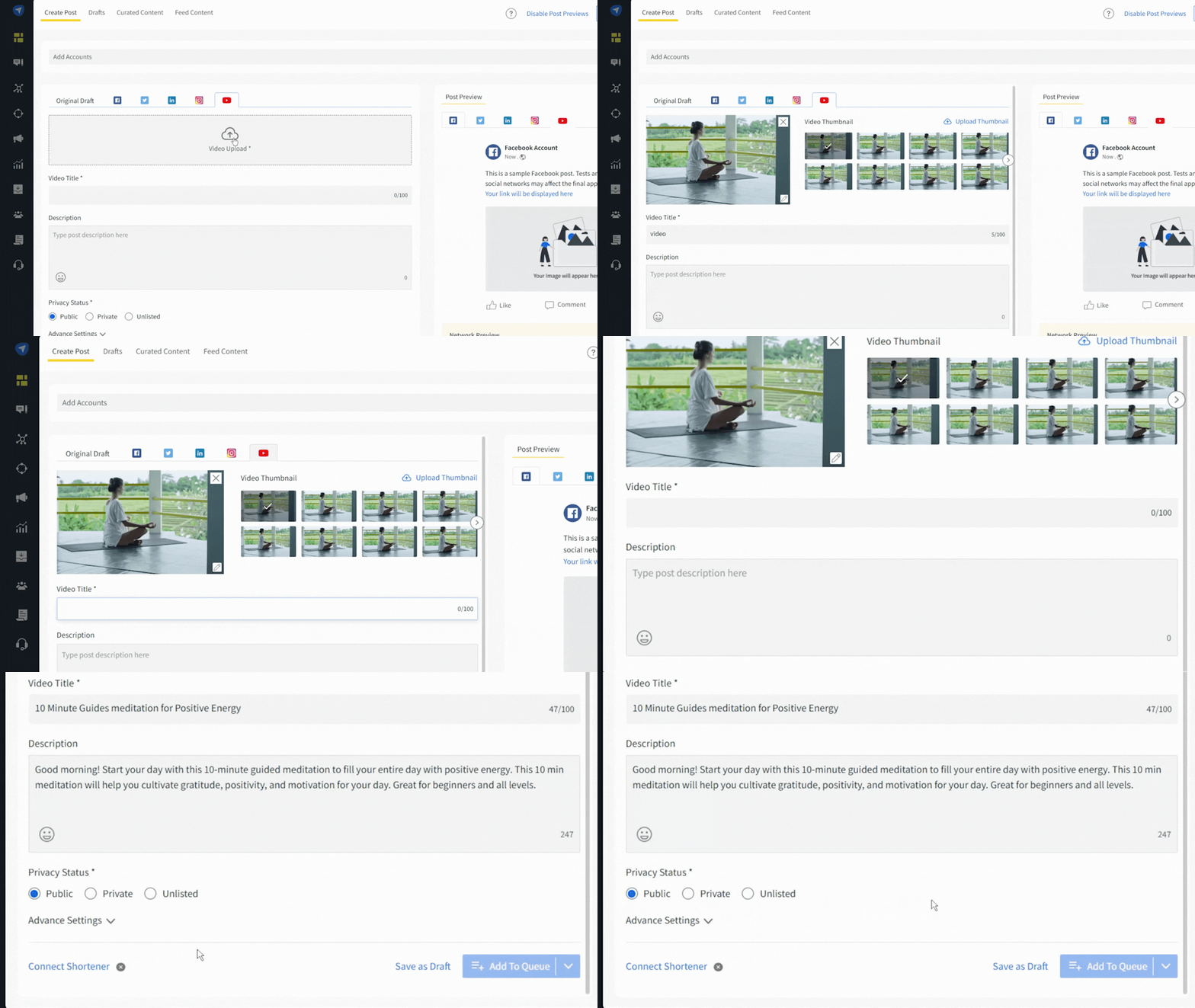
But video strategy and content creation is no simple task, it requires an idea, content, time, and workforce. This is why it pays to get all the help you can get, especially from a tool like SocialPilot that can help create an automated posting calendar, automate your scheduling, sync with your drives for easy access, and edit your thumbnails, etc on the dashboard and more.
With SocialPilot, you can create and schedule native videos on YouTube, Facebook, Instagram, Linkedin, Twitter, and more from a single dashboard. Not only does this help create optimized content, but you can also use it to keep your video schedule consistent.
Wrapping up
Your video content specifications cheat sheet is ready. Start designing your video content campaigns using the best video tools to leverage the power of social media network marketing.
Use SocialPilot, a powerful social media management platform, to schedule these videos to share them at the best time for maximum engagement. Keep track of your overall social media analytics and learn more about your audience and their preferences. Take its free trial and make your presence on multiple social media impactful.