
Creating content daily is one of the fastest ways to burn out as a social media manager. According to the 2024 Mentally Healthy Survey, which gathered responses from over 2,000 media, marketing, and creative professionals, seven in ten reported experiencing burnout. For social media managers producing content reactively across multiple client accounts, that number is easy to believe.
They spend the week writing posts, seeking approvals, and handling last-minute client requests. By Friday, the next week’s content often remains unstarted. The cycle continues because the underlying process does not change.
The solution is structured, proactive planning. Agencies that maintain consistency across multiple client accounts do not work more; they complete all tasks in one organized session each month.
Content batching enables this efficiency. With a solid planning framework, AI tools, and reusable templates, your team can create a full month of content for all clients in a single day.
As noted in a Reddit thread, batching saves significant time and provides flexibility for last-minute changes or announcements.

This guide explains how a social media team should prepare for batch day, including steps to take 48 hours in advance, an hour-by-hour batching day schedule, and a streamlined client approval process after batching.
Social media content batching means grouping all content creation tasks – ideation, caption writing, graphic design, and scheduling – into one focused session, rather than creating posts individually throughout the week.
Batching is ideal for clients less affected by rapidly changing industry trends and helps make deadlines more manageable [source: Reddit].
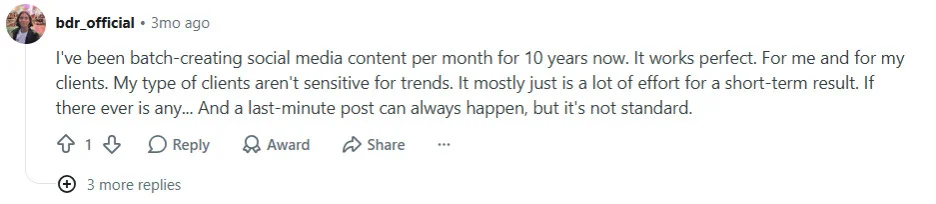
For agencies with multiple clients, batching allows production of a full month of posts for every account in one structured day. This approach eliminates daily reactive work and reduces time lost to context-switching.
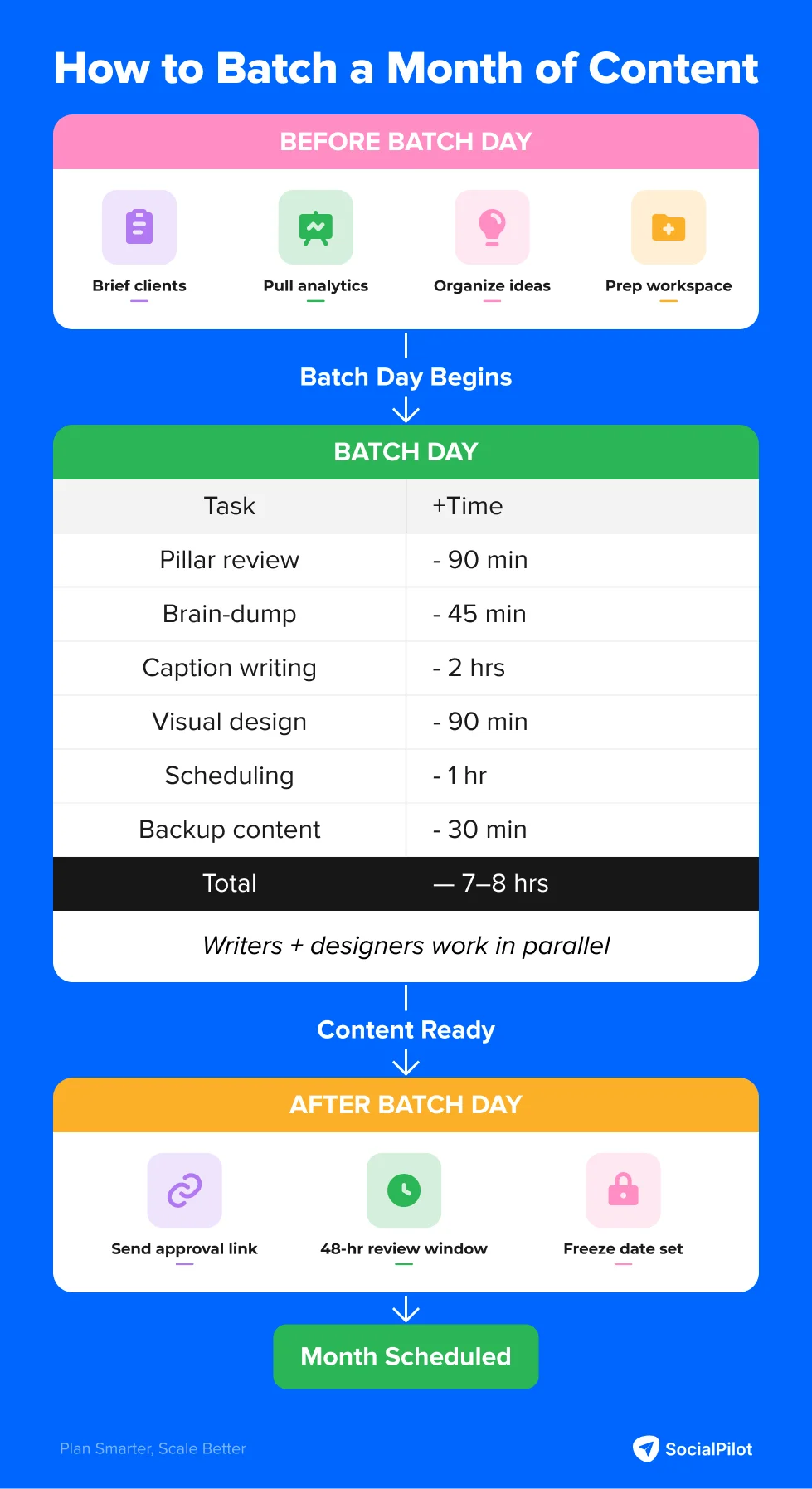
Part 1: What Needs to Happen Before Batch Day
The single most common reason batch days collapse is a weak workflow. It is showing up to batch day without the inputs the day requires. Your team cannot write strong, on-brand captions without a brief. Designers cannot build visuals efficiently without an organized asset folder. No one in the team can work at speed without a backlog of ideas ready to draw from.
Here is exactly what needs to happen in the 48 hours before your batch day begins.
Two Days Before: Send the Pre-Batch Brief Request to Every Client
Most agency batching guides overlook this step, yet it determines whether your approval cycle lasts 24 hours or five days.
Two days before batch day, send each client a short, structured message asking for three things:
- Anything they need promoted or announced this month,
- Anything that is off-limits or paused, and
- Any feedback on last month’s content they want applied to this cycle.
Keep requests brief. A five-question form or a concise three-bullet email is more likely to receive a response than a lengthy questionnaire.
Collecting input before content creation prevents building and scheduling posts that clients may later reject. A five-minute client response can save you multiple revision cycles.
Tools to use: Email, Slack, or a simple Typeform or Google Form per client. Some agencies use a shared Notion page per client with a recurring monthly brief template.
Two Days Before: Pull Last Month’s Performance Data for Every Client
While awaiting brief responses, review each client’s analytics and identify their top three to five posts from the previous month. Look for:
- Which content pillar drove the most engagement
- Which post format did the platform reward, and
- Whether any topic landed significantly better or worse than expected.
Use this data to adjust the pillar split for the new month, rather than relying on gut instinct or what feels right for the brand.
According to GlowSocial, content creation and design account for 60 to 70% of social media management time. If this effort is spent on underperforming content due to a lack of review, the production process is misaligned from the outset.
Tools to use: Social media analytics tools, native platform insights (Meta Business Suite, LinkedIn Analytics), or a shared performance tracking spreadsheet.
One Day Before: Review and Organize the Idea Backlog
Batch day is not where ideas come from – it is where you organize what your team has been collecting throughout the month. The most important habit for any agency running a batching system is capturing ideas in real time:
- A comment a client made,
- A trending topic in their industry,
- A question their audience keeps asking.
Add these ideas to a shared idea bank as soon as they arise, rather than waiting until batch day.
If your team has consistently added ideas, use the day before batch day to review and refine the backlog. If not, build an initial idea list for each client using brief responses and performance data.
Tools to use: Social media planning tools for ongoing idea capture across all client accounts throughout the month; a shared Notion doc or Google Sheet for the pre-batch review session.
Morning of Batch Day: Clear the Workspace in 20 Minutes
Before the first time block starts, spend 20 minutes confirming the following with your team:
- All client brief responses have been received, or you have decided to proceed with the available information for non-responders.
- Every client’s brand kit, asset folder, and template library is accessible and organized.
- Each team member knows their role for the day, when their section starts, and which clients they are responsible for
- No meetings are booked inside the batch day window (this should have been protected in the calendar the week before)
Part 2: The Batch Day – A 7-Hour Agency Schedule
Below is the complete time-block structure for a batch day managing 8 to 20 client accounts. After the strategy phase, writers and designers work simultaneously, maximizing time savings through parallel execution.
| Time Block | Task | Duration | Who Is Working |
| 9:00 – 10:30 AM | Pillar review + content calendar planning | 90 min | Strategy lead / SM manager |
| 10:30 – 11:15 AM | Brain-dump across all clients | 45 min | SM manager; designers begin asset prep in parallel |
| 11:15 AM – 1:15 PM | Caption writing across all clients | 2 hours | Writers; designers building templates simultaneously |
| 1:15 – 1:45 PM | Lunch break | ||
| 1:45 – 3:15 PM | Visual design across all clients | 90 min | Designers; SM manager reviewing and editing captions |
| 3:15 – 4:15 PM | Scheduling, tagging, and metadata | 1 hour | SM manager + writers handling final caption edits |
| 4:15 – 4:45 PM | Backup content creation | 30 min | SM manager + writers |
| 4:45 – 5:30 PM | Buffer for overruns and final review | 45 min | All |
This schedule works for teams with at least one social media manager, one or two writers, and one or two designers. In smaller teams with overlapping roles, work blocks may overlap, but the sequence and time allocations remain the same.
Step 1: Pillar Review and Content Calendar Planning (90 Minutes)
The first 90 minutes focus on strategy and must occur before any copy is written or templates are opened. This block plans the entire month for every client, and its clarity determines the quality of all subsequent work.
Review What Actually Worked Last Month
Review each client’s analytics to identify top-performing posts from the previous period. Look at engagement by content type, reach by platform, and which individual post generated comments, saves, or shares rather than just impressions. The goal is to let the data shift the pillar mix for this month. Not assumptions, not what the client thinks should work, but what the audience actually responded to.
Lock In the Pillar Split for Every Client
After identifying what worked, assign a specific post count to each content pillar for every client. For example, a client posting 20 times in a month might have the following breakdown:
| Content Pillar | Posts This Month | Notes |
| Educational / Tips | 8 | Performed best last month – increase slightly |
| Promotional / Product | 6 | Product launch in week 3 – front-load |
| Engagement / Community | 4 | Q&A format tested well |
| Behind the Scenes | 2 | One office video + one team story |
| Total | 20 |
If this split is not set before writing begins, the brain-dump becomes unfocused and caption writing takes longer. Deciding what to write during the session wastes valuable batch day time.
Check What Is Happening in Each Client’s World This Month
For each client, confirm the following:
- Any product launches, promotional periods, or announcements in the next 30 days.
- Any industry awareness days or national holidays relevant to their audience
- Any brand moments from last month that require a follow-up post.
Clarifying these details during planning ensures writers know what content each client needs for the month.
Step 2: Brain-Dump Across All Clients (45 Minutes)
This block is not an ideation session. It focuses on quickly reviewing and organizing collected ideas, along with expanding on the social media content pillars set in Step 1.
“If you’re creating content on the fly every day, you’re not just burning time, you’re burning out. I used to wake up every morning thinking, ‘What should I post today?’… Then I discovered content batching. And it changed everything.”
Kyrus Keenan Westcott, Senior Paid Media Strategist
Run through each client in sequence, spending five to eight minutes per client maximum. For each account:
- Open the idea backlog.
- Review the pre-batch brief responses.
- Cross-reference the pillar targets, and
- Quickly expand any ideas that have potential.
At this stage, write working titles – short, descriptive phrases that provide writers with a starting point, such as “3 signs your email list needs a reset” or “behind the scenes of our Q2 product shoot.” Full captions are developed in the next block.
Note: A common mistake is skipping this block and moving directly to caption writing. Without clear working titles, writers slow down and quality declines. The brain-dump bridges strategy and execution, and omitting it causes issues in later stages.
Step 3: Caption Writing Across All Clients (2 Hours)
This is the most time-intensive and demanding block. The goal is to produce a complete set of publish-ready caption drafts for each client – adapted for platforms, tagged by pillar, and ready for visuals.
Run the Writing by Pillar, Not by Client
Writers should complete one content type across all client accounts before moving to the next. For example, write all educational posts, then all promotional posts, followed by engagement posts. Staying in a single content mode improves speed and quality compared to frequently switching between brand voices and formats.
While writers draft captions, designers can use the working titles to prepare visual assets: organizing approved images, setting up branded templates in Canva, and pre-selecting stock photos for each client.
Adapt for Platform, Not Just for Client
When copywriting for social media, make sure that each lead caption has a platform-specific version before scheduling. LinkedIn favors professional, longer formats; Instagram prefers short hooks and visual-first content; Facebook typically falls between the two in style and tone.
Writers should create a lead caption for each post and note which platforms require major adaptations versus minor tweaks. This approach keeps variation manageable and avoids treating each platform as a separate writing session.
Keep Drafts Deliberately Rough at This Stage
This stage is for drafting, not finalizing. Polishing occurs during the approval cycle. Attempting to perfect every sentence now slows the process and undermines batching efficiency. A strong hook, clear body, and actionable call to action are sufficient to move drafts forward.
Step 4: Visual Design Across All Clients (90 Minutes)
By the end of caption writing, designers should have templates ready and client asset folders open. The design block is not for building visual systems from scratch. Setting up brand kits during this stage will cause significant delays.
Templates Are What Make This Block Work
Every client should have a locked set of visual templates before batch day begins: at minimum one carousel format, one single-image post, one quote graphic, and one story format. These templates live in Canva (via brand kits) or Adobe Express and are simply updated with new content at each batch cycle.
You can also explore SocialPilot’s social media templates – a library of professionally designed customizable templates built for agencies managing content across multiple clients and industries.
Designing from templates saves substantial time compared to starting from scratch, as rightfully mentioned in the below Reddit thread.
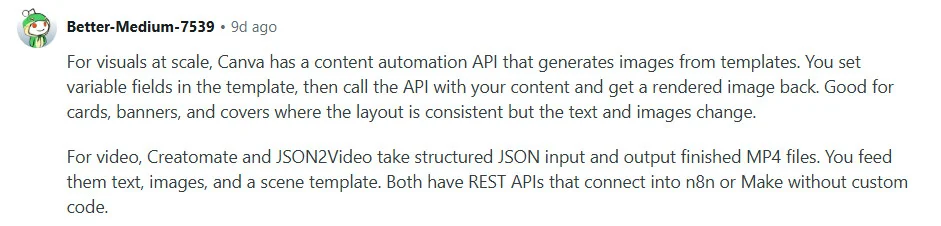
For a client with 20 posts across four formats, using templates can reduce design time by approximately six hours.
Set Up a Dedicated Asset Folder Per Client
Before the design block starts, each client’s folder should contain:
- Approved product images,
- Brand logos in all needed variations,
- Team photos or headshots, and
- 10 to 15 pre-selected stock images that match their visual style.
Select stock images at the beginning of each month to avoid searching for images during the batch session.
For clients needing custom visuals, AI image generation tools like Midjourney, Adobe Firefly, or DALL-E can fill gaps, but templates should remain central to the workflow. Custom illustration or video editing should be planned and assigned before batch day, not during it.
What Designers and Writers Are Doing Simultaneously
While designers create visuals, the social media manager or a senior writer should review and edit captions: strengthening hooks, checking platform variations, and flagging drafts needing further work. By the end of this block, captions and visuals should be ready to pair and schedule together, avoiding sequential reviews after design is complete.
Step 5: Scheduling, Tagging, and Metadata – Nothing Gets Left Incomplete (1 Hour)
The scheduling block brings all elements together, but is also a common failure point. Incomplete posts – such as captions without images, images without comments, or posts missing hashtags – are the main reason batched content is delayed.
The rule is clear: only fully complete posts are added to the scheduler. Each post must include a caption, visual, first comment, and hashtags before scheduling.
Use Bulk Upload With Full Metadata
Instead of scheduling posts individually, use SocialPilot’s bulk scheduling to upload all content for each client at once. Tag each post with the client name, platform, content pillar, and post format to upload all content for each client at once.
These tags allow you to audit the monthly calendar at a glance, ensuring pillar balance, format variety, and consistent posting frequency before content goes live.
Follow the video below to learn more about bulk scheduling using SocialPilot.
Set posting times using each client’s audience analytics. Most platforms provide activity windows, which should be pre-configured in your scheduler to avoid manually entering the best times to post on social media for each batch.
Use Client-Specific Workspaces to Prevent Cross-Posting Errors
One of the most damaging mistakes in multi-client batching is posting one client’s content to another client’s account. At 10 or more clients with overlapping categories, this is not a hypothetical risk. It is just a matter of time if you don’t have a system that prevents it.
Having separate workspaces for each client helps keep their account environment isolated, so scheduling, drafting, and reviewing affect only the right accounts.
Step 6: Build a Backup Buffer Before You Close Out (30 Minutes)
Before concluding batch day, spend 30 minutes creating a safety buffer for each client. This step is often overlooked but becomes essential within the first two weeks of using the system.
Create two to three evergreen backup posts per client that require no approval and can be published at any time. Use quote graphics, reshares of evergreen content, or simple engagement questions. These serve as contingency posts for unexpected changes, approval delays, or team emergencies.
In addition to backup posts, add a brief reactive idea list for each client to the Content Library. Include three to five topics suitable for quick-turn posts if timely events arise. Note the angle now so execution is fast when needed.
Part 3: After Batch Day – Getting Client Sign-Off Without Derailing the Schedule
Batch day generates the content, but the approval process determines if it goes live on schedule. Many agencies lose more time to approval back-and-forth than to content creation, often relying on email threads or attachments that are difficult to track.
According to research referenced in Swydo’s social media approval guide, campaigns using batch approvals – sending all content for review at once rather than post by post – see 40% faster publication timelines compared to those reviewed one post at a time.
Send the Approval Request Immediately After Scheduling
After scheduling all content, send each client a single approval link instead of a PDF or email chain. Clients can view each post as it will appear, approve or request changes in one step, and leave comments on specific posts as needed.
This will help you capture all feedback and approvals in one place, attached to the specific post they relate to.
Set a Silent Approval Rule – In Writing
Before your first batch cycle with any new client, establish a clear expectation in your contract and onboarding materials: if feedback is not received within 48 hours of the approval request, posts go live as scheduled.
As this thread mentions, mostly it is the client’s approvals and not production that slows down the whole process of delivery.
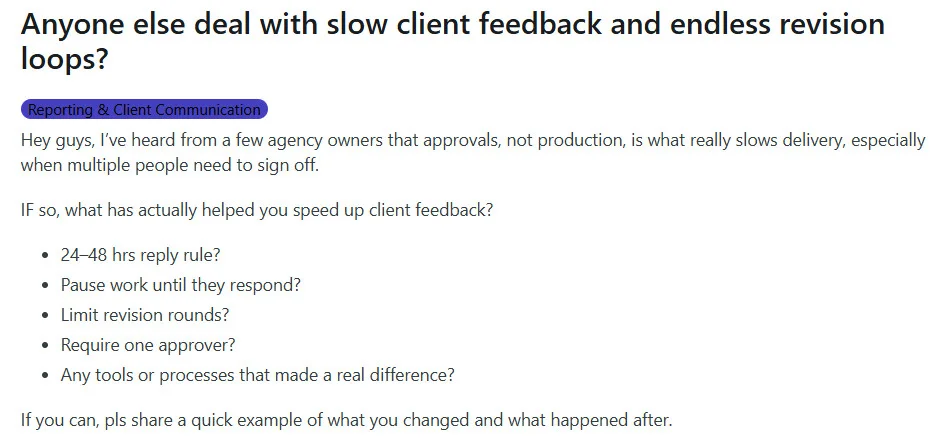
Agencies find clients respond faster when they know you will not wait indefinitely. The 48-hour window offers flexibility without making your schedule dependent on client response times.
Set a Hard Content Freeze Date
Establish a specific day each month after which no changes will be made to that month’s scheduled content. Revisions submitted after the freeze date go into the queue for the following month. This boundary does two things: it protects a month of production work from being dismantled by last-minute client requests, and it teaches clients to use the review window they have rather than treating feedback as an open-ended process.
The 80/20 Rule: How to Stay Reactive Without Breaking the Batch System
A fully batched calendar with no room for reactive content will eventually create friction. Clients may need to respond to news, trends, or competitor actions. If your calendar is 100% locked, none of that can happen without pulling and rebuilding content.
Address this by structuring the calendar to include flexibility. Plan 80% of each client’s posts during batch day and reserve 20% as open slots for reactive content, as noted in the Reddit thread below.
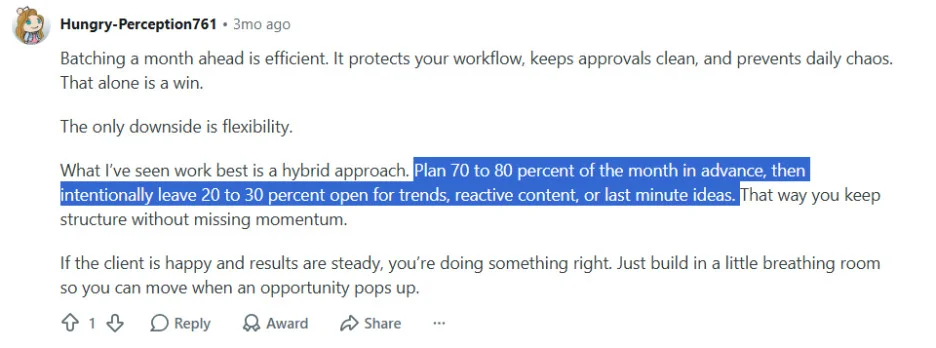
For a client posting 20 times a month, reserve four slots for unplanned content. This allows you to remain relevant without altering the other 16 scheduled posts.
For industries needing more real-time content, such as news or events, adjust the ratio to 70/30 or 60/40. The batch provides structure, while the reactive layer ensures responsiveness.
Both can coexist when the calendar is designed for it from the start.
The Five-Minute Daily Scan
One additional habit protects the batch system from the one situation it cannot fully anticipate: a post that was approved and scheduled correctly but becomes tone-deaf due to a news event after the fact.
Each morning, assign one team member to spend five minutes reviewing the content calendar and checking that day’s scheduled posts for all clients.
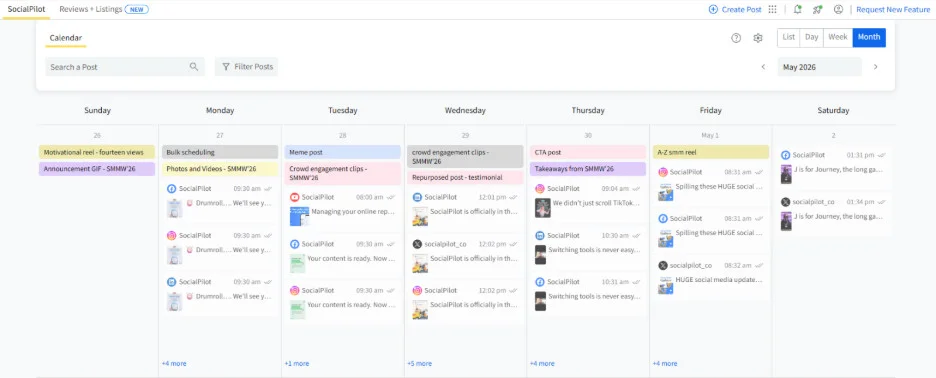
This practice ensures that no inappropriate content is published in light of current events.
If a post needs to be removed, it can be immediately replaced with a backup post from the Content Library. With a proper backup layer, this recovery takes less than 10 minutes.
Common Mistakes That Kill the Batching Day
These issues frequently occur in unsuccessful agency batching attempts, but most can be avoided with proper preparation and structure.
1. Skipping the pre-batch brief.
Creating content without client input often leads to partial rejection of posts. Collecting briefs two days before batch day prevents multiple revision cycles.
2. Arriving at batch day with no idea backlog.
If your team has not consistently added ideas to a shared system, the brain-dump block starts from scratch, slowing progress. The brain-dump should organize existing ideas, not begin from zero.
3. Writing for one client at a time instead of one pillar at a time.
Finishing all of Client A’s posts before moving to Client B means switching between brand voices every 30 to 60 minutes, which compounds cognitive load throughout the day and produces inconsistent output.
4. Two same-niche clients starting to sound identical.
When there is no per-client brand voice guide open during the writing block, similar-industry accounts begin blending. The healthcare client and the wellness brand should sound noticeably different. One-page voice anchors per client, kept visible during writing, prevent this.
5. Leaving posts partially complete before scheduling.
Captions without images, images without hashtags, posts without first comments – these do not go out on time. The scheduling block should not move forward on any post that is not 100% complete.
6. No backup content in the library.
Without a buffer layer, every unplanned event – a pulled post, a sick day, a client who misses the approval window – requires creating from scratch under time pressure.
7. No content freeze date in place.
Without a clear revision deadline, clients submit changes after the calendar has been built and scheduled, which means rebuilding work that was already done.
Batch Creating Works & Using the Right Tool Makes It Stick
Batching is not just a productivity hack. It is what separates agencies that grow sustainably from those that are constantly scrambling to keep up. When your team plans, writes, designs, and schedules in one focused session, the quality goes up, the context-switching goes down, and the client experience becomes more consistent across the board. Done well, one batch day a month can replace weeks of reactive, fragmented production.
The system only holds, though, when the tools match the workflow. SocialPilot is built specifically for agencies managing multiple client accounts – with dedicated client workspaces, bulk scheduling, a shared Content Library for team-wide idea capture, and a client approval workflow that replaces email chains with a single shareable review link. Every feature maps directly to a step in this guide.
If you are ready to run your first batch day, explore SocialPilot’s plans and pricing and find the setup that fits your agency.