
Are you looking to enhance engagement and generate leads via Twitter? Or perhaps you’re finding it challenging to navigate the Twitter algorithm to bolster your brand awareness.
Regardless of your goal, understanding the Twitter algorithm is a crucial first step.
So, what exactly is the Twitter algorithm?
The Twitter algorithm is a complex system that determines the ranking of tweets on your timeline. The algorithm ranks content based on several factors, including personal interest, location, recency, and virality.
This blog post will dive into these factors and explain how they influence the content ranking on your feed.
Moreover, we’ll provide actionable marketing strategies to help you outsmart the Twitter algorithm.
Based on our research, we’ve identified eight key Twitter metrics that you should prioritize in your marketing campaigns.
How Does the Twitter Algorithm Work?
From over 100 million daily posts across 600 million users, only a tiny fraction reaches you, selected with almost unmatched precision. Since 2025, the X algorithm has been running, powered by Grok, a powerful AI that reads every post, watches videos, and predicts what you will love.
Launched in 2025, this system creates intuitive feeds that reward real engagement and help new creators get discovered while cutting spam and echo chambers. The result is a smoother, smarter experience, though with some bugs.
The algorithm behind Grok has a three-step recipe:
- Gather ingredients (source candidates),
- Season to taste (rank them), and
- Plate it up (mix and filter)
We’ll break it down simply, with real-world examples, so you can see how your posts fit in.
The algorithm doesn’t look at every post on X. Instead, it starts by collating a shortlist of about 1,500 potential posts (called “candidates”) tailored to you. This happens in two buckets:
- In-Network (Your Inner Circle of about 50% of Candidates): These are posts from people you follow. X uses quick models to rank them based on your past interactions.
For example, if you always reply to @garyvee’s motivational threads, his next post jumps to the front of the line.
If a tweet gains popularity within a Twitter community, it has a chance to appear on the “For You” timeline of users within that community.
- Out-of-Network (Fresh Discoveries – The Other ~50%): Sourcing Out-of-Network tweets is more complex as it involves identifying relevant tweets from millions of accounts you don’t follow. Twitter uses two approaches for this: the embedding space approach – SimClusters (grouping users into “communities,” e.g., “AI enthusiasts” or “soccer fans”) and graph traversals (mapping who interacts with whom). It pulls in trending or similar content to introduce you to new voices.
Imagine you’re into indie music. Even if you don’t follow @indiemusicnews, a viral clip of a rising band’s live set might pop up because X algorithm sees you frequenting similar posts.
Quick Takeaways: Grok at this step. It now evaluates all 100M+ daily posts semantically (understanding meaning, not just keywords), so niche creators get a fair shot at discovery.
Example: A small coffee shop account posting a quick video of their latest brew might reach foodies like you if it matches your “coffee mornings” vibe, even if they have zero followers in common.
Step 2: Ranking – Scoring for Relevance
Grok plays judge and scores each candidate based on how likely you are to engage (like, reply, watch, or bookmark). This “heavy ranker” algorithm is basically a powerful neural network that quickly analyzes hundreds of signals in just seconds.
Under this stage, all tweets, regardless of their source, are ranked based on Twitter’s machine learning model. From the initial ~1500 sourced from In-Network and Out-of-Network, Twitter ranks them for relevance.
Instead of using old-school ranking formulas, it focuses on predicting what you personally will find interesting right now. The better it predicts your interest, the higher that post appears in your feed.
| Factor | What It Means | Why It Matters (With Example) |
| Relevance & Recency | Matches your interests + how fresh the content is. Grok prioritizes posts from the last few hours. | A breaking news thread on Tesla’s latest robotaxi demo may get pushed higher if you’re an EV fan. Older posts fade quickly, so timely content wins. |
| Engagement Signals | Early likes, replies, reposts, and “dwell time” (how long you read/watch). Replies now weigh 14× more than likes. | @MrBeast’s giveaway post blows up because fans reply with their “dream prizes”. The reply-heavy engagement tells the algorithm “this is hot.” |
| Media & Format Boost | Videos, images, polls, and threads outperform plain text. Native videos under 2:20 get a strong boost. | A fitness creator’s 30-second workout video beats a text-only tip, visuals double engagement, according to X data. |
| Credibility (TweepCred) | Author reliability, diverse posting, and no spam behavior. Premium users get a slight ranking edge. | Trusted voices rank higher than spammy accounts. The credibility increases reach. |
| Community & Diversity | Grok balances your feed to avoid overload and monotony. | If you’re deep into crypto threads, the feed may add a meme or unrelated topic to avoid echo-chamber fatigue. |
Quick Takeaway: Grok’s full takeover means rankings adapt in real-time. Dwell on a post about sustainable fashion? Expect more eco-brands in your feed. But beware of low-quality items (e.g., bare links), as they can be deboosted by up to 80%.
Step 3: Heuristics & Mixing – The Final Polish
X’s algorithm, powered by Grok, doesn’t just serve raw scores. It refines the list with AI-driven smart filters. This includes:
1. Filters for Safety & Variety: Grok removes duplicate posts, NSFW content, and topics you’ve muted, and it also makes sure your feed has a healthy mix of different types of posts.
- Author Diversity: Ensures that consecutive tweets from a single author are not displayed.
- Visibility Filtering: Filters tweets according to your preferences.
- Content Balance: Strives to display a balanced mix of In-Network and Out-of-Network tweets.
- Conversations: Provides context to tweet replies by threading them to the original tweet.
2. Social Proof: If people in your network are engaging with something, like when someone you follow reposts a tweet, Grok is more likely to show it to you because it assumes you might care too.
3. User Controls: You can tap “Not Interested” or tell Grok things like “Show me less politics,” and it will immediately adjust what it recommends based on your feedback.
The result is a “For You” feed that blends around 50 posts from accounts you follow with fresh discoveries, and it updates every time you open the app. If you prefer a simple chronological timeline, you can switch to “Following” for a clean, real-time feed.
For instance, take Nike’s X strategy into consideration. They post short videos of athletes’ training sessions like tennis pro Jannik Sinner’s intense drills, with the caption “Fight for every ball.” It reaches sports fans like you because Grok notices your fitness interests, giving the post far more reach than a plain announcement.
Quick Takeaway: Grok adds the final magic touch after ranking. It cleans spam, respects your “Not Interested” clicks and direct commands, boosts posts your friends love, and balances everything so your ‘For You’ feed stays fresh and varied.
You can switch to ‘Following’ for a simple chronological timeline, but most users prefer ‘For You’ since it mixes posts from people they follow with fresh discoveries, and it updates the moment you open the app.
The Twitter algorithm is designed to personalize your feed and deliver content relevant to your interactions on the platform. Previously a closely guarded secret, Twitter has since released its algorithm source code on GitHub. This code revelation provides insights into the key metrics considered for the platform’s timeline and search result section.
The three stages in the recommendation pipeline work together to optimize the user experience on the “For You” timeline. However, to beat the Twitter algorithm, you need to have a deeper understanding of the Twitter algorithm ranking signals.
So, let us get to know them.
X Algorithm Ranking Signals
Over the years, the X algorithm has undergone numerous changes. While some of these changes have been publicly disclosed, others were revealed when Elon Musk unveiled the algorithm’s code. Despite these revelations, several ranking signals remain crucial for marketers on X:
1. Relevance
Among all the factors that account for this, your past behavior on the platform is the most crucial. While ranking tweets in your feed, the algorithm considers the accounts you follow and the tweets you reply to, like, or retweet. Tweets that garner attention and spark conversations are considered valuable by the algorithm.
Your location and the topics you’ve tweeted about also influence which tweets appear on your “For You” timeline.
2. Recency
The X algorithm prioritizes the most recent and updated content on the “For You” timeline. That conveys that fresh and popular tweets stand a chance to gain better Twitter engagement and visibility in the timeline. About recency, current events, and trending topics may appear in the trending section.
3. Diversity
X also strives to diversify your feed by showing various content from different accounts and perspectives. This is to avoid creating a “filter bubble” where you only see tweets that align with your existing beliefs. This approach fosters a more balanced and open conversation.
4. Media Files
Tweets with visual elements tend to receive higher engagement rates and are more likely to be prioritized by the algorithm, mainly because the platform takes into account users’ interaction with different media types.
However, it’s important to ensure that any included media is not abusive or spammy, as the algorithm is designed to filter out such content.
7 Top X Metrics to Prioritize
X has provided some insights into ranking signals. Based on that, the top seven metrics influencing users’ timelines are:
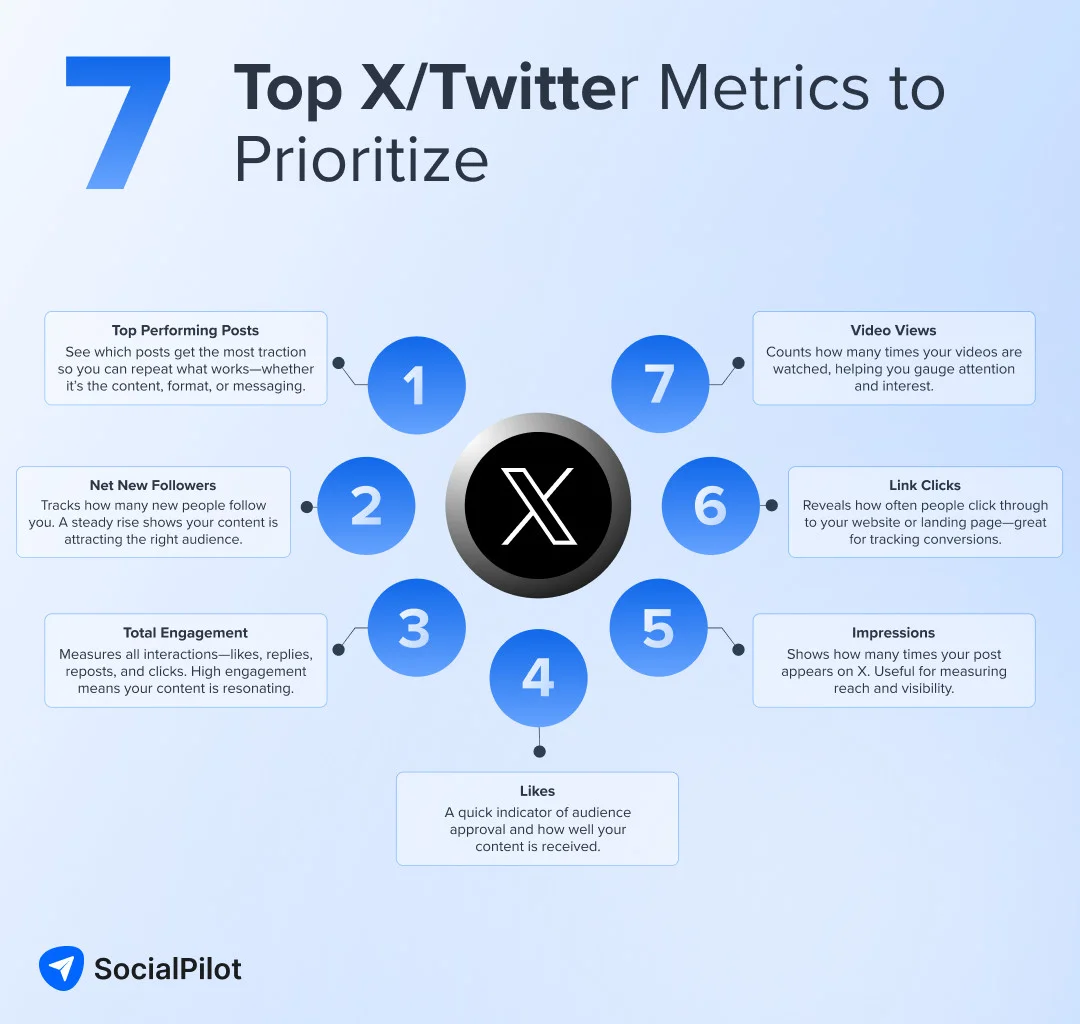
However, understanding these metrics and creating Twitter campaigns around them is only the beginning. To truly succeed, you must grasp how the Twitter algorithm works and recognize its core ranking signals that denote quality.
How Does the Twitter Algorithm Affect Users?
X (Twitter), with its global user base of more than 650 million monthly users, has a vast volume of tweets, resulting in degradation of the user experience without a refined algorithm.
Twitter has done a great job segregating its Home and Explore sections. The Home section brings a mix of In-Network and Out-of-Network content, whereas the Explore section allows users to explore trending topics, news, sports, and entertainment tweets.
Here is how the Explore section enables users to view trending topics at a given geographical location.

Twitter adds more to the user experience by allowing users to explore trending topics for any location. All they need to do is toggle off the “Show content in this location” option and choose their desired location in the “Explore Location” section.

All these features form a better user experience that keeps the users hooked to the platform.
Another element that enriches the user experience on Twitter is the Google Translate option. This feature breaks down language barriers, enabling users to explore perspectives on any topic worldwide.
Given all that Twitter does to enhance the user experience, digital marketers must make the best moves to beat the algorithm and stand out on the platform. For a deeper understanding of how algorithms shape visibility across platforms, you can also check this social media algorithm guide.
Let us now discuss some winning tips to gain the desired outcome from Twitter marketing efforts.
10 Winning Tips to Beat the Twitter Algorithm
1. Be Consistent
Like every social media platform, maintaining an active presence on Twitter is equally important. So, if you have something in mind to tweet, go for it and see how it unfolds on the platform. However, it’s also important to learn from tweets that don’t perform well and avoid repeating the same mistakes.
To keep your followers engaged, aim to post at least once or twice a day, but no more than four to five tweets. This consistency is the key to standing out and navigating the algorithm more effectively. To get consistency, you can schedule your tweets on Twitter with its native scheduling or by using Twitter scheduling tools.
The algorithm favors accounts that are consistently engaged and frequently share valuable content. For instance, Nike consistently shares engaging content, from product launches to motivational messages, which keeps their followers engaged and their tweets appearing in the Home section.

If you’re only posting five to six times a month, it’s unlikely that your tweets will make it to the Home Tweets section. Consistency is key, so make sure to maintain a regular posting schedule.
2. Get Your Account Verified
A verified account carries a sense of authenticity and credibility, making it more likely to grab the algorithm’s attention. The blue tick, once a symbol of notability in your industry or field, can now be obtained through a subscription fee.
All you need to do is sign up for Twitter verification and pay the monthly fee of $8 on a web browser and $11 on iOS. By signing up and getting your account verified, your account will also get a boost on Twitter, as revealed by its algorithm code.

Beyond standing out from the crowd, Twitter verification offers additional benefits such as text formatting in tweets, the ability to edit tweets, and fewer ads in the “For You” timeline.
Twitter has also introduced two new checkmarks. The gold checkmark is available for business accounts, while the gray one is designated for government officials. These checkmarks further enhance the visibility and credibility of your account, making it easier for you to navigate the Twitter algorithm.
3. Know the Right Time to Tweet
The timing of your tweets can significantly influence their visibility and engagement. However, to know the best time to post, you must dig into the performance analytics data of all your social media posts.
Consider experimenting by scheduling and posting tweets at different times throughout the day for a month using a tool like SocialPilot. This can help you identify the time slots that yield the highest engagement.

For instance, you might find that tweets receive the most engagement during lunch hours when users take a break and check their social media feeds. By scheduling tweets during these peak engagement times, brands can increase their visibility and reach.
4. Use Media Files Generously
Visual content stands out on Twitter and catches the eye of users scrolling through their feeds. Incorporate images, videos, GIFs, and other media files into your tweets to make them more engaging and shareable.
Tweets with visual elements tend to receive higher engagement rates and are more likely to be prioritized by the algorithm. So, get creative and make your tweets visually appealing to capture attention and increase your reach.
Look at the example below. Here is a tweet announcing that Selena Gomez’s makeup line “Rare” would launch in India. This makes the tweet more engaging than a text-only tweet.

5. Leverage Tweet Polls
Twitter polls are an excellent way to encourage interaction and increase engagement with your followers. By posing questions and providing options, you invite your audience to participate and share their opinions. This drives conversations and signals to the algorithm that your content is generating meaningful interactions.
Consider how Samsung’s tweet, showcased below, effectively encourages engagement:

This simple yet engaging approach demonstrates the power of Twitter polls in fostering interaction and boosting engagement.
Incorporate tweet polls into your content strategy to enhance engagement and improve your visibility within the algorithm.
While using hashtags might seem outdated, they remain a powerful tool for gaining traction on Twitter. Hashtags enable your content to be discovered by users interested in a specific topic or event.
Emphasize trending hashtags and use them as per relevance to the content of your tweet. Additionally, mentioning relevant accounts in your tweets can attract attention from their followers and stimulate conversation.
Just remember to use tags strategically and sparingly, focusing on the most relevant ones and avoiding being spammy.
7. Encourage Followers’ Engagement
Engagement on Twitter is a two-way street. Therefore, it’s essential to encourage your followers to interact with your tweets through likes, retweets, replies, and more.
One effective strategy to foster engagement is to ask questions, solicit opinions, and create opportunities for meaningful conversations. Such tweets can stimulate your followers to interact with your content. This engagement sends quality signals to the algorithm, which can boost the visibility of your tweets.
8. Repurpose Top-Performing Content
If you have tweets that gained significant engagement and resonated well with your audience, don’t let them disappear into the Twitterverse. There’s a good chance that these tweets could perform well again.
Consider repurposing these top-performing tweets by re-sharing them at strategic intervals. However, consider adding a fresh twist or updating the content to keep it relevant.
By leveraging your best-performing content, you increase the chances of generating more engagement and attracting new followers.
For instance, a tweet about a popular blog post could be repurposed with a new angle or updated statistics, giving followers a fresh reason to engage with the content.
9. Leverage Analytics Data for Planning Content
Analytics data can be valuable for refining your marketing strategies. It provides insights into what works best for your brand and allows you to evaluate the results of your experiments.
But where can you find this in-depth data? Twitter analytics of course!
Use Twitter analytics tools to view your content performance for Twitter and all other social media platforms. You can also identify trending topics and hashtags for Twitter.
10. Join Relevant Trends
Participating in relevant trends and conversations can significantly boost your visibility and engagement.
Monitor trending topics and hashtags within your industry or niche, and find meaningful ways to contribute to the discussion. Engaging in timely conversations increases the likelihood of your tweets being discovered by a wider audience and gaining traction.
Final Words
This guide provides everything you need to navigate the Twitter algorithm and amplify your presence on the platform. Remember, the algorithm exists to offer the best experience to all users, so your content must contribute positively to this experience.
Here again, understanding your audience and their preferences is key to planning your content. Combining this knowledge with authenticity, value, and genuine interactions can lead to successful strategies.
Ultimately, don’t forget to explore SocialPilot pricing plans to see how a social media management tool can fit your budget and save you from additional legwork while marketing on Twitter. With the right plan, you’ll not only simplify scheduling and reporting but also get more time to focus on creating meaningful content.