You’ve spent hours on a video. Good thumbnail. Solid title. You hit publish and nothing happens. Two days later, a similar video from a smaller channel blows past yours. Same niche. Better timing.
Posting time on YouTube isn’t a minor optimization. For channels with an established audience, shifting your upload window by just a few hours can improve first-24-hour views by 20–40% [Source]. That early boost is what tells the algorithm to push your video to a much larger audience.
So, what is the best time to post on YouTube to get the most out of your videos and shorts?
To answer this question, we’ve analyzed 301k YouTube videos published through SocialPilot by 27k+ YouTube channels.
Let’s break it down.
TL;DR: Best Times to Post on YouTube by Format
| Format | Best Upload Time | Best Days | Worst Time | Key Strategy |
| Long-form Videos (8+ min) | 2–4 PM local time | Wed, Thu, Fri (Sun for morning content) | Before 9 AM · After 10 PM | Publish 2–3 hrs before evening peak |
| YouTube Shorts | 12–2 PM or 6–7 PM local | Fri, Sat, Thu | 3–7 AM · Sun evenings | Catch midday + evening scroll windows |
| B2B / Agency Content | 9–11 AM weekdays | Tue, Wed, Thu | Fri evenings · Weekends | Matches work-hour browsing |
| Educational / Tutorial | 8–10 AM weekdays | Mon, Tue, Wed | Late evenings · Weekends | Habit-based morning learning |
| Gaming / Entertainment | 3–4 PM weekdays | Thu, Fri, Sat | Monday mornings | Pre-peak upload for 7–10 PM audience |
How Have We Discovered the Best Posting Time on YouTube?
SocialPilot analyzed 301k YouTube videos published using SocialPilot Scheduler by 27k YouTube channels, measuring engagement rate normalized per view across industries, content formats, and regions. Normalizing per view rather than raw counts, makes findings applicable whether you have 500 subscribers or 500,000. Data covers publishing patterns and engagement outcomes across industries, geographies, and both long-form and Shorts formats.<
When is the Best Time to Post on YouTube
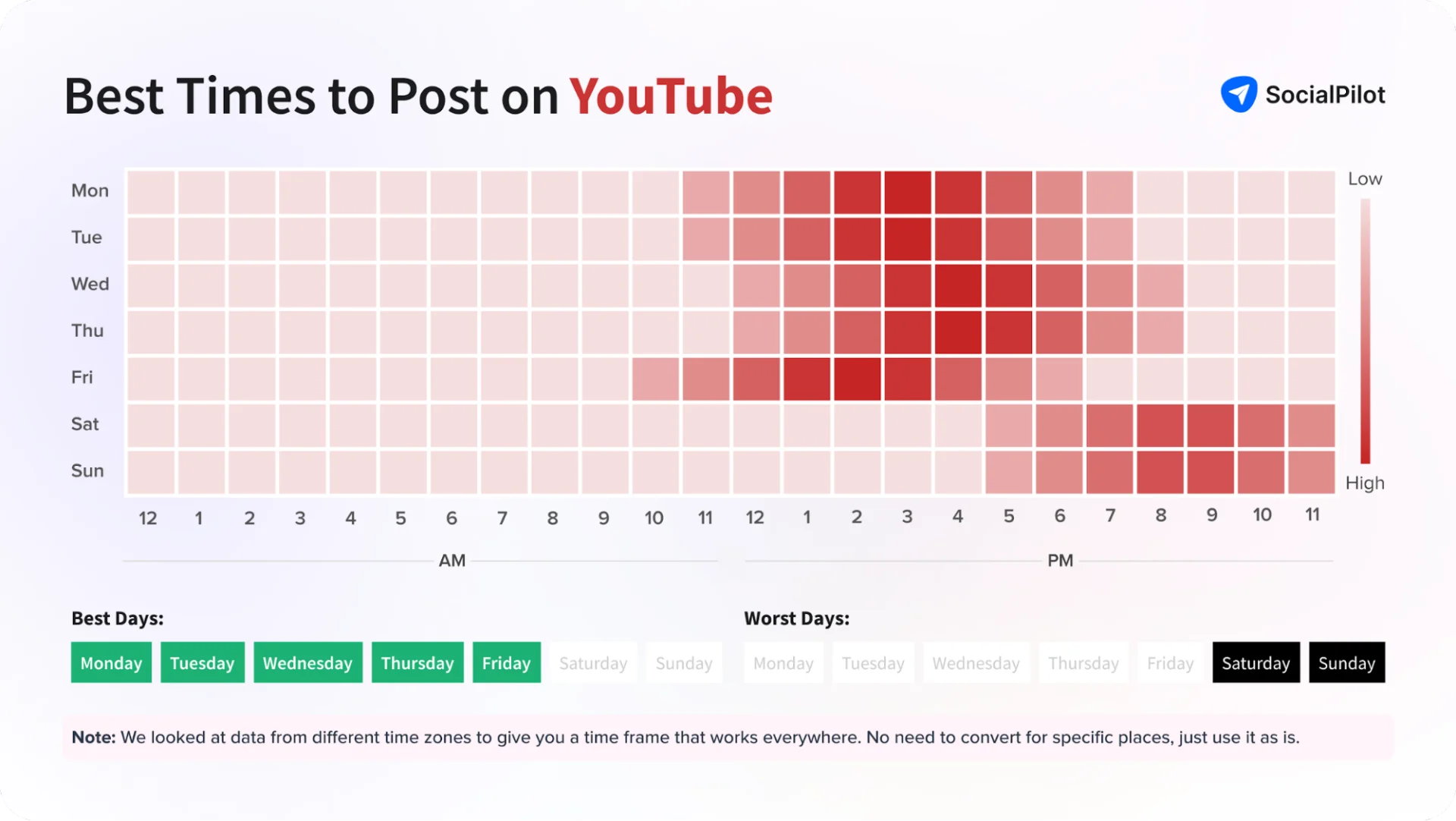
Here’s what 301,000 videos analysis reveal:
The best times to post on YouTube are 2–4 PM local time on weekdays, with Wednesday, Thursday, and Friday being the strongest days overall.
But that’s the aggregate picture and aggregate data hide the most important 2026 finding.
Long-form videos and YouTube Shorts now have almost completely opposite optimal posting windows.
Publishing both formats on the same schedule is likely costing you performance on one of them. We break each format out separately below.
Overall aggregate peaks:
Why Posting Time Matters: How YouTube Decides What to Recommend
Most creators treat YouTube like a social feed. It isn’t. YouTube is a recommendation engine and understanding how it makes decisions is the most useful thing you can do for channel growth.
Here’s what happens the moment you hit publish:
Stage 1: The test pool. YouTube shows your video to a small segment of your subscribers and recent viewers. This is your initial audience. Their behavior determines whether the video gets wider distribution.
Stage 2: Signal collection. The algorithm measures three things:
- Click-through rate (did people tap your thumbnail?)
- Watch time (did they stay?)
- Engagement signals (likes, comments, shares).
These signals build your engagement velocity, how fast positive signals accumulate in the first 24–48 hours.
Stage 3: Distribution decision. Strong early signals → YouTube pushes your video to Browse feeds and Suggested videos for a much larger audience. Weak signals → limited distribution, back-burnered to Search traffic alone.
The 48-hour window is what matters. The majority of a video’s algorithmic push happens in the first two days. What your initial test pool does in that window determines whether YouTube amplifies or ignores your content.
This is why timing matters, not because there are more people online at 3 PM, but because the right upload time ensures your test pool is active and engaged when your video lands.
Publish Before Peak Strategy: The Most Important Timing Concept in 2026
Most guides tell you to post when your audience is most active. That advice is wrong.
Here’s what actually happens when you publish at peak time: your video arrives in the feed without any momentum. YouTube hasn’t indexed it fully, hasn’t tested the thumbnail on a sample audience, and hasn’t sent subscriber notifications yet. You arrive late for your own launch.
The solution: upload 1–2 hours before your audience’s peak.
This gives YouTube time to:
- Process and fully index your video
- Run thumbnail tests on a small initial sample
- Deliver subscriber notifications, ready to click when viewers open the app
- Build initial engagement velocity before the bulk of your audience arrives
By the time your main audience peaks, the video already has positive early signals. YouTube pushes it with confidence to a much wider audience.
The SocialPilot’s customer case study.
A finance content creator using SocialPilot was uploading Shorts late at night because “that’s when editing got finished.” But YouTube Analytics showed their audience was most active between 6 PM and 8 PM.
They shifted publishing to 4 PM, roughly two hours before peak activity and kept everything else identical: same content style, same thumbnails, same posting frequency.
Results over eight weeks:
| Metric | Change |
| Views/Impression | +29% |
| Average watch time | +18% |
| Subscriber growth | +22% |
| Content quality | No Change |
One timing adjustment created a measurable lift in reach and engagement.
That’s the difference between posting when you’re ready and posting when your audience is ready.
What’s New in 2026: Long-form Videos and Shorts (Now Have Opposite Peak Times)
This is the single most important timing update for 2026: long-form videos and YouTube Shorts now perform best at almost completely opposite times of day.
| Long-form Videos | YouTube Shorts | |
| Viewer mindset | Intentional sit-down watching | Passive scroll, micro-sessions |
| Peak viewing window | 6–9 PM evenings | 12–3 PM + 7–9 PM |
| Best upload time | 2–4 PM (2–3 hrs before evening peak) | 12–2 PM or 6–7 PM |
| Best days | Wed, Thu, Fri (Sun for morning content) | Fri, Sat, Thu |
| Algorithm behaviour | 48-hr initial window is critical | Can resurface days or weeks later |
| SocialPilot’s 2026 study finding | Mornings dominate (Sunday 10 AM = peak single slot) | Evenings dominate (Fri 4–7 PM = strongest) |
Our analysis showed that creators posting both formats at the same time often saw weaker performance overall. The channels with the strongest growth treated Shorts and long-form content as separate publishing strategies with different schedules, audience expectations, and engagement patterns.
If you publish both formats, give them separate schedules. Long-form uploads in the early-to-mid afternoon. Shorts in the midday or early evening. Don’t compete with yourself.
Best Time to Post Long-form YouTube Videos
Long-form videos (8+ minutes) require viewer intent. People don’t stumble into a 15-minute tutorial, they choose to sit down and watch. That means long-form follows a different pattern than Shorts.
Our analysis showed a clear pattern: long-form videos perform best when uploaded a few hours before peak viewing activity, not during it. Publishing earlier gives YouTube time to process, distribute, and test the video before audiences become most active.
| Day | Best Upload Time | Target Peak | Notes |
| Monday | 2–4 PM | 6–9 PM | Good opener for the week |
| Tuesday | 2–4 PM | 6–8 PM | Consistent strong performer |
| Wednesday | 3–5 PM | 7–9 PM | Highest median engagement day |
| Thursday | 3–5 PM | 7–9 PM | Weekend energy builds |
| Friday | 1–3 PM | 5–8 PM | Earlier peak as audiences wind down for the weekend |
| Saturday | 8–10 AM | 11 AM–1 PM | Morning sit-down viewing window |
| Sunday | 8–10 AM | 10 AM–12 PM | Highest single long-form slot |
Worst times for long-form: Before 9 AM on weekdays. After 10 PM. These windows produce the lowest engagement velocity because viewers aren’t in a position to commit to a full video.
Best Time to Post YouTube Shorts
Shorts operate on a completely different consumption pattern. Viewers scroll during micro-sessions — lunch breaks, commutes, the ten minutes before bed. Shorts thrive in these low-attention, high-frequency windows.
This produces two distinct peak windows that don’t overlap with long-form:
| Window | Time | Viewer Context |
| Midday scroll | 12–3 PM | Lunch breaks, mid-morning browsing |
| Evening wind-down | 7–9 PM | Post-work, post-school downtime |
Best days for Shorts: Friday, Saturday, Thursday. Our 301k+ video study found Friday 4–7 PM as the strongest individual Shorts window.
One important difference from long-form: Shorts can resurface days or weeks after publishing if the algorithm finds the right audience later. A Short posted at a suboptimal time can still find its audience. This means consistency matters more than perfect timing for Shorts, the algorithm rewards regular posting.
Worst times for Shorts: 3–7 AM. Sunday evenings.
Best Time to Post on YouTube by Day of Week
| Day | Long-form Upload | Shorts Upload | Long-form Viewer Peak | Shorts Viewer Peak |
| Monday | 2–4 PM | 7 AM or 12 PM | 6–9 PM | 8–9 PM |
| Tuesday | 2–4 PM | 7–11 AM or 5–7 PM | 6–8 PM | 9–10 PM |
| Wednesday | 3–5 PM | 12 PM or 3–6 PM | 7–9 PM | Afternoon |
| Thursday | 3–5 PM | 7–11 PM | 7–8 PM | Evening |
| Friday | 1–3 PM | 7–9 AM or 11 AM–1 PM | 5–8 PM | 4–6 PM + 9–11 PM |
| Saturday | 8–10 AM | 9–10 AM or 3–6 PM | 11 AM–1 PM | Mid-afternoon |
| Sunday | 8–10 AM | 10–11 AM or 3–5 PM | 10 AM–12 PM | 9 PM |
The best time to post on YouTube changes throughout the week because viewer behavior shifts between workdays and weekends. Long-form videos and Shorts also follow different engagement patterns, which means using the same posting schedule for both formats can limit reach.
Below are the strongest posting windows based on our analysis of 27k+ creator channels and current YouTube viewing trends.
The Best Time to Post on YouTube on Monday
The best time to post long-form YouTube videos on Monday is between 2–4 PM, while Shorts perform best around 7 AM or 12 PM.
Monday audiences typically return to routine-driven viewing habits. Long-form videos gain momentum before evening watch sessions, while Shorts perform better during commute hours and lunchbreak scrolling.
The Best Time to Post on YouTube on Tuesday
The best time to post long-form YouTube videos on Tuesday is between 2–4 PM, while Shorts perform best between 7–11 AM or 5–7 PM.
Tuesday consistently showed strong engagement across both formats. Afternoon uploads prepare long-form content for evening viewing peaks, while Shorts benefit from both midday mobile usage and post-work scrolling sessions.
The Best Time to Post on YouTube on Wednesday
The best time to post long-form YouTube videos on Wednesday is between 3–5 PM, while Shorts perform best around 12 PM or 3–6 PM.
Wednesday had some of the strongest midweek engagement levels in our analysis. Shorts performed especially well during afternoon breaks, while long-form content peaked later in the evening.
The Best Time to Post on YouTube on Thursday
The best time to post long-form YouTube videos on Thursday is between 3–5 PM, while Shorts perform best between 7–11 PM.
As the weekend approaches, evening YouTube activity increases noticeably. Thursday evening Shorts showed particularly strong engagement, while long-form content benefited from prime-time viewing sessions.
The Best Time to Post on YouTube on Friday
The best time to post long-form YouTube videos on Friday is between 1–3 PM, while Shorts perform best around 7–9 AM or 11 AM–1 PM.
Friday viewing patterns start earlier than most weekdays. Audiences begin shifting into weekend behavior, making midday and late-afternoon posting windows especially effective.
The Best Time to Post on YouTube on Saturday
The best time to post long-form YouTube videos on Saturday is between 8–10 AM, while Shorts perform best around 9–10 AM or 3–6 PM.
Saturday audiences engage earlier in the day compared to weekdays. Long-form videos performed best during morning viewing sessions, while Shorts gained stronger traction during afternoon browsing periods.
The Best Time to Post on YouTube on Sunday
The best time to post long-form YouTube videos on Sunday is between 8–10 AM, while Shorts perform best around 10–11 AM or 3–5 PM.
Sunday morning remained one of the strongest windows for long-form YouTube content, especially for educational, lifestyle, and entertainment videos. Shorts engagement increased again later in the evening before the workweek restarted.
Time and Days to Avoid Posting on YouTube
| Avoid | Why |
| Before 9 AM weekdays | Audience in commute or work mode — low intentional viewing |
| After 10 PM | Smaller active audience, reduced notification delivery |
| Early Saturday morning | Weekend patterns shift later; viewers sleep in |
| Sunday evenings (for Shorts) | Shorts engagement dips significantly Sunday after 8 PM |
Factors to Consider Before Posting on YouTube
1. Define Your Niche and Audience First
A gaming channel targeting 16–24-year-olds follows completely different viewing patterns than a B2B SaaS tutorial channel targeting marketing managers. Know who you’re posting for before picking a time window.
2. Content Type Shapes Optimal Time
- Tutorials and educational: 8–11 AM. Viewers in learning mode.
- Entertainment and gaming: 3–10 PM. Downtime viewing.
- Food and lifestyle: 11 AM–1 PM and 5–7 PM. Mealtime context.
- Business and finance: 9 AM–2 PM. Professional research sessions.
3. Time Zone of Your Target Audience
Post in your audience’s local time, not yours. If your audience is primarily US East Coast, 3 PM EST catches both Eastern and Central simultaneously while Pacific starts lunch. Use YouTube Studio’s geographic breakdown to identify your top-audience regions.
4. Test Across 6–8 Uploads Before Drawing Conclusions
Run the same content type at different times. Track first-24-hour views and engagement rate per view, not raw views, which vary based on thumbnail and title differences. Patterns become clear after a quarter of consistent testing.
5. Analyze Your Subscribers’ Behaviour
YouTube Studio’s “When your viewers are on YouTube” heatmap is more accurate than any published study. Check it monthly: seasonal shifts, school calendars, and platform changes all move viewing windows.
Best Times to Post on YouTube by Location
All times below reflect your target audience’s local time, not your upload location.
US Audience vs. Global Audience
US audiences follow a clear pattern driven by the Eastern and Pacific time zone overlap:
- Long-form Videos: 3–5 PM EST catches both coasts simultaneously
- YouTube Shorts: 2–4 PM EST for afternoon mobile sessions, 7–9 PM EST for evening
This timing helps videos gain momentum before evening peak viewing hours across both coasts.
International audiences showed more variation. UK and European audiences leaned slightly later, while Australian audiences showed stronger morning and evening activity patterns. That difference becomes important for channels targeting specific countries instead of a broad global audience.
Time Zone Conversion Reference
| Audience Local Time | EST (US East) | PST (US West) | GMT (UK) | IST (India) | AEST (Australia) |
| 9 AM | 9 AM | 6 AM | 2 PM | 7:30 PM | 11 PM |
| 12 PM | 12 PM | 9 AM | 5 PM | 10:30 PM | 2 AM |
| 3 PM | 3 PM | 12 PM | 8 PM | 1:30 AM | 5 AM |
| 7 PM | 7 PM | 4 PM | 12 AM | 6:30 AM | 9 AM |
Best Time to Post on YouTube — USA (EDT)
- Monday: 2 PM, 5 PM, 9 PM
- Tuesday: 2 PM, 5 PM, 8 PM
- Wednesday: 2 PM, 5 PM, 8 PM
- Thursday: 12 PM, 3 PM, 6 PM
- Friday: 3 PM, 4 PM, 7 PM
- Saturday: 9 AM, 11 AM, 4 PM
- Sunday: 11 AM, 2 PM, 5 PM
Since the USA has six time zones, we have provided the best posting times in EDT (Eastern Daylight Time). While these times offer a reliable guideline, users in other time zones across the USA will have similar peak engagement periods, simply adjusted to their local time.
Best Time to Post on YouTube — Australia (AEST)
- Monday: 7 AM, 12 PM, 5 PM, 8 PM
- Tuesday: 8 AM, 1 PM, 8 PM
- Wednesday: 7 AM, 11 AM, 5 PM, 8 PM
- Thursday: 9 AM, 5 PM, 10 PM
- Friday: 9 AM, 1 PM, 2 PM, 6 PM
- Saturday: 10 AM, 1 PM, 6 PM
- Sunday: 10 AM, 4 PM, 9 PM
Best Time to Post on YouTube — India (IST)
- Monday: 6 PM, 8 PM, 10 PM
- Tuesday: 6 PM, 8 PM, 10 PM
- Wednesday: 6 PM, 8 PM, 10 PM
- Thursday: 11 AM, 6 PM, 8 PM, 10 PM
- Friday: 11 AM, 6 PM, 8 PM, 10 PM
- Saturday: 9 AM, 11 AM, 1 PM
- Sunday: 9 AM, 11 AM, 1 PM
Best Time to Post on YouTube — Philippines (PHT)
- Monday: 10 AM, 2 PM, 5 PM
- Tuesday: 9 AM, 12 PM, 6 PM
- Wednesday: 8 AM, 3 PM, 7 PM
- Thursday: 10 AM, 2 PM, 6 PM
- Friday: 11 AM, 4 PM, 9 PM
- Saturday: 9 AM, 1 PM, 6 PM
- Sunday: 9 AM, 1 PM, 6 PM
Best Time to Post on YouTube — Canada (CTZ)
- Monday: 2 PM, 5 PM, 9 PM
- Tuesday: 2 PM, 5 PM, 8 PM
- Wednesday: 2 PM, 5 PM, 8 PM
- Thursday: 12 PM, 3 PM, 6 PM
- Friday: 3 PM, 4 PM, 7 PM
- Saturday: 9 AM, 11 AM, 4 PM
- Sunday: 11 AM, 2 PM, 5 PM
Best Time to Post on YouTube — UK (BST)
- Monday: 2 PM, 4 PM, 6 PM
- Tuesday: 10 AM, 4 PM, 6 PM
- Wednesday: 11 AM, 4 PM, 7 PM
- Thursday: 9 AM, 1 PM, 6 PM
- Friday: 2 PM, 5 PM, 8 PM
- Saturday: 9 AM, 11 AM, 1 PM
- Sunday: 9 AM, 11 AM, 1 PM
Best Time to Post on YouTube — Brazil (BRT)
- Monday: 1 PM, 5 PM, 8 PM
- Tuesday: 2 PM, 5 PM, 8 PM
- Wednesday: 2 PM, 6 PM, 9 PM
- Thursday: 12 PM, 3 PM, 7 PM
- Friday: 3 PM, 5 PM, 9 PM
- Saturday: 10 AM, 1 PM, 5 PM
- Sunday: 10 AM, 12 PM, 6 PM
Best Time to Post on YouTube — Germany (CET)
- Monday: 2 PM, 5 PM, 7 PM
- Tuesday: 11 AM, 4 PM, 7 PM
- Wednesday: 12 PM, 5 PM, 8 PM
- Thursday: 10 AM, 2 PM, 6 PM
- Friday: 2 PM, 6 PM, 8 PM
- Saturday: 9 AM, 11 AM, 2 PM
- Sunday: 10 AM, 12 PM, 3 PM
Best Time to Post on YouTube — Vietnam (ICT)
- Monday: 11 AM, 2 PM, 7 PM
- Tuesday: 10 AM, 1 PM, 7 PM
- Wednesday: 9 AM, 3 PM, 8 PM
- Thursday: 11 AM, 2 PM, 7 PM
- Friday: 12 PM, 4 PM, 9 PM
- Saturday: 9 AM, 1 PM, 6 PM
- Sunday: 10 AM, 1 PM, 7 PM
Best Time to Post on YouTube — Indonesia (WIB)
- Monday: 10 AM, 1 PM, 7 PM
- Tuesday: 9 AM, 12 PM, 7 PM
- Wednesday: 9 AM, 2 PM, 8 PM
- Thursday: 10 AM, 2 PM, 7 PM
- Friday: 11 AM, 4 PM, 9 PM
- Saturday: 9 AM, 12 PM, 6 PM
- Sunday: 10 AM, 1 PM, 7 PM
Best Times to Upload on YouTube by Industry (2026 Data)
Different industries attract different viewing habits. A gaming audience behaves very differently from a business audience, which means the best posting time for one niche may completely underperform in another. These time windows reflect when viewers in each category are most actively engaging with new content.
| Industry | Best Upload Time | Peak Viewing / Live Streaming | Notes |
| Gaming | 3–4 PM weekdays | 7–10 PM | Post-school/work session. Thu–Fri strongest. |
| Education / Tutorial | 8–10 AM weekdays | 9 AM–12 PM | Habit-based morning learning. Mon–Wed strongest. |
| Fitness & Health | 5–7 AM or 5–7 PM | 6 AM, 10 AM, 7 PM | Pre-workout morning + post-work evening. |
| Beauty & Fashion | 10 AM–12 PM | 11 AM, 3 PM, 8 PM | Mid-morning browse + evening wind-down. |
| Technology | 7–9 AM or 10 AM–12 PM | 8 AM, 12 PM, 6 PM | Professional audience browses during commute and lunch. |
| Food & Cooking | 9–11 AM or 3–5 PM | 11 AM, 4 PM, 7 PM | Aligned to mealtime interest windows. |
| Entertainment | 12–2 PM | 1 PM, 5 PM, 9 PM | Peaks during unwind time. |
| Travel | 9–11 AM | 10 AM, 2 PM, 6 PM | Leisure browsing windows. |
| Business & Finance | 6–8 AM or 9–10 AM | 7 AM, 11 AM, 6 PM | Early morning + work break professional browsing. |
| Kids Content | 6–8 AM or 1–2 PM | 8 AM, 3 PM, 7 PM | Before school + after-school windows. |
1. Gaming
Best Time to Post: 3–4 PM weekdays
Gaming audiences are most active after school and work hours, with peak viewing usually happening between 7–10 PM. Thursday and Friday consistently showed the strongest engagement for gaming content.
2. Education & Tutorials
Best Time to Post: 8–10 AM weekdays
Educational content performs best during morning learning windows when viewers are actively researching, studying, or building routines. Monday through Wednesday showed the strongest consistency.
3. Fitness & Health
Best Time to Post: 5–7 AM or 5–7 PM
Fitness content aligns closely with workout routines. Early mornings perform well for pre-workout motivation, while evening uploads capture audiences finishing work and heading into workouts.
4. Beauty & Fashion
Best Time to Post: 10 AM–12 PM
Beauty and fashion audiences engage heavily during mid-morning browsing sessions and again later in the evening. Tutorials, GRWMs, and product-focused content consistently performed strongest around these windows.
5. Technology
Best Time to Post: 7–9 AM or 10 AM–12 PM
Tech audiences tend to browse during commutes, work breaks, and lunch hours. Product reviews, AI updates, and industry news saw stronger engagement during weekday mornings and midday windows.
6. Food & Cooking
Best Time to Post: 9–11 AM or 3–5 PM
Food content performs best around meal-planning and mealtime browsing behavior. Morning recipe inspiration and late-afternoon cooking content consistently showed strong engagement.
7. Entertainment
Best Time to Post: 12–2 PM
Entertainment content peaks during downtime and evening relaxation hours. Midday uploads performed best because they gained traction before evening viewing spikes around 5 PM–9 PM.
8. Travel
Best Time to Post: 9–11 AM
Travel audiences engage most during casual browsing sessions when viewers are exploring destinations, planning trips, or watching aspirational content during leisure hours.
9. Business & Finance
Best Time to Post: 6–8 AM or 9–10 AM
Business and finance audiences behave more like B2B viewers, strongest engagement came during early workday hours, commute windows, and lunch-break browsing sessions.
10. Kids Content
Best Time to Post: 6–8 AM or 1–2 PM
Kids content follows school schedules closely. Early morning uploads performed well before school hours, while afternoon posting captured after-school viewing peaks.
These industry benchmarks are a starting point, not a fixed rule. The strongest-performing creators consistently adjusted their posting schedules based on their own audience activity, geography, and content format.
B2B vs. B2C: How Your Audience Type Changes Everything
The largest timing gap most YouTube guides ignore: who you’re talking to matters more than what niche you’re in.
| B2B Content | B2C Content | |
| Typical viewers | Social media managers, marketers, agency buyers | Consumers, enthusiasts, general audiences |
| When they watch | During work hours — research and decision-making mode | Evenings and weekends — downtime |
| Best upload time | 9–11 AM weekdays | 3–5 PM weekdays |
| Peak viewing window | 11 AM–2 PM (work break and lunch) | 6–9 PM |
| Best days | Tue, Wed, Thu | Wed, Thu, Fri |
| Worst time | Friday evenings, weekends | Monday mornings |
If you’re publishing for agencies, SaaS buyers, or marketing professionals, like much of SocialPilot audience, the midday window is your target. These viewers are at their desks, in research mode, browsing during lunch or a break between meetings.
B2C content follows evening patterns because consumers decompress after work and school.
Does Posting Time on YouTube Actually Matter?
It depends on your channel size. Here’s the breakdown, without hedging:
For channels with 10,000+ subscribers: Yes, timing matters. Posting 2–3 hours before your audience’s peak can improve first-24-hour views by 20–40%. The algorithm has enough subscriber data to run a meaningful initial test, and that early boost compounds. The SociaPilot’s finance channel user case study, +29% impressions from one timing shift, is a real example.
For channels under 1,000 subscribers: Timing is a minor factor. YouTube’s initial test pool is your subscriber base. If that base is small, the algorithm doesn’t have enough signals to make dramatically different recommendations regardless of upload hour.
What creators in r/NewTubers and r/youtube consistently say:
“By the next day, videos posted at different times tend to reach similar average views anyway. Timing might give a short-term first-hour boost, but it doesn’t rescue weak content and it’s the last thing to optimise if your engagement rate is near zero.”
The decision framework:
- If your engagement rate is near zero, focus on improving your content strategy first. Timing helps amplify good content, it cannot fix weak content.
- If your videos already perform well but growth has plateaued, posting time becomes the next optimization lever worth testing.
- Channels with under 1K subscribers should prioritize consistency, upload frequency, and content quality over precise timing optimization.
- Channels with over 10K subscribers can benefit significantly from timing adjustments. Even shifting uploads 2–3 hours before audience peak activity can improve early momentum and reach.
The most reliable signal is always your own YouTube Studio heatmap, more accurate than any published study, including this one.
What YouTube Creators Actually Say About Posting Time
No large-scale study captures what real creators experience day-to-day. Here’s what the creator community has found across forums and real channel experiments.
- Small creators on Reddit communities like r/NewTubers largely agree that posting time has minimal impact for channels under 1K subscribers. Most believe content quality and consistency matter far more than timing at this stage.
- Established creators in communities like r/youtube report that optimal posting times can improve first-24-hour performance by roughly 20–40%, especially for channels with larger subscriber bases. The common consensus: timing helps amplify strong content but cannot rescue weak videos.
- Real-world experiments from SocialVideoPlaza found that increasing upload frequency alone did not dramatically increase total views. The larger factor was overall channel momentum and posting consistency rather than exact upload hour.
- A verified 2026 gaming channel case study from ScaleLab showed strong results after shifting uploads from noon to 4:30 PM to align with a 7 PM audience peak. Over two months, impressions increased by 32% and suggested traffic rose by 41% without changing the content itself.
- Shorts creators consistently report that YouTube Shorts can gain traction days or even weeks after publishing. Because of this, creators recommend focusing more on consistency than obsessing over exact posting times for Shorts.
The most repeated creator recommendation across forums: use your own YouTube Studio audience heatmap. Go to YouTube Studio → Analytics → Audience → “When your viewers are on YouTube.” That data is usually more accurate for your channel than any general posting guide.
How to Find Your Own Best YouTube Posting Time (YouTube Studio Guide)
Generic data is a starting point. Your own channel data is the real answer.
Step 1: Open YouTube Studio. Click Analytics in the left sidebar.

Step 2: Go to the Audience tab.
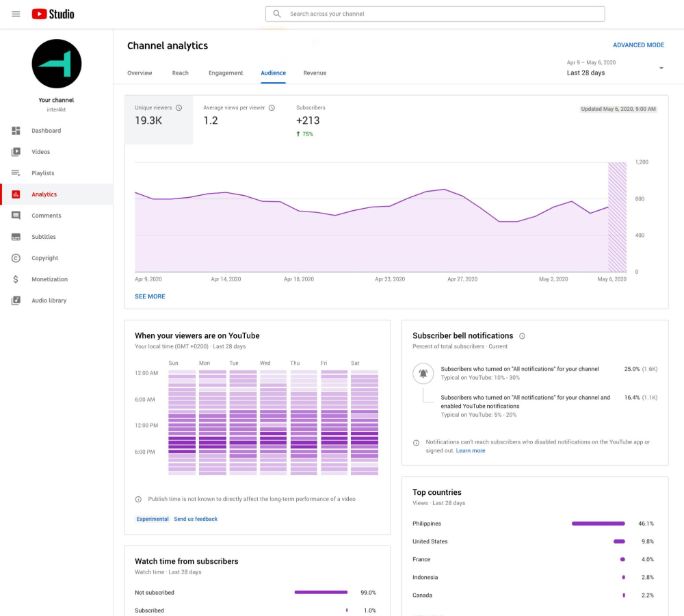
Step 3: Scroll to “When your viewers are on YouTube.” This heatmap shows hour-by-hour audience activity across the week. Darker purple shows that more of your audience is active at that time.
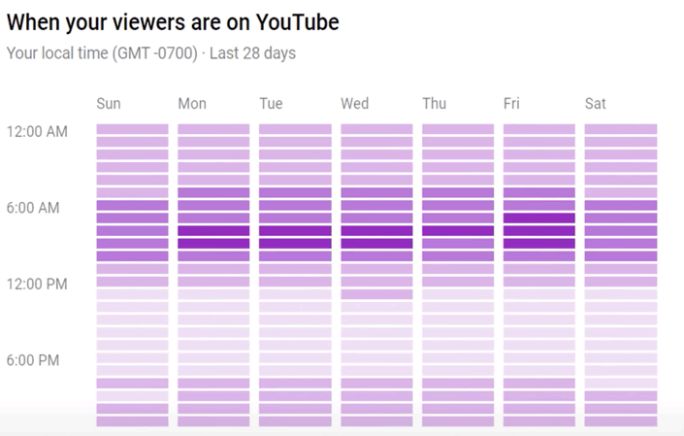
Step 4: Find your highest-activity windows. Count back 2–3 hours from the darkest blocks. That’s your optimal upload time.
Step 5: Check this monthly. Audience patterns shift seasonally, back-to-school periods, holidays, and platform-wide changes all move viewing windows.
If your channel is new and the heatmap shows limited data: Track the “Real time” section in YouTube Analytics for 4–6 weeks. Log views by time in a spreadsheet. Clear patterns emerge after around 10 uploads.
Start Your 14-day Trial
How Often Should You Post on YouTube in 2026?
After timing, the next question is always frequency. For most creators and brands, the ideal YouTube posting frequency is 1–2 long videos (8 mins plus) and 3-5 Short per week. That’s frequent enough to stay consistent with the algorithm while still maintaining content quality.
With over 2.5 billion monthly active users, YouTube rewards consistency more than sheer volume. There’s no universal upload formula, some creators grow with weekly uploads, while others succeed posting only a few times per month.
For example, creators like MrBeast often publish just a handful of highly produced videos each month, while gaming and reaction creators may upload far more frequently.

Our analysis of posting patterns across industries found the median YouTube channel publishes around 12 videos per month, making 3 uploads per week a strong benchmark for most channels.
For YouTube Shorts, higher frequency tends to work better because Shorts move faster through the algorithm. Posting 5–7 Shorts per week is a strong starting point for maintaining reach and discoverability.
What Dexxter Clark’s channel experiments found on frequency:
- 7 videos/week produced only ~25% more combined views than 1 video/week
- 3x/week for 4 weeks: no measurable improvement over 1x/week
- Conclusion: consistency over months beats volume in any given week
What actually compounds: A channel that posts consistently trains YouTube to expect, and pre-allocate distribution for, each new upload. A channel posting sporadically gets less initial push, even on its best content.
Post at whatever frequency you can sustain for 12 months. That consistency will outperform any burst-and-rest strategy.
Better Timing, Better YouTube Performance
The best time to post on YouTube depends on your audience, content format, and location, but clear patterns do exist. Our analysis of 27k+ creators’ channels found that long-form videos perform best a few hours before evening peaks, while Shorts thrive during midday and evening scroll sessions.
Use these benchmarks as a starting point, then refine your schedule with your own YouTube Analytics data and audience behaviour insights. Small timing adjustments can make a measurable difference in reach, watch time, and engagement.
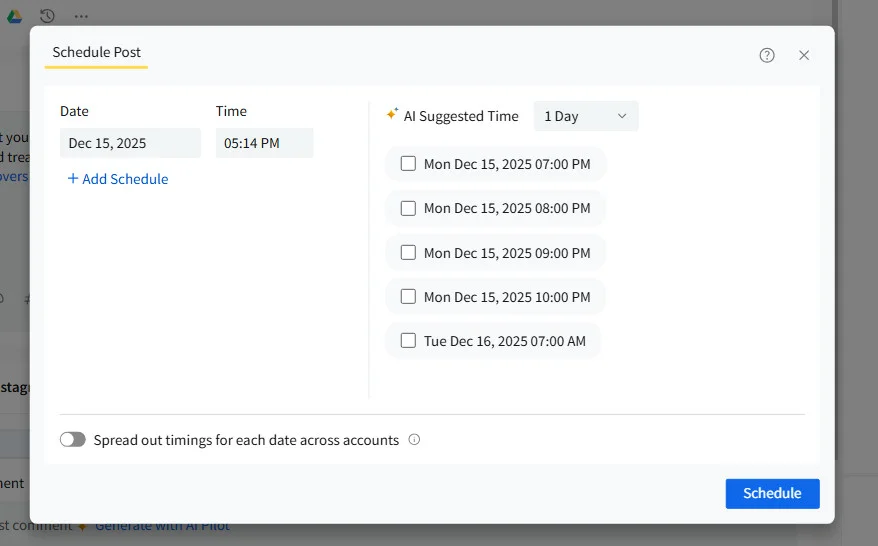
For easier scheduling and smarter publishing, try SocialPilot to plan YouTube videos and Shorts at the best times, automate posting, and manage your content calendar from one dashboard.