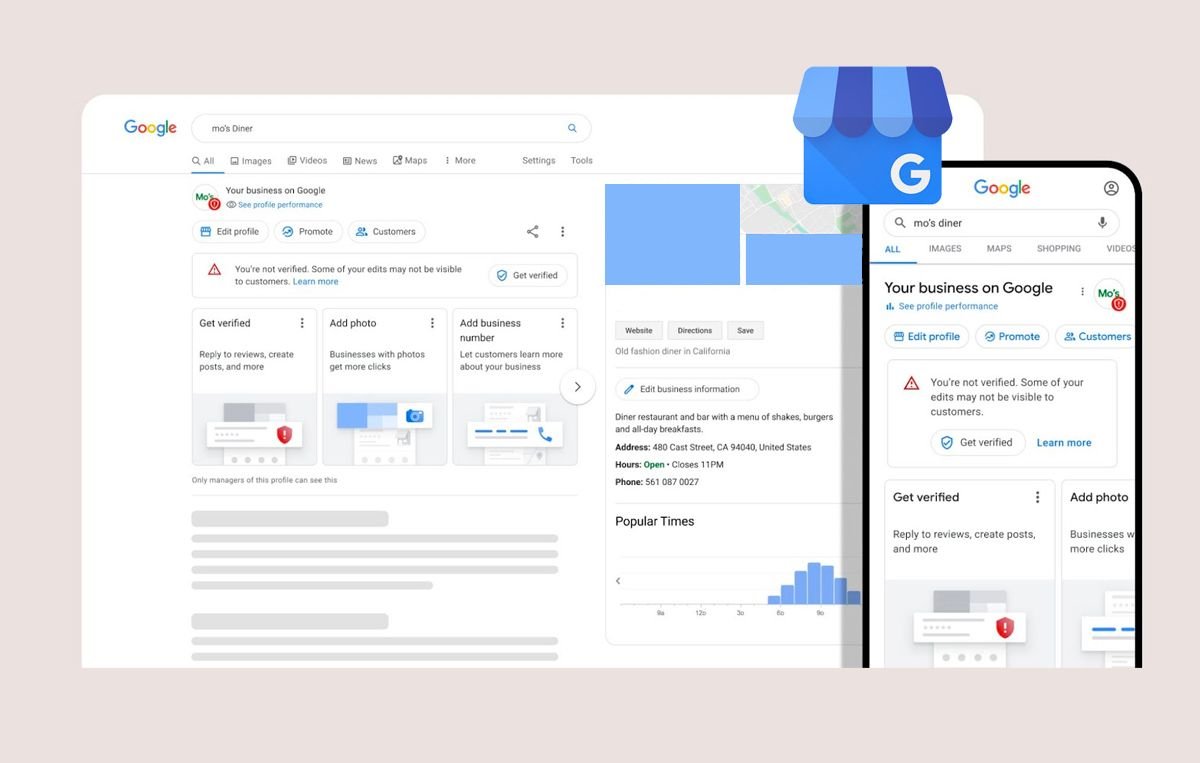
Synonymous with online searches, Google is the go-to site for consumers looking to find almost anything. The site currently holds a market share of 92.47%, making its top search page positions invaluable to businesses in all sectors.
While many companies are already focused on promoting their site via SEO strategies, there are a few other ways to get the word out about your business on Google, and Google Business Profile is one of them.
Google Business page setup is relatively simple and worthwhile.
In this article, we’ll show you how to set up a page for your company before taking you through some of the key benefits of doing so.
What Is Google Business Profile?
Google Business Profile (GBP) works as your business’s virtual storefront on Google Search and Maps. And the best thing about it? Listing your business and doing marketing for your products/services here is absolutely free!
Google My Business is a platform where you can share important information such as your company name, address, contact details, website, services/products, and opening hours, all in one place, so it’s easy as can be for potential customers to know about you and reach out.
Creating a Google Business Profile is a straightforward process. You either create a new profile or claim an existing one, then verify your details. Profile verification is crucial as it helps people discover your business and add authenticity.
So, if you want to attract more customers, ensure your GBP is verified, details are accurate, and your profile is fully optimized.
How to Set Up Your Google Business Page?
Setting up Google Business Profile is simple. It won’t be long before your listing is up and running, attracting the attention of potential new customers.
Here are 8 simple steps to set up your Google Business Profile.
1. Open Google Business Profile Manager
All businesses with a Google account will have access to Google Business Profile Manager, which is what you need to set up your Google Business Profile page.
If you already have a Google account, it’s just a case of logging in and opening Google Business Profile Manager. If you’re logged into Google, it will open without you having to enter any further information.
If you don’t yet have a Google account, you’ll need to start by setting one up. This is a quick and simple sign-up that takes a matter of minutes.
2. Add Your Business to Your Account in Google Business Profile Manager
Once you’ve got Google Business Profile Manager open, you’ll see an option to add a new business to your account.

Find your business and select its name, or click ‘add your business’ if your company’s name doesn’t appear automatically in the drop-down options.
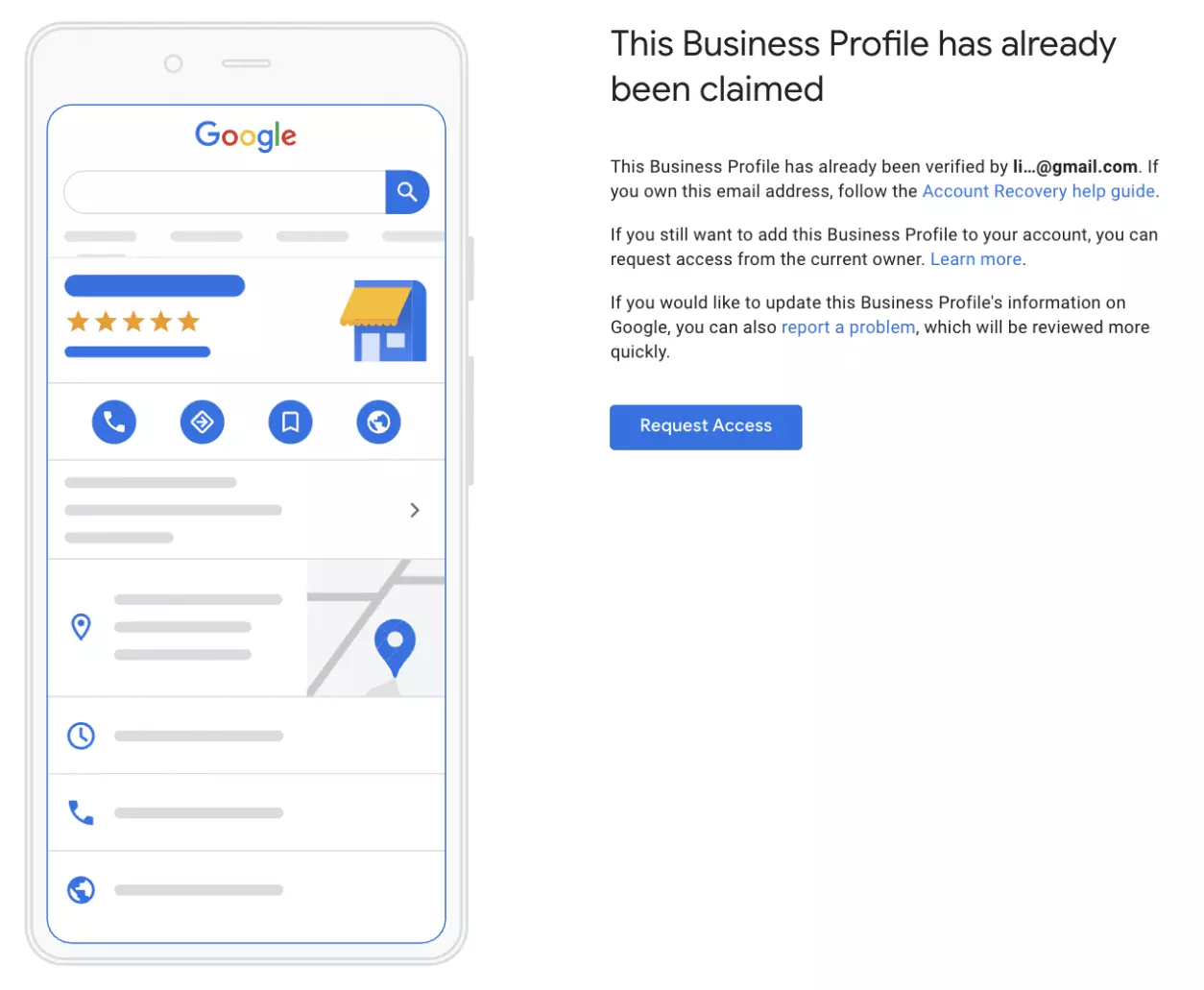
3. Request to Add an Existing Business
In some cases, a Google Business Profile might have already been set up for the brand in question. If that’s the case, you’ll simply need to request access to the profile that already exists. You can click ‘request access’ and simply follow the steps on the screen.
4. Add Your Business Name and Choose a Category
If your business profile is new, you’ll need to input the business’s name. Use the name your business is commonly known by, avoiding any unnecessary additional information.
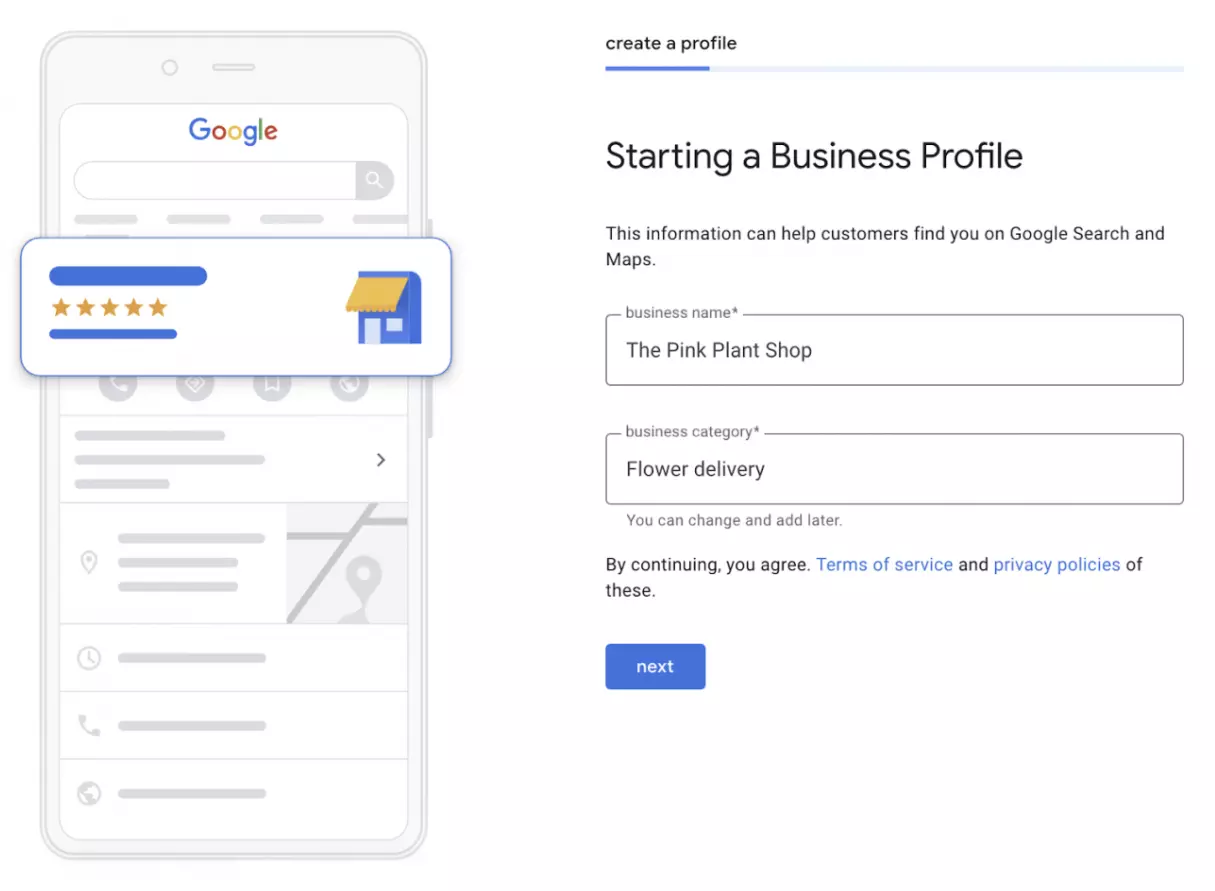
Once the business name has been added, you can choose a category for your company.
If you’re unsure about the best category at this point, don’t worry, you’ll be able to edit this later if you find one that fits your brand better.
Click ‘next’ to move on to the next step.
5. Choose Your Location
One of the key benefits of Google Business page setup is providing your customers with detailed information on your location.
At this point, the setup process will require you to state whether or not your company has a physical premise that customers can visit.
If it does, you’ll be asked to input your business address. The site may then ask you to approve the positioning of a marker for your business, which Google Maps will use.
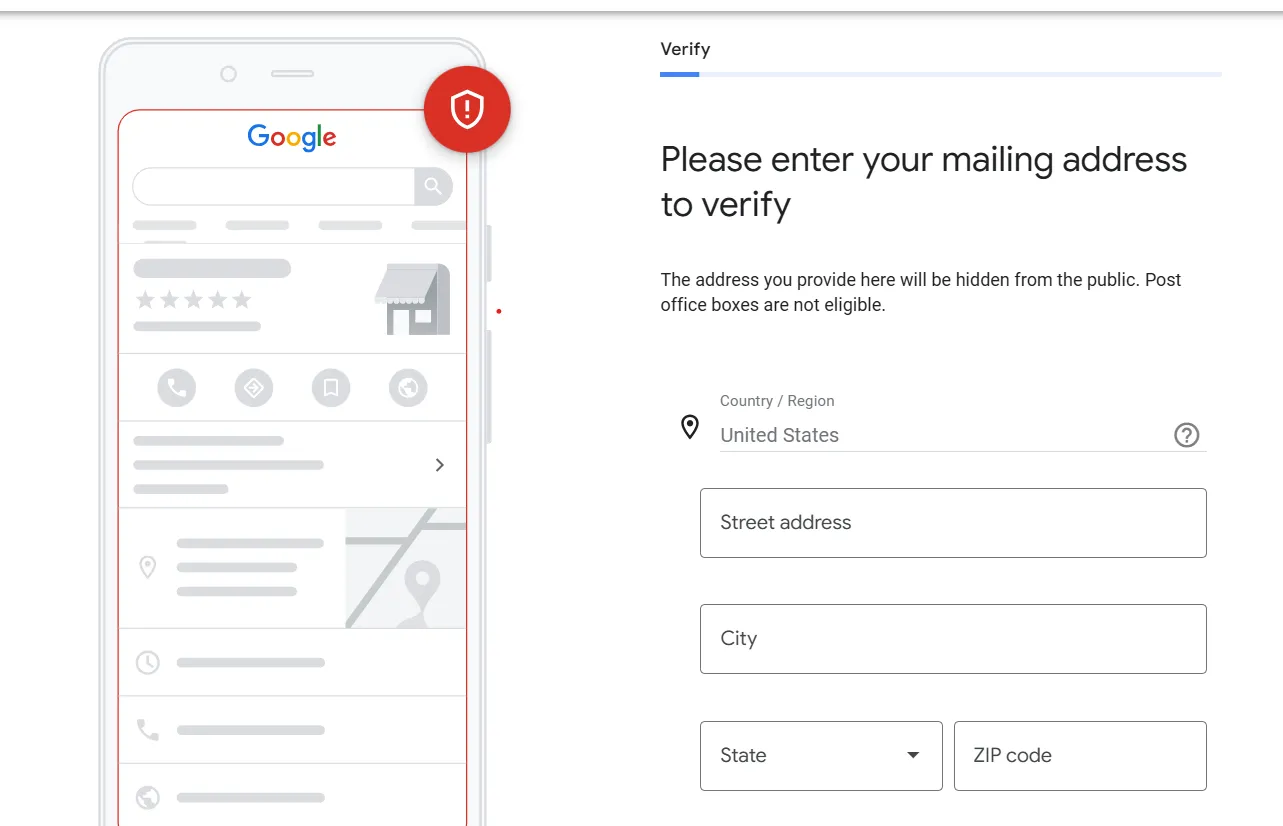
Businesses without a physical store or HQ that customers can access can still proceed through this step. Instead of inputting your location, you might be asked to list the areas your business covers.
6. Add Your Contact Information
All Google Business Profiles have contact information for companies, so you’ll add this in the next step.
List your business phone number and the email address you’d like potential customers to use. If your company doesn’t have a staffed phone line, you can leave this blank. You’ll have the opportunity to add a website address here, too.
If you don’t yet have a website set up, there’s a tickbox you can use to tell Google you don’t have a website.
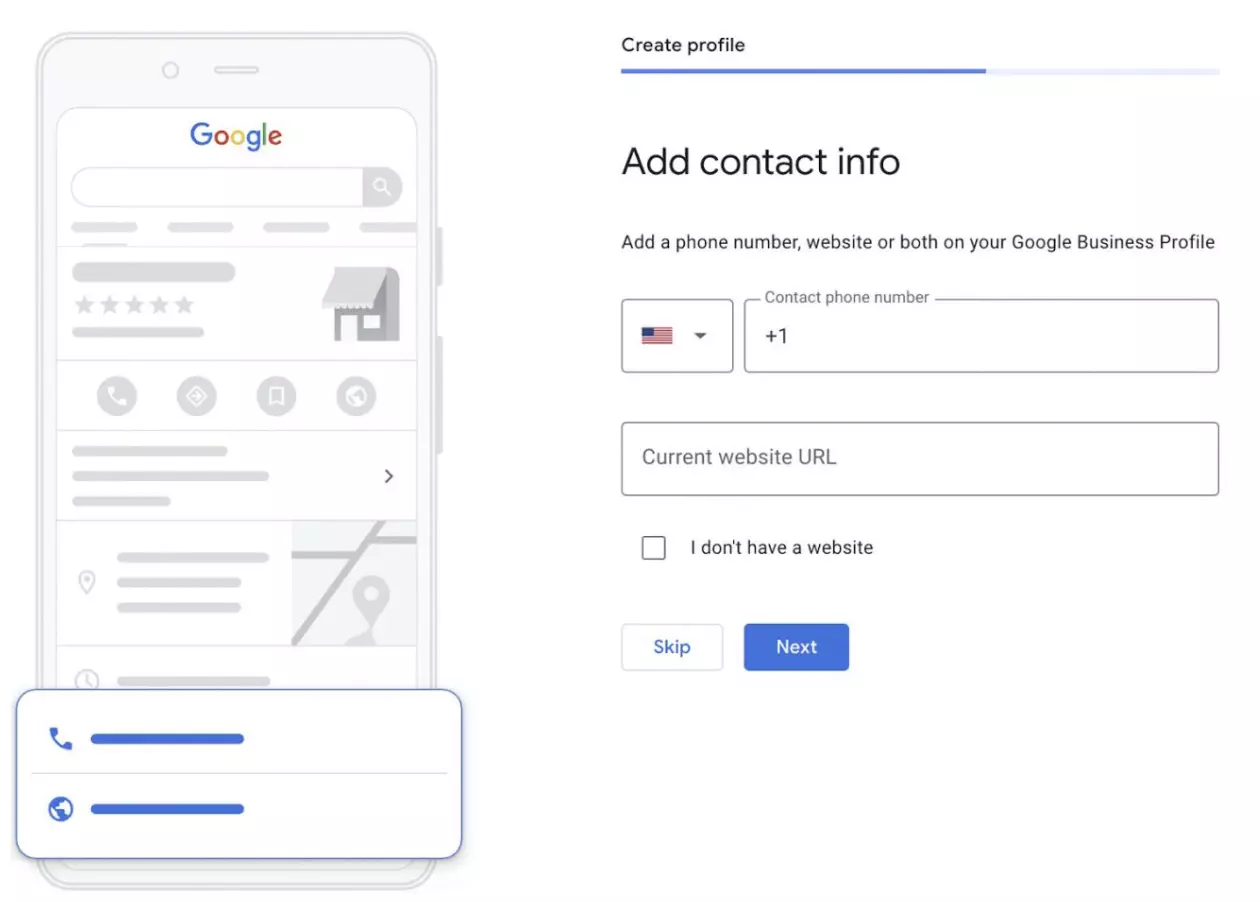
Of course, this information can be updated as soon as a website is created.
7. Choose Whether or Not to Receive Information From Google
At this point, Google will ask you if you want to sign up to receive information and updates.
While there’s no requirement to do so, there are significant benefits to ensuring you’re always in the know about the latest news from the search giant.
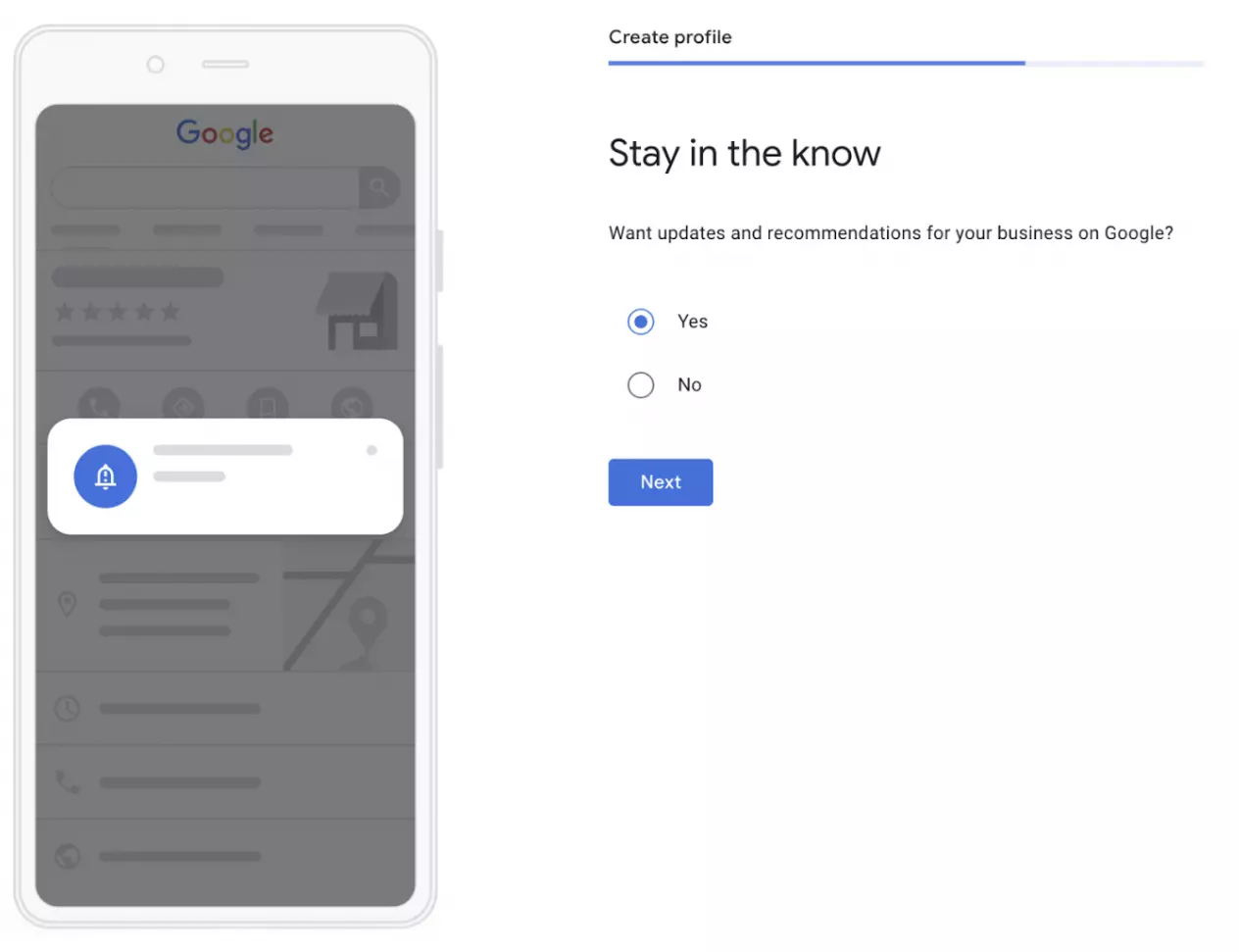
So, we’d recommend you tick this box.
8. Verify Your New Business Listing
The final step is one of the most important. Google will now ask you to verify the accuracy of the information you’ve provided.
This is done via a verification process. It’s the only part of the setup that can take a little time.
You can verify your listing via phone or email if you don’t have a physical location. These options aren’t available to all businesses, but if you are eligible, you will see one of these or both.
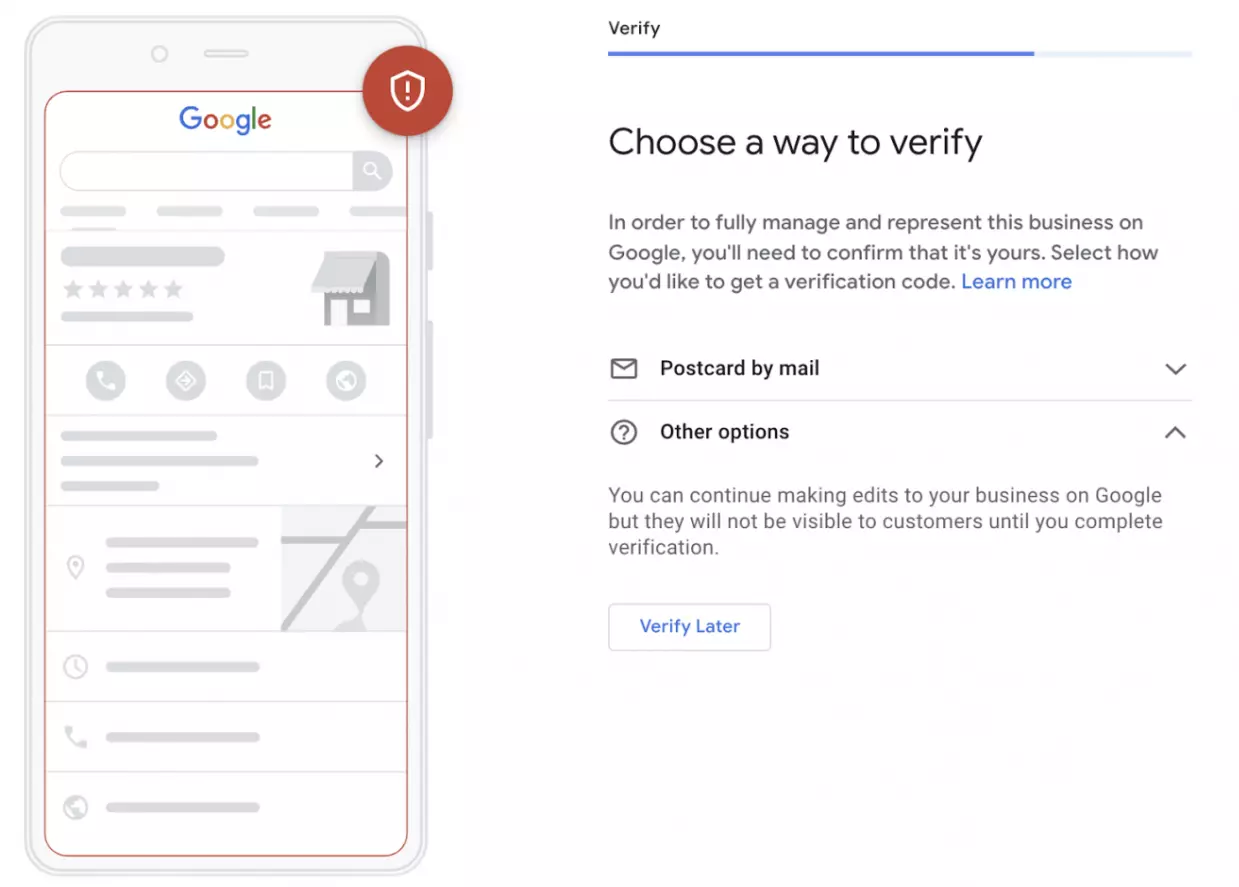
Postcard Verification
Usually, Google sends a postcard to the provided address with a five-digit verification code. This will usually arrive within five working days. Once you’ve received the postcard and have the verification code, you’ll just need to input the number to verify your business.
Phone Verification
If you are eligible to verify your business via phone, you can select this option. You’ll receive an automated phone call, telling you your verification number over the phone. You can then input the number to verify your business similarly.
Email Verification
Email verification is another option which is available to some businesses. If you can verify in this way, you can choose to have the verification number emailed to you. The email address must be the same one that’s connected to your Google Business Profile account. Once you receive the number via email, you can input it to complete the verification process.
Best Practices for Google Business Page Setup
Setting up your business page is just the first step.
Once it’s up and running, you’ll be able to customize your information and add further details to attract more customers. Here’s how to do it.
1. Make Sure Your Profile Is Complete
A complete profile on Google Business can do wonders for your traffic and help you build trust.
Data released by the search engine reveals that customers are 2.7x more likely to see a business as trustworthy and reputable if its listing is complete. They’re also 70% more likely to visit and 50% more likely to consider making a purchase.
There’s so much information that you can add beyond where your business is located and when it’s open.
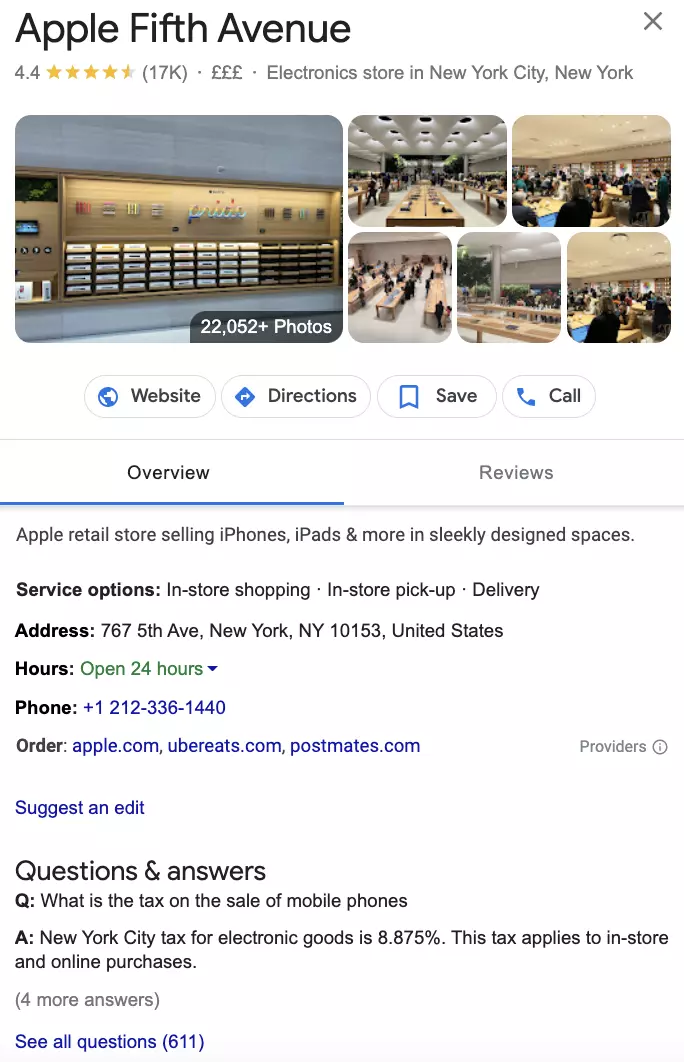
Listings allow you to input information about the products and services offered, descriptions of your company, and even in-store photography to give customers an insight into what they can expect.
2. Add Photography and Videos to Inject Some Personality
When you create your Google Business Profile, you’ll be asked to upload your logo and an image for your cover photo.
We highly recommend doing so, as customers will be able to recognize your brand at a glance when they spot it on search results. But you can also go one step further by adding photographs and videos to your profile.
Head to the dashboard and select ‘photos.’ From here, you’ll be able to upload photographs from inside your store or your HQ, alongside images of the products or services you’re selling and videos of behind-the-scenes tours or product demonstrations.
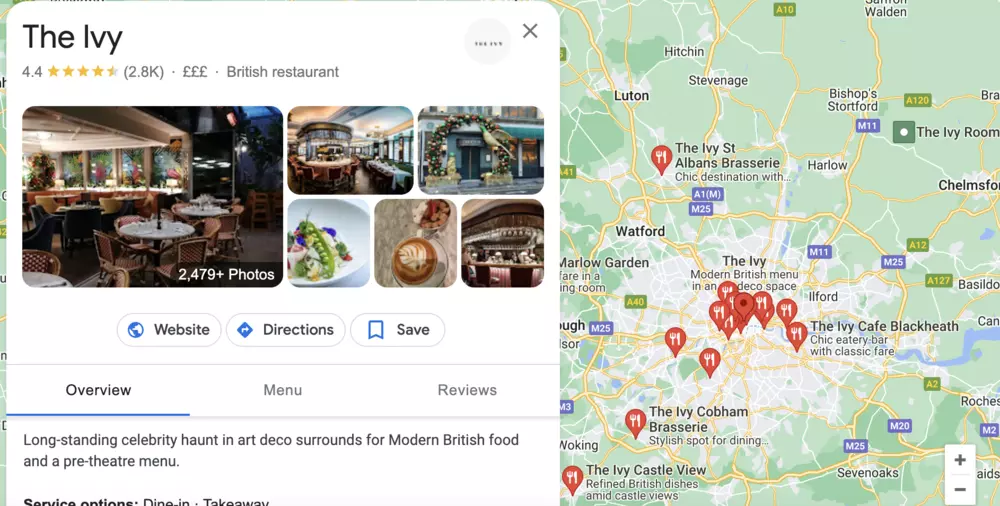
As you can see from the above example, Google Business Profile provides a golden opportunity to allow potential customers a glimpse inside your business.
High-end restaurants like The Ivy use it to showcase their decor and give future diners an idea of the atmosphere inside. Food photography is also used to tempt potential customers to make a booking.
3. Encourage Customer Reviews
Google Business Profile is a great way of drawing attention to the positive feedback your company has received.
It allows customers to leave star ratings and more detailed feedback about their experience.
If you’re providing a standout service and recent customers are prepared to share the good news about your company, this could make a huge difference to the growth of your brand.
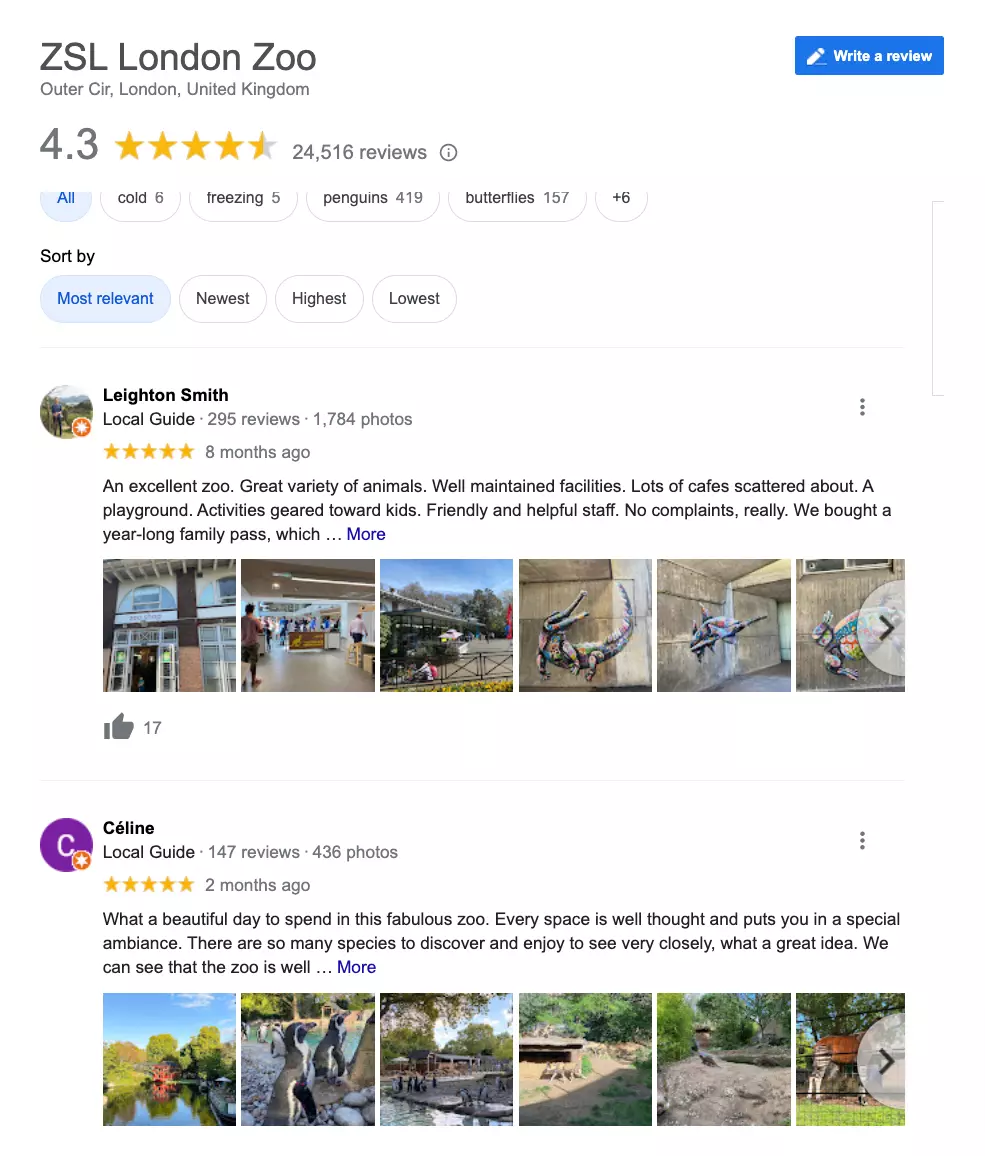
The above example shows how Google Business Profile is being used for customer reviews by ZSL London Zoo.
The zoo invites its visitors to leave reviews of their day, with many uploading photos of their experience. This hugely powerful marketing tool makes a real difference when it comes to influencing future customers who may be unsure whether or not to visit the attraction.
Of course, even the best businesses will receive negative reviews from time to time. But companies shouldn’t be afraid of giving customers a chance to leave their reviews in such a public forum.
Instead, negative feedback should be seen as another opportunity. In this case, it gives businesses a chance to hear customers’ concerns, learn from them and make changes to enhance their offering in the future.
4. Use Keyword Research to Optimize Listing Copy
Relevance couldn’t be more important on Google Business Profile.
If you’re unsure how to ensure your listing is as relevant as possible, just use your existing keyword research.
No doubt, you’ll already have an idea of the keywords most important to your business and your customers. You can use these exact keywords to optimize your Google Business Profile.
If you’re unsure of the best keywords to use, it’s a good idea to research by monitoring social media and looking into data provided by Google Analytics.
Compile the best keywords for your listing page and incorporate them naturally into your listing copy for the best results.
5. Verify Your Listing
Verified businesses are far more likely to catch the eye of consumers. They appear more often in local search results, which is good news for your local SEO. Moreover, they tend to rank higher on general Google search results pages.
12 Ways to Supercharge Your Local Marketing with Google Business Profile
Get found, gain trust, and convert searchers into customers by implementing the best GBP marketing tactics.
Here you can discover the top Google Business Profile marketing strategies to reach new people and grow your business.
1. Get Found by Local Customers: Without Spending on Ads
Want more customers without burning cash on ads? Your Google Business Profile (GBP) can make that happen!
When people search for businesses like yours, Google’s results are divided into three main sections – paid ads at the top, followed by the Local 3-Pack, and then organic search results.
Now, the Local 3-Pack is where the magic happens. It showcases the top three local businesses based on the searcher’s location.
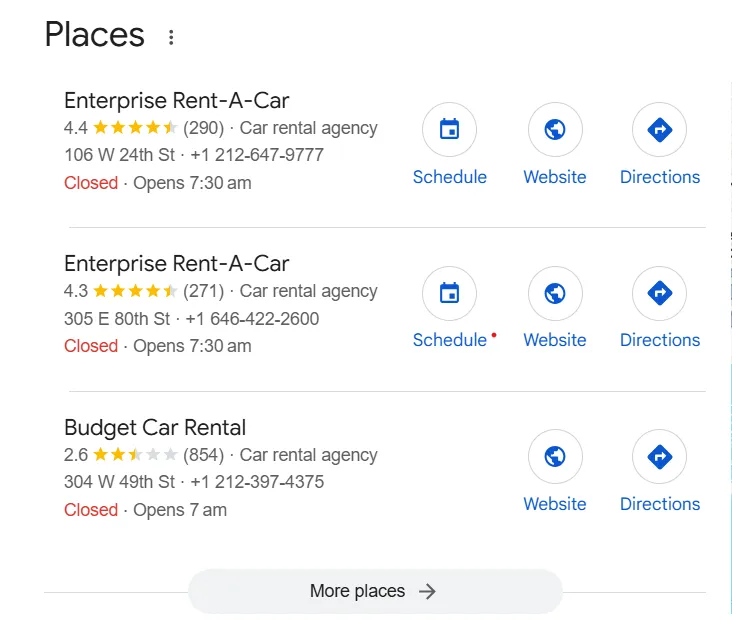
And the best part? You don’t even need a website to show up there!
Most companies invest time and resources in SEO tricks, attempting to rank in these top positions. But here’s the truth: having an optimized Google Business Profile greatly increases your chances of reaching the Local 3-Pack.
This translates to increased visibility on Google Maps, local search, and even above organic results, without paying a single penny for ads.
Therefore, if you haven’t used GBP yet, you’re missing a consistent flow of local customers actively looking for what you provide.
2. Respond to Your Customers Instantly!
Ever had a question about a business but couldn’t be bothered to call?
Yeah, you, me, and your customers may feel the same way…we all experienced it!
Let’s assume someone finds your business on Google, and they’re interested. But they need a quick answer—maybe about a custom order, availability, or pricing. If they can’t reach you easily, guess what? They might just move on.
That’s where Google’s FAQ feature saves the day!
It lets people ask you directly from your Google Business Profile—no calls, no website visits, just a quick message. And you? You get to respond instantly and turn curious visitors into real customers.
This is how you need to respond professionally:
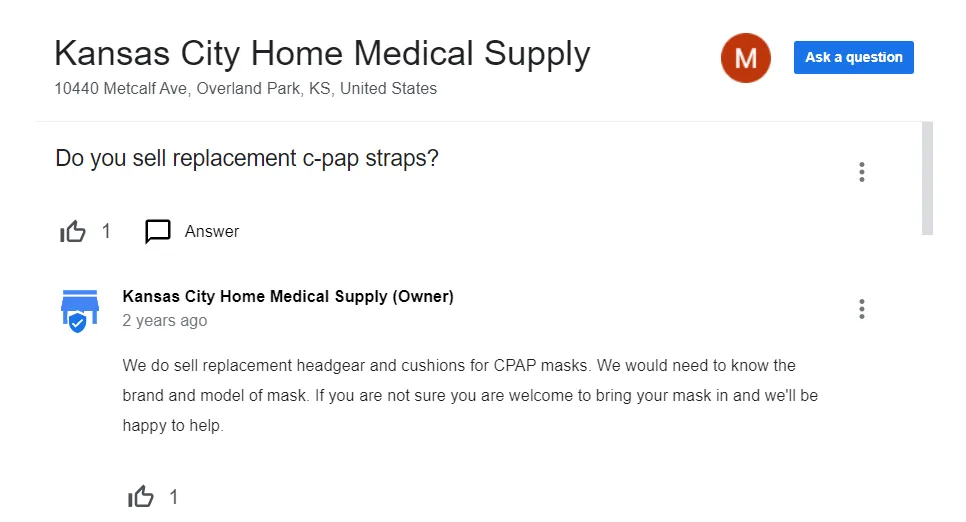
And here is the solution! You can save your valuable time with an automated, personalized response to customer feedback, queries, or reviews in real time without manual efforts using SocialPilot’s AI-powered automated review response.
3. Build Trust and Turn Customers into Brand Advocates
Customers trust businesses with strong reviews. In fact, reviews influence 16% of local search rankings, meaning more positive feedback can push your business higher on Google.

But you can’t just wait for reviews to roll in. You need a strategy.
Here’s the action plan to make it happen:
- Aim for 10-15 new high-quality (honest, not all 5-star) reviews each month.
- Make leaving a review easy (Share direct GBP review links via email, SMS, or QR codes).
- Use review generation tools to automate review requests.
- Encourage customers to mention specific services & keywords (This helps boost relevance in search).
- Respond to every review, good or bad (shows you care and builds credibility).
By actively managing reviews, you turn happy customers into brand advocates while improving your local search visibility!
4. Make Your Business Voice Search-Ready
“Hey Google, find a coffee shop near me.”
With voice search on the rise, your Google Business Profile needs to be optimized for spoken queries.
Here’s how:
- Use Conversational Keywords: People speak differently than they type. Optimize your listing with natural, question-based phrases like “Where can I find the best pizza near me?”
- Ensure Complete and Accurate Info: Voice assistants pull data from your GBP. Make sure your address, hours, and contact details are always up to date.
- Focus on Local SEO: Most voice searches are location-based. Add relevant keywords like “24/7 pharmacy Near Times Square” or “pet-friendly cafe in Chicago.”
- Answer Common Questions: Use the FAQ section to cover popular customer queries in a clear, direct manner.
By optimizing for voice search, you’re making sure your business is the first name people hear when they ask Google for recommendations.
5. Promote Your Latest Offers & Updates with GBP
Your Google Business Profile is more than a virtual business card—it’s an active marketing tool that keeps you in front of potential customers. Leverage the posting feature to promote your current deals, new product releases, special promotions, or significant announcements right on Google Search and Maps.
Think of it as a free advertising space where you can share compelling posts that drive engagement, such as:
- Running a limited-time discount? Announce it.
- Introducing a new service? Promote it.
- Hosting an event? Get the word out.
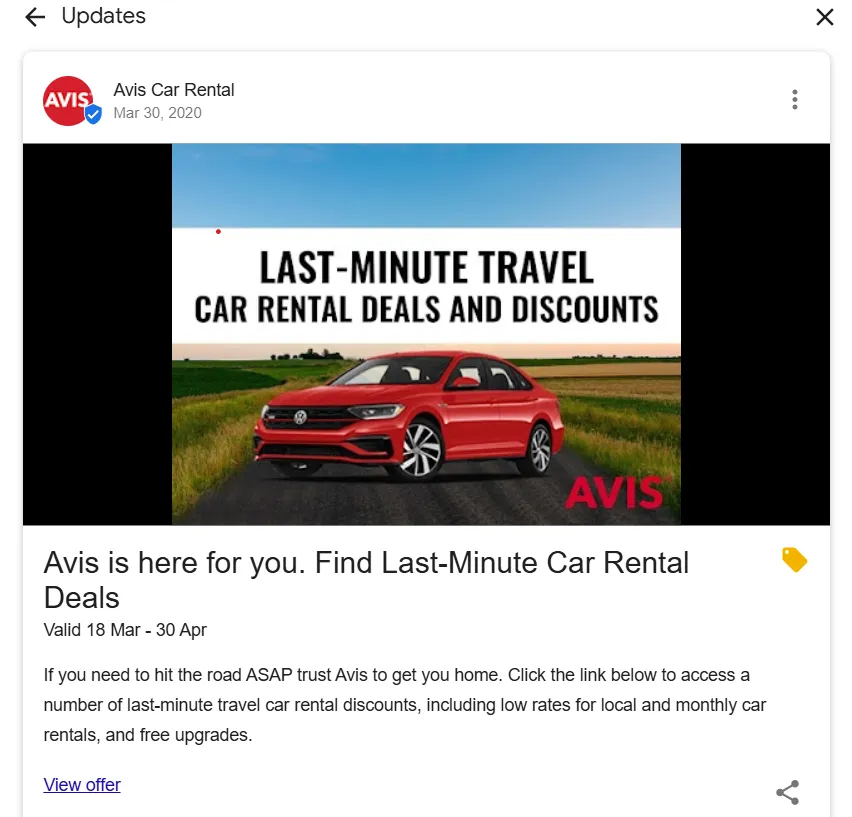
Just make sure each post is clear, relevant, and includes a strong call-to-action like “Shop Now,” “Claim Offer,” or “Learn More” to encourage customers to take the next step.
We all know manually updating your Google Business Profile isn’t always feasible. That’s where SocialPilot comes in!
With SocialPilot’s GBP Scheduler, you can automate and schedule offers, updates, and announcements that appear directly on Google Search & Maps—keeping your business active without the hassle.

It also helps you create engaging posts effortlessly with:
- Post ideas & templates for fresh content inspiration
- AI-generated captions, relevant hashtags & images
- A built-in link shortener for clean, trackable URLs
Also, you can manage GBP posts and social media content side by side using SocialPilot’s Content Calendar, giving you complete control in one place!
START FREE TRIAL TODAY
6. Drive More Foot Traffic and Sales with GBP
Want more foot traffic and sales? A Google Business Profile (GBP) can make that happen. Google reports that businesses with a GBP are 70% more likely to attract local visits from nearby customers.
Why? Because GBP builds trust, verified businesses stand out in search results, making people more likely to choose you over competitors.
But here’s the thing: If your business site is slow, you could lose potential customers before they even get to see what you have to offer. So, ensure your site loads quickly and is optimized for mobile to convert those local searches into real sales!
7. Leverage GBP Features Tailored to Your Business
Google Business Profile isn’t merely about appearing in search, it’s filled with industry-specific functionality that enables businesses to turn searches into customers.
Whether you own a restaurant, hotel, salon, or service business, Google provides business-specific additional features to simplify customer interactions.
- Restaurants & Cafes: Add your menu, take bookings, and even let customers order food online.
- Hotels & Resorts: Highlight availability of rooms, rates, and direct booking functionalities to entice travelers.
- Salons & Spas: Allow customers to book appointments right from Google Search.
- Retail Stores: Highlight your product catalog and update inventory in real time.
- Service Providers: Offer instant quotes and enable direct messaging for inquiries.

By making full use of these business-specific features, you’re not just appearing on Google—you’re turning searches into bookings, visits, and sales.
8. Let Your Brand’s Personality Shine
People don’t just buy things, but they love connecting with brands/businesses that feel real, humanized, and relatable to them. That’s why your Google Business Profile shouldn’t just be about listing services; it should reflect who you are and what you stand for… which means your profile should reflect your brand values and unique personality.
Let’s understand this concept with a simple example: If you run a restaurant, which post caption do you feel more engaging?
- Option 1: “We offer great food at the best prices!”
- Option 2: “We know catching up with friends is priceless. That’s why we’ve got special discounts for groups—because good food tastes even better with great company!”
See the difference? The second one feels personal and inviting, making customers more likely to engage.
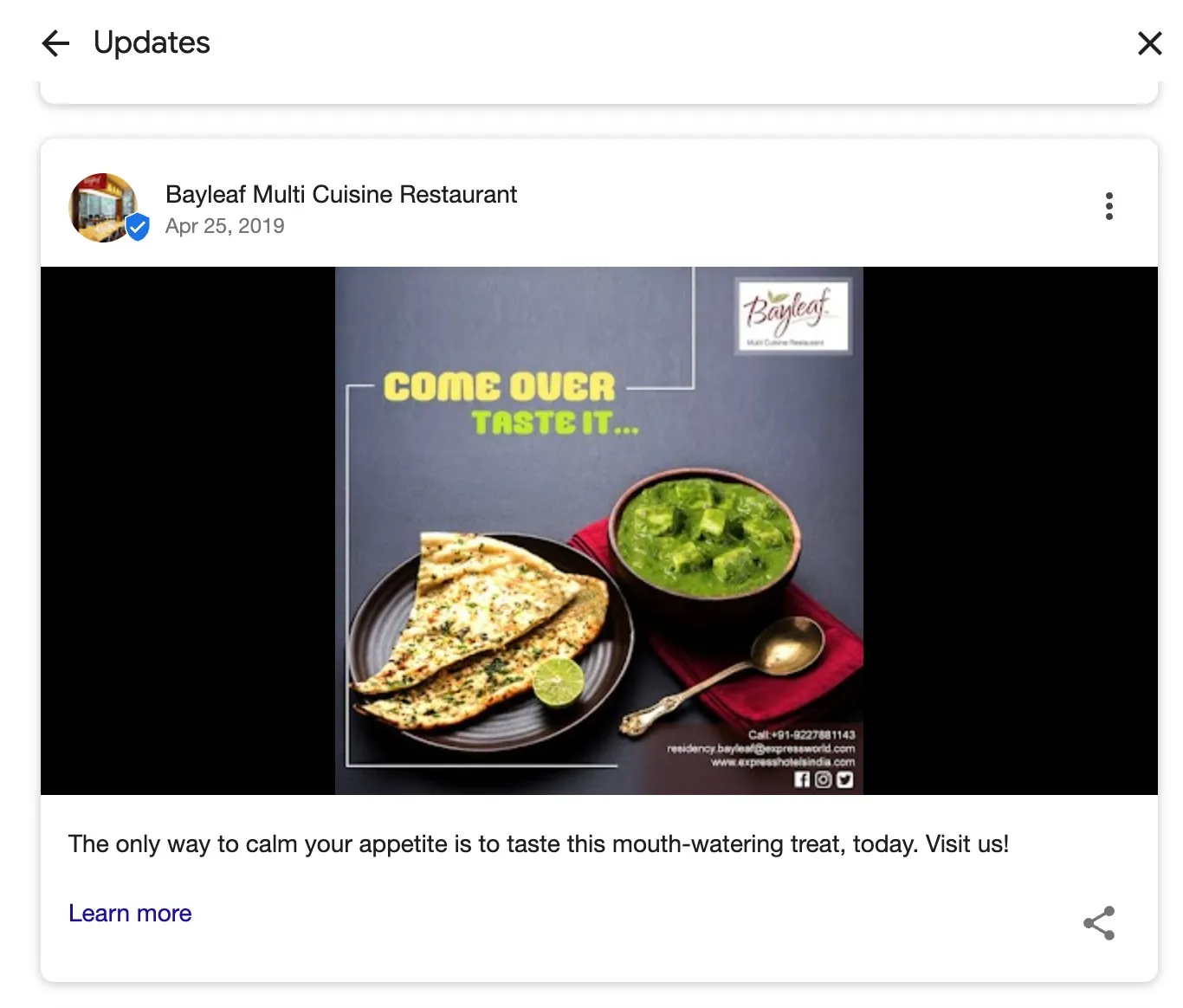
Here are a few ways to make your GBP posts and profile feel more human and appealing to visitors:
- Showcase your team: Share behind-the-scenes moments or introduce employees to add a personal touch.
- Highlight customer stories: A glowing review or a fun customer experience can be way more powerful than just talking about your business yourself.
- Tie into local events: Got a festival coming up in your area? Offer a limited-time deal or event-based promotions to stay relevant.
The goal?
Make your business feel like more than just a business. The more personal and engaging you are, the more customers will remember (and choose) you!
9. Turn Insights into Action with GBP Analytics
Guesswork won’t grow your business—data will. That’s where Google Business Profile Insights comes in.
- How are customers finding you? Are they searching your name or discovering you through keywords? Adjust your SEO accordingly.
- What actions are they taking? Are they clicking your website, requesting directions, or calling? If calls are low, maybe it’s time to tweak your CTA.
- Which photos and posts work best? GBP shows how your content compares to competitors. If engagement is low, update your visuals and messaging.
- When are people searching for you? Spot peak hours and time your promotions for maximum impact.
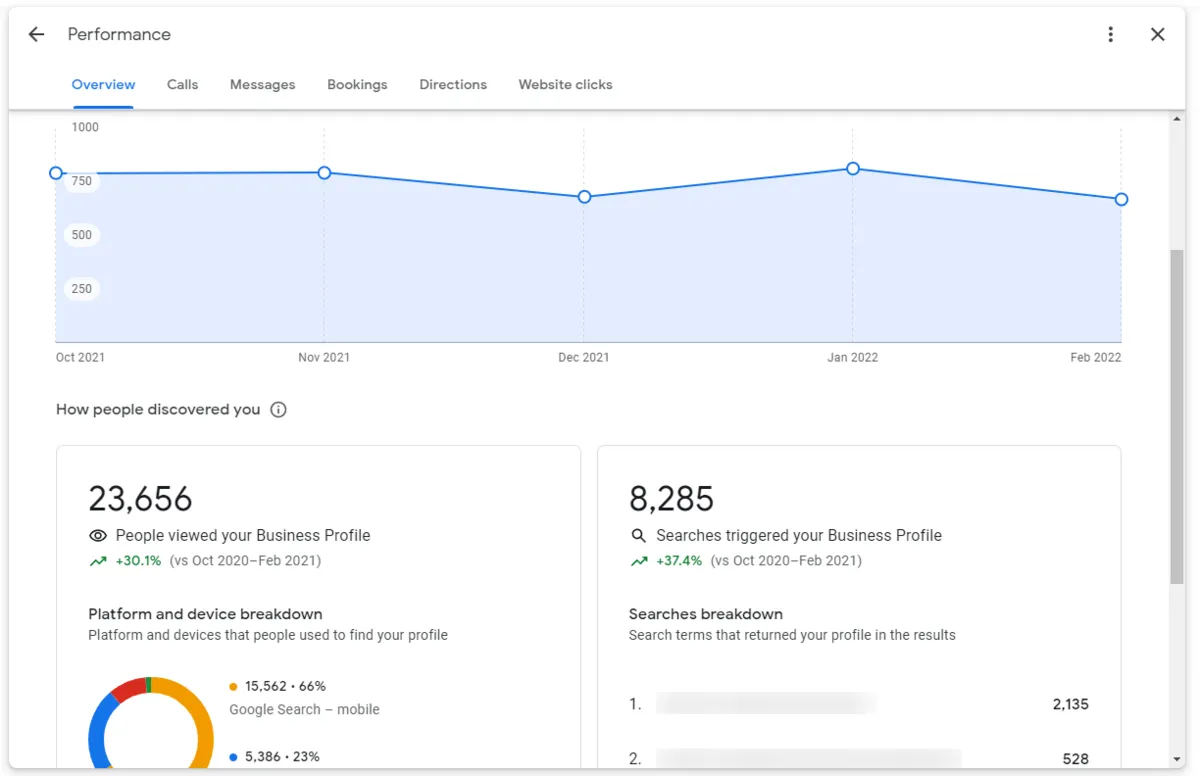
Use these insights to fine-tune your GBP marketing, optimize your Google listing, and attract more customers.
10. Draw More Visitors to Your Site
Let’s be real, nobody likes digging through a dozen websites just to find the right business. People want quick answers, and your Google Business Profile (GBP) can deliver exactly that.
Here’s how:
- Add your website link to your GBP profile. Ensure it’s easy to find and clickable.
- Post regular updates. Share offers, events, and news to keep your audience engaged.
- Answer common questions to remove doubts and hesitation.
And the best part? Google even helps by displaying those handy “Visit Website” or “Book Now” buttons right on your profile.
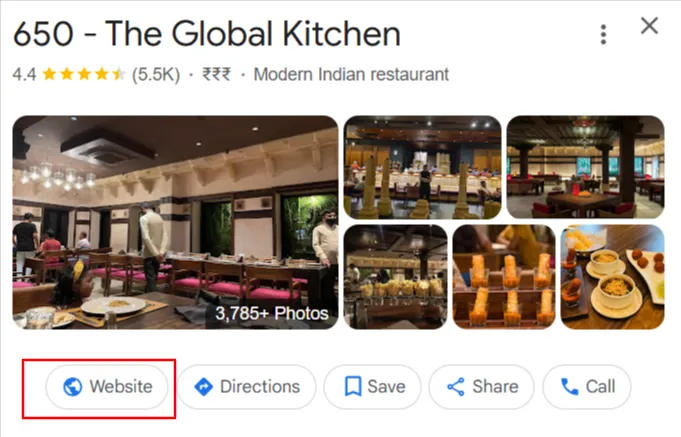
So instead of hoping people somehow land on your site, make it effortless for them. A well-optimized GBP doesn’t just bring more traffic, it brings the right traffic.
11. Run a Review Collection Campaign to Rank Higher & Gain Trust
Ever wondered why some businesses always show up in Google’s Local 3-Pack while others struggle to be seen? A big reason is customer reviews.
Why Do Reviews Matter for GBP?
- Businesses with more positive reviews rank higher in Google’s Local 3-Pack.
- 87% of consumers read online reviews before choosing a local business.
- More than 57% of customers won’t consider a business with less than 4 stars.
That’s why you need a consistent review collection strategy—not just waiting for customers to leave feedback randomly.
Here’s the full action plan for you:
- Target 10-15 new high-quality reviews per month.
- Use SocialPilot Reviews to automate review requests.
- Encourage customers to mention specific services & keywords in reviews.
- Respond to every review, positive or negative.
But, don’t forget to report spam or fake Google reviews before they damage your credibility, if you receive any.
12. Optimize Products & Services with High-Intent Keywords
Want to show up when potential customers are searching for exactly what you offer? Optimizing your GBP products and services with buyer-focused keywords can significantly boost your visibility.
Why does it always work?
- Businesses that use relevant keywords in their GBP listing see up to 50% more profile views.
- Google ranks businesses higher when they match search intent.
- Customers searching for specific services (e.g., “custom wedding cakes near me”) are ready to buy.
And here’s how to do it:
- List all products/services with detailed, keyword-rich descriptions.
- Use high-intent phrases like “Custom wedding cakes in Texas” instead of just “cakes.”
- Check Google Search Console & GBP Insights for top-performing keywords.
- Update descriptions based on seasonal trends (e.g., “Christmas gift wrapping” in December).
13. Turn Google Reviews into a Marketing Powerhouse
Your Google reviews aren’t just for building trust, they’re marketing gold! By strategically integrating User-Generated Content (UGC) from Google Reviews across your marketing funnel, you can boost conversions and drive more sales.
Here’s how to put your reviews to work:
- Feature top reviews in PPC ads to build credibility and improve click-through rates.
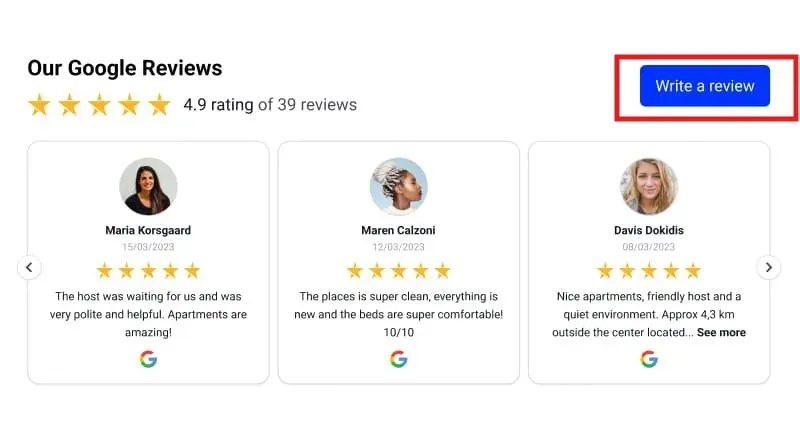
- Embed Google customer reviews on landing pages & product pages using SocialPilot Review Widget to increase conversions.
- Include positive reviews in email campaigns & newsletters to nurture leads.
- Leverage review snippets in social media posts & GBP updates to engage potential customers.
Get Started With Your Google Business Page Setup Right Away
Google Business Profile provides endless opportunities for companies hoping to get noticed.
Creating a listing is quick, easy, and free, so there’s no reason not to get one set up today.
Once your listing is up and running, inject some of your brand’s personality alongside your essential business information and use GMB tools to manage your profile. This will ensure that all those who stumble upon it are interested enough to visit your website and learn more about your company.
Optimize your listing with keywords, photography, video, and more.
In no time, you’ll have a great Google Business Profile listing that’s working hard to pique the interest of potential customers.