Did you know that the average click-through rate is 10.5% ? However, for effective email campaigns, it is estimated that it is possible to increase the click-through rate of an email by up to 20 to 30%.
If your subscribers don't click on the links in your emails, it's difficult to convert them. So how do you encourage them to visit your links?
Discover now 6 techniques to use to increase the click rate in your emails !
1. Identify high-performance content
Before taking action to increase the click-through rate on your emails, you need to review your previous campaigns. Start by analyzing the results of the last six months. To help you, you can ask yourself the following questions:
- Which emails generated the most interest?
- What responses have you gotten on transactional emails, marketing offers and newsletters?
- Among your offers and newsletters, which emails had the highest click-through rates?
- Is your audience clicking on CTAs in images or in text?
It is essential to compare the content in your emails and the performance difference between them before modifying them to get better results.
2. Position the call-to-action well to increase the click-through rate
The positioning of your call-to-action (CTA) plays an important role in the click-through rate. The best location will be determined by A/B testing. As always, every audience is different! The idea is therefore to get to know it to improve traffic from your newsletters.
However, to get your testing off to a good start, implement these few basic best practices:
- Place the CTA on the right side of the text since we read from left to right;
- Position the call to action above the fold to grab the attention of readers who won't scroll through your post content;
- Place the CTA at the beginning of the email, but also at the bottom. Some recipients will need to read your content before clicking on the link;
- If your emails are read primarily on mobile, place the call to action in the upper left corner to avoid it being cut out by some smartphones.

3. Use directional cues
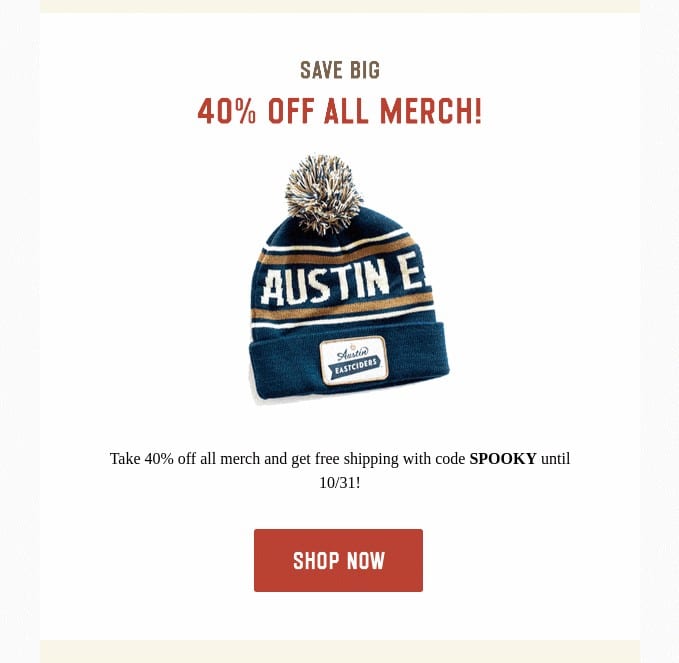
Directional cues help direct your prospect's attention. These include calls to action as well as images, videos or customer testimonials. These cues are divided into two categories: implicit and explicit.
Implicit cues are subtle and often go unnoticed by visitors. They come in the form of white spaces and color contrasts. With white space, your subscribers have fewer things to focus on and are forced to look around, especially colorful visuals. Using contrast, you can make the reader pay attention to a particular area.
Explicit clues consist of arrows or buttons. Impossible to miss them!
4. Create urgency with a PS section
Less than 16% of your subscribers read the content of your emails word by word; the others just scan them. Aware that all the important information will be at the end, they first consult the last lines of your email.
With a Post Scriptum section at the bottom of your content, you can summarize your email and create urgency with a highly persuasive message. The urgency factor can be a deadline, a limited number of items, a gift for the first orders, etc. The important thing is to add a link directly after announcing the urgency to increase clicks.
Also read : 7 tips to reduce the weight of your emails
5. Carry out scoring with email addresses
This technique allows you to obtain deeper data about your subscribers.
Scoring subscribers to your newsletter consists of examining each email address to assign a score. Based on a contact's levels and activity history, you can predict how likely they are to click on links in your emails.
A low score indicates that the address is inactive and therefore unlikely to respond. The higher the score, the more you can focus on these contacts and re-engage them with targeted campaigns. Result: the click rate in your emails increases!
THE marketing automation tools generally offer a lead scoring system.
6. Use dynamic content to maximize clicks
With dynamic content, you take the personalization of your emails to another level. You adapt the content according to the segmentation of your customers.
As you use personal data, your emails become more impactful for the recipient. If you send content that meets their needs, they will want to click. They will want to discover the product, service or blog article that meets their expectations.
The more the content is of interest to your reader, the more likely they are to click.
Thanks to dynamic content, a well-placed CTA and a well-executed exercise, you can get the most out of your campaigns and increase the click-through rate. Always remember to analyze your emails carefully to detect the links that generate the most traffic. The objective is to refine your campaigns with each new sending!
What is the average click-through rate for an email?
The average email click-through rate can vary by industry, but is generally between 2% and 5%.
Consider segmenting your emails to get a better view of your click-through rate. Even when you send an e-mail aimed at your entire base (prospects and customers), segment the sendings to be able to analyze the statistics in a differentiated way.
You will notice that the average click-through rate on your customers is generally higher and that the click-through rate on your prospects is lower. It is generally advisable to clean your customer databases to limit the sending of emails to those who do not open or interact with your emails.
What is the difference in CTR and CTOR?
When we talk about click-through rates for emails, we need to differentiate between CTR and CTOR.
CTR: the average click-through rate compared to emails sent
The CTR, or Click Through Rate, corresponds to the number of clicks generated compared to the number of emails sent. It is naturally lower than the CTR since it depends on the opening rate of the email.
Taking it into account is not necessarily wise, since if you have deliverability problems, the CTR will be negatively impacted.
CTOR: the average click-through rate compared to opened emails
The CTOR, or Click To Open Rate, corresponds to the number of clicks generated compared to the number of emails opened. It is more realistic to analyze this figure since it corresponds to the click-through rate of Internet users who actually viewed the email.
It is generally this average click rate that we should aim to increase.
Our advice to increase the click rate
Are you unable to reach your target with your newsletters? This may be a deliverability issue. Follow the advice of our white paper to improve your deliverability or call a email marketing expert !